
You hit send on the campaign. Klaviyo says “delivered.” Your open rate says otherwise.
That gap is where deliverability tooling lives, and most of the market wasn’t built for you. Half the tools serve cold outbound teams sending 50 emails a day from one mailbox. The other half are enterprise reputation platforms priced for ISPs, not for a Shopify brand running Klaviyo flows to a 200,000-person list.
We tested ten tools through the lens of a sender, whatever ESP you’re on, including GlockApps, the seed-list testing category’s most established name and, until this update, the one dedicated test tool this list was missing. Each review states what we could test and what we couldn’t. InboxEagle is ours, reviewed under the same rubric as everything else, cons included. New to the concepts? Start with what email deliverability is and inbox vs. promotions vs. spam.
The 5 categories of deliverability tools
Before the reviews, a quick framework, because “check,” “test,” and “monitor” get used interchangeably in this space and it muddies every comparison.
| Category | What it does | Typically |
|---|---|---|
| Check tools | Instant, one-time diagnostics: blocklist lookup, SPF/DKIM/DMARC verification, reputation score, right now | Free |
| Test tools | Send a campaign to a seed list and show where it actually lands (inbox, Promotions, or spam) and why | Pre-send, freemium/paid |
| Monitoring tools | Continuous tracking of reputation, placement, and authentication over time, with alerts | Free (ISP-run) or paid |
| Optimization tools | Actively improve deliverability through warmup, list hygiene, validation, and engagement | Paid |
| Platforms | All-in-one suites combining several of the above | Paid |
Each tool below is reviewed under one primary category, the one it’s actually bought for. Where a tool does more than one thing, that’s noted in the review, but it isn’t reviewed twice.
For the check-versus-test distinction specifically, seed list testing vs. real-world inbox monitoring goes deeper than this table can.
Quick comparison
| Tool | Category | Best for | Free tier | Starting price |
|---|---|---|---|---|
| Google Postmaster Tools | Monitoring | Gmail-specific reputation monitoring | Yes (free) | Free |
| Microsoft SNDS | Monitoring | Outlook/Hotmail IP reputation monitoring | Yes (free) | Free |
| Barracuda Reputation Lookup | Check | Instant domain/IP blocklist check | Yes (free) | Free |
| MXToolbox | Check | MX/DNS/blacklist/DMARC diagnostics | Yes (free lookups) | Free (Delivery Center from $129/mo) |
| Sender Score | Check | Quick IP/domain reputation score | Yes (free) | Free |
| GlockApps | Test | Manual seed-list placement testing bundled with DMARC analytics and blocklist monitoring | Yes (2 tests) | Free · $59/mo (annual, bundle) |
| Mailshake | Optimization (cold outbound) | Cold email sequences with basic deliverability protections | No | $29/mo |
| Orita AI | Optimization | AI-driven Klaviyo list segmentation and cleanup | No (free engagement audit) | Custom (quote-based) |
| Postmark | Platforms (transactional email) | Transactional email sending with deliverability-first infrastructure | Yes (100 emails/mo) | $15/mo |
| InboxEagle | Platforms | Continuous AI-agent deliverability monitoring for Klaviyo-connected brands and agencies | 14-day trial | $20/mo |
The reviews
Google Postmaster Tools
Category: Monitoring Website: postmaster.google.com
Positioning: “Use Postmaster Tools to analyze your email performance, and help Gmail route your messages to the right place.”
Quick verdict: The single most important deliverability tool for any sender with a meaningful Gmail audience, and it’s free. Not a nice-to-have. Treat it as mandatory infrastructure.
Best for: Any ecommerce brand sending to a list with significant Gmail representation, which realistically is almost everyone, that wants to know how Google actually rates their sending domain rather than guessing from open rates.
Capabilities: domain reputation, IP reputation, spam rate, authentication status (SPF/DKIM/DMARC), encryption (TLS), and delivery error breakdown. No inbox placement testing, no warmup, and no alerting beyond the dashboard itself.
Setup experience: Straightforward, but authentication-gated. You sign in with a Google account, click through a short “Getting Started” wizard, and enter the domain you authenticate mail with. That’s your SPF/DKIM domain, not necessarily your root domain, and it trips people up. Google then hands you a google-site-verification TXT record to add to your DNS.
Verification isn’t instant. The domain sits in “Not Verified” status until DNS propagates, which can take anywhere from a few minutes to 48 hours depending on your DNS host. For an ecommerce brand on Cloudflare or Route53 this is usually fast. On some registrar-managed DNS it can drag.
Product review: Once verified, the dashboard is genuinely clear. Reputation is shown on a simple High/Medium/Low/Bad scale rather than an opaque score, which is more actionable than most paid tools manage. The spam-rate chart is the one to watch daily, and Google’s own guidance treats anything above 0.1% as a real problem. Our full walkthrough of Google Postmaster Tools covers how to read each chart, and the 0.1% spam rate threshold explains what happens when you cross it.
Testing results: Domain verification completed successfully within the expected DNS propagation window. Data population for reputation, spam rate, and authentication begins appearing 24 to 48 hours after verification, and requires meaningful send volume to Gmail addresses before the graphs are statistically useful. A low-volume sender will see mostly blank charts for the first week or two.
Strengths: Free. Directly from the source, meaning Gmail itself rather than a third-party inference. Clean, non-technical presentation of reputation data. Delivery error detail is genuinely useful for diagnosing authentication problems.
Weaknesses: Gmail-only, so it tells you nothing about Outlook, Yahoo, or other providers. No inbox-vs-Promotions-vs-Spam placement testing, since it shows reputation rather than where a specific campaign landed. Requires meaningful volume before data is useful, so it’s less helpful for very small senders. The UI has had legacy and redesign inconsistency, and Google has flagged the older version for deprecation.
Ecommerce relevance: Essential, not optional, for Klaviyo and Shopify senders, because Gmail is typically the single largest inbox provider in a US, UK, or CA ecommerce list. But it’s a monitoring layer, not a fix. Pair it with a placement-testing tool and, for the reputation and inbox-placement layer specifically built for Klaviyo sends, InboxEagle.
Pricing: Free. No paid tier exists.
Microsoft Smart Network Data Service (SNDS)
Category: Monitoring Website: sendersupport.olc.protection.outlook.com/snds
Positioning: “Deliverability to Outlook.com is based on your reputation. SNDS gives you the data you need to understand and improve your reputation at Outlook.com.”
Quick verdict: The Outlook and Hotmail equivalent of Google Postmaster Tools, with the same free, mandatory-infrastructure logic. It’s noticeably less polished, and it’s IP-based rather than domain-based, which is a worse fit for most ecommerce senders on shared ESP infrastructure.
Best for: Senders on a dedicated sending IP who want visibility into Outlook.com and Hotmail reputation. Less useful if you’re sending through an ESP’s shared IP pool, since you may not control or even know the specific IP to register. If you’re weighing that decision, dedicated IP vs. shared IP covers the tradeoffs.
Capabilities: IP-level reputation, traffic volume, spam complaint rate, spam trap hit indicators, and Junk Mail Reporting Program (JMRP) feedback loop enrollment. No domain-level view, no placement testing, no warmup.
Setup experience: More friction than Google’s equivalent. Sign-in requires a Microsoft account, which you create if you don’t have one, then you submit an access request for a specific IP, IP range, CIDR block, or ASN.
Unlike Google’s near-instant DNS check, Microsoft verifies ownership via reverse DNS, WHOIS, or an email sent to postmaster@ or abuse@ on the domain, and approval isn’t immediate. Microsoft’s own guidance puts single-IP approval at a few hours to a day, network ranges at one to three days, and large ASN requests at several days.
Product review: Functional but dated. “View Data” and “View IP Status” are separate sections rather than a unified dashboard, and the visual design lags well behind Postmaster Tools. The Junk Mail Reporting Program, which is Microsoft’s feedback-loop equivalent, is a genuinely useful add-on but is a separate opt-in step rather than automatic.
Testing results: Account creation and the access-request submission flow worked as documented. Because approval is a manual, time-delayed process rather than an instant DNS verification, we were not able to observe the populated reputation dashboard within this testing window. This section will be updated once access is approved. We’re flagging that explicitly rather than describing a dashboard we haven’t actually seen.
Strengths: Free. Direct signal from Microsoft rather than a third-party inference. The JMRP feedback loop is valuable for catching complaint spikes early.
Weaknesses: IP-based rather than domain-based, which is a poor fit if you don’t control a dedicated sending IP, and that’s common for ecommerce brands on Klaviyo or Mailchimp shared infrastructure. The manual approval process introduces days of delay. The interface is dated relative to Google’s tool. There’s no equivalent of Gmail’s clean reputation categories.
Ecommerce relevance: Lower than Google Postmaster Tools for most Shopify and Klaviyo brands, specifically because of the IP-versus-domain distinction. Many ecommerce senders don’t have a dedicated IP to register. Worth setting up if you do have one, or if Outlook and Hotmail deliverability problems are already showing up in open-rate data by provider. Microsoft’s 2026 bulk sender requirements raise the stakes on this either way.
Pricing: Free. No paid tier exists.
Barracuda Reputation Lookup
Category: Check Website: barracudacentral.org
Positioning: An IP and domain reputation and blocklist lookup maintained by Barracuda Central, feeding the Barracuda Spam & Virus Firewall used by many corporate mail gateways.
Quick verdict: A fast, no-signup, single-purpose check. Useful as one line item in a pre-send checklist, not as a standalone deliverability strategy.
Best for: A quick “are we blocklisted right now” gut-check before a big send, or troubleshooting when B2B and corporate recipients, who are more likely to sit behind Barracuda gateways, report missing emails.
Capabilities: domain and IP reputation check, Barracuda Intent Block List status, and domain categorization. No monitoring over time, no alerting, no authentication checking, no placement testing.
Setup experience: None required. No account, no sign-up. Navigate to the lookup page, type a domain or IP into the field, and click “Check Reputation.”
Product review: There isn’t really a dashboard. It’s a single-query results page, not a monitored view. Results return in plain text: whether the domain or IP appears on Barracuda’s Intent Block List, and what category Barracuda has classified it under, such as “business.”
Testing results: The lookup returned a clear, unambiguous result on the first query, showing not-listed status and a domain category with no errors or ambiguity in the output. Query-to-result time was near-instant.
Strengths: Genuinely free, with no account needed. Fast. Useful specifically for the Barracuda-gateway segment of recipients, which generic deliverability tools often don’t check at all.
Weaknesses: A single point-in-time snapshot only, with no historical trend and no alerting if status changes later. Narrow scope, covering Barracuda’s own blocklist and reputation system rather than Gmail, Outlook, Yahoo, or general blocklists like Spamhaus. Not built for ecommerce workflows at all, with no Klaviyo or Shopify context and no campaign-level reporting.
Ecommerce relevance: Minor but non-zero. Most DTC ecommerce lists skew consumer and Gmail-heavy rather than corporate, so Barracuda-gateway exposure is lower than for B2B senders. Worth a quick check before major sends as a free sanity check, not worth building a workflow around. For the broader blocklist picture, see how to check and remove an email blacklisting.
Pricing: Free. No paid tier for the lookup tool itself.
MXToolbox
Category: Check Website: mxtoolbox.com
Positioning: “SuperTool,” a combined MX record, DNS, blacklist, and SMTP diagnostic suite. Free at the individual-lookup level, paid for ongoing monitoring via its “Delivery Center” product.
Quick verdict: The most complete free diagnostic tool in this list. One query surfaces MX records, DMARC and BIMI status, and jump-off points to blacklist and SMTP checks. The free tier alone is worth bookmarking. The $129/mo Delivery Center upgrade is a much bigger ask, and reviewers are split on whether it’s worth it.
Best for: A single “audit everything about this domain right now” check. Diagnosing a specific delivery problem, confirming DNS and authentication records are live, or a pre-launch checklist item before a new sending domain goes live.
Capabilities: MX record lookup, email service provider identification, DMARC record and policy check, BIMI record check, DNS record validation, blacklist check across 100+ RBLs, SMTP connectivity test, and, on the paid tier, inbox placement testing and ongoing monitoring via Delivery Center.
Setup experience: No account needed for the core lookups, and you can run an MX Lookup anonymously. An account, with a free tier available, unlocks saved history and one free monitor.
The MX Lookup tool itself is a single search field. Enter a domain, click “MX Lookup.”
Product review: Results are dense but well organized. A query for a domain returns MX records with preference and IP, a DNS-record-published check, and then a block of “related tests” covering BIMI, DMARC record presence, and DMARC policy enforcement status, each with a green check or a warning icon.
Testing results: A single MX Lookup query returned MX records, correctly identified the email service provider (Proofpoint, in this case) from the MX hostnames, confirmed DNS records were published, and flagged a BIMI issue where the record was published but the logo wasn’t appearing in inboxes, alongside a healthy DMARC record with an enforced quarantine or reject policy. All of this came from one search with no account required, which is genuinely efficient for a quick audit. If those acronyms need unpacking, SPF, DKIM, and DMARC explained is the primer.
Strengths: The free tier is unusually comprehensive, and most competitors gate DMARC and BIMI checks behind a paid plan. One search surfaces multiple authentication signals at once instead of requiring separate tools. ESP identification is a nice touch for quickly understanding a domain’s sending infrastructure.
Weaknesses: The free tier is diagnostic only, a snapshot rather than ongoing monitoring or alerting. The paid Delivery Center jump at $129/mo is steep relative to competitors, and reviewers note the upsell can feel aggressive after a free check. Review volume across G2 and Capterra is thin, and the split is polarized, with mostly five-star ratings for the free diagnostics and sharper complaints concentrated on the paid tier’s billing and cancellation experience.
Ecommerce relevance: Solid as a free, no-account diagnostic step in a pre-send checklist, particularly useful for confirming DMARC enforcement and catching BIMI misconfiguration, both of which affect brand trust signals in the inbox. The paid Delivery Center overlaps meaningfully with what a Klaviyo-native tool like InboxEagle covers at a different price point and with ecommerce-specific context. For ongoing monitoring rather than one-off diagnostics, that overlap is worth weighing before paying for both.
Pricing: Core lookup tools including MX Lookup, blacklist check, DMARC and DNS lookup, and SMTP test are free. Delivery Center, covering monitoring and inbox placement testing, starts at $129/mo based on current published third-party pricing data. MXToolbox does not publish its plan pricing directly on-site. Verified August 2026.
Public reviews: G2: 4.1/5 (~29 reviews). Capterra: 4.5/5, but from a single-digit review base, too small to be statistically meaningful. Reviewers consistently praise the free diagnostics. The more polarized feedback, including some 1-star reviews, clusters around the paid tier’s pricing and support experience. Verified August 2026.
Sender Score
Category: Check Website: senderscore.org
Positioning: “Become a better sender every day.” A free reputation score from 0 to 100 for a given IP or domain, run by Validity, the same company behind Everest.
Quick verdict: A fast, single-number reputation gut-check. Useful as a quick comparison point over time, but a single score is a much blunter instrument than a real placement test, and it asks for contact details before showing a result, which is more friction than the other free check tools in this list.
Best for: A quick, free sanity check on IP and domain reputation, especially useful as a baseline before and after a deliverability cleanup effort such as a list-hygiene push.
Capabilities: IP and domain reputation score on a 0 to 100 scale, plus educational content on improving sender reputation. No placement testing, no authentication checking, no monitoring or alerting on the free tier.
Setup experience: Enter a domain or IP in the homepage search field and click “Let’s go!”
Unlike Barracuda or MXToolbox’s free lookups, Sender Score gates the actual result behind a short form asking for first name, last name, company name, work email, annual email volume, and country before showing the score.
Testing results: The initial query and lead-capture form both completed without friction. The score result itself sits behind that submitted form, which is a materially different and slower experience than the other free check tools reviewed here that return a result instantly with no contact information required.
Strengths: Free. Backed by Validity’s sending-reputation data, which is used more broadly across the industry, including in Everest, one of the enterprise platforms in this category. A single comparable score is easy to track over time.
Weaknesses: Gated behind a lead-capture form rather than an instant, anonymous result, which is a meaningfully higher-friction experience than Barracuda, MXToolbox, or the ISP-run monitoring tools. A single 0 to 100 score is a much coarser signal than inbox placement testing or provider-specific reputation data. No historical trend or alerting on the free tier. For what a score like this can and can’t tell you, see email sender reputation score.
Ecommerce relevance: Reasonable as an occasional spot-check, but the lead-gated flow makes it a worse fit for a repeatable pre-send checklist than the other free check tools in this piece. Most useful as a once-in-a-while comparison point rather than a workflow tool.
Pricing: Free for the basic score lookup. Validity does not publish self-serve paid tiers for Sender Score specifically on the tool’s own site, and further engagement routes through “Talk to an expert.”
GlockApps
Category: Test Website: glockapps.com
Positioning: A spam testing and deliverability suite built around seed-list inbox placement checks, with DMARC analytics and blocklist monitoring sold alongside it. In operation for 15+ years.
Quick verdict: The most complete seed-list test in this list, and the only tool here reviewed primarily as a test tool rather than a check, monitor, or platform. One run returns inbox placement, a SpamAssassin-style content score, and a 50-plus blocklist check together. The tradeoff is credits, not automation: every run, however it’s triggered, draws down a monthly credit allowance, so a brand sending more campaigns than that allowance covers has real gaps between tests.
Best for: A pre-send QA step, a redesigned template, a new sending domain, or a subject-line change you want to sanity-check across Gmail, Outlook, Yahoo, and AOL spam filters before it goes to your full list.
Capabilities: seed-list placement testing across four modes (Manual, Mailchimp-integrated, Automatic, and Smart Test), spam-filter and mailbox-provider selection by region (North America, Europe, CIS, Asia/Pacific), a SpamAssassin content score with a rule-by-rule point breakdown, IP and domain blocklist checks across 50-plus lists with historical monitoring, and DMARC Analytics covering RUA aggregate report ingestion, digest reporting, and up to a year of retained history.
Setup experience: No account is required to see the shape of the product; the free tier’s 2 tests cover what’s reviewed here.
Product review: A GlockApps test isn’t one screen, it’s a short flow, then a tabbed report. Here’s each step.
Choosing a test type
Every test starts with picking a test type, Manual, Mailchimp-integrated, Automatic, or Smart Test.
Selecting filters and providers
Next you choose which spam filters and mailbox providers to check, grouped by region, North America, Europe, CIS, and Asia/Pacific.
Sending the test
The Manual mode’s send step is exactly that: copy the generated test ID string into an email, then send it yourself to the provided seed list of addresses. GlockApps also offers Mailchimp, Automatic, and Smart Test modes for triggering a run, which we didn’t walk through hands-on in this pass.
Placement results
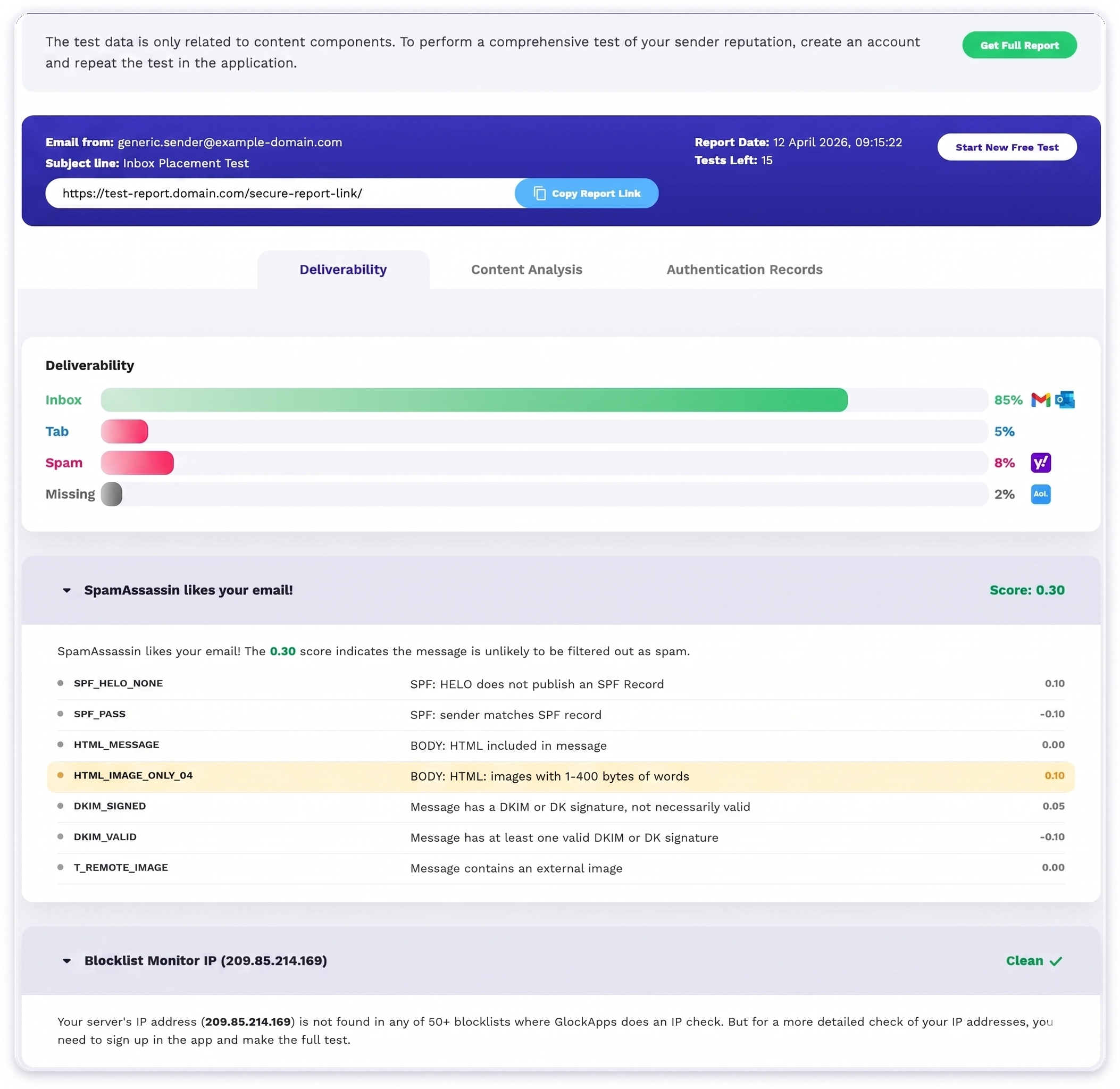
Results land on a tabbed report, Deliverability, Content Analysis, and Authentication Records, with the test’s report date, subject line, sending address, and a shareable report link at the top, alongside a running “tests left” counter against the account’s credit balance. A completed test returned an 85% inbox rate, 5% landing in a tab, 8% in spam, and 2% missing entirely, with no explanation in the interface for what happened to that missing share, split by provider icon across Gmail, Outlook, Yahoo, and AOL. That’s a real, usable placement split from one test, not a mockup, but it’s a single point-in-time result from the Manual flow tested here.
Content score and blocklist check
The same report includes a SpamAssassin-style content score, 0.30 in this run, read as “unlikely to be filtered,” with a line-by-line ledger of what added or subtracted points (an unsigned HELO costing 0.10, a valid DKIM signature earning back 0.10), and a 50-plus blocklist check on the sending IP that came back clean.
Uptime Monitor
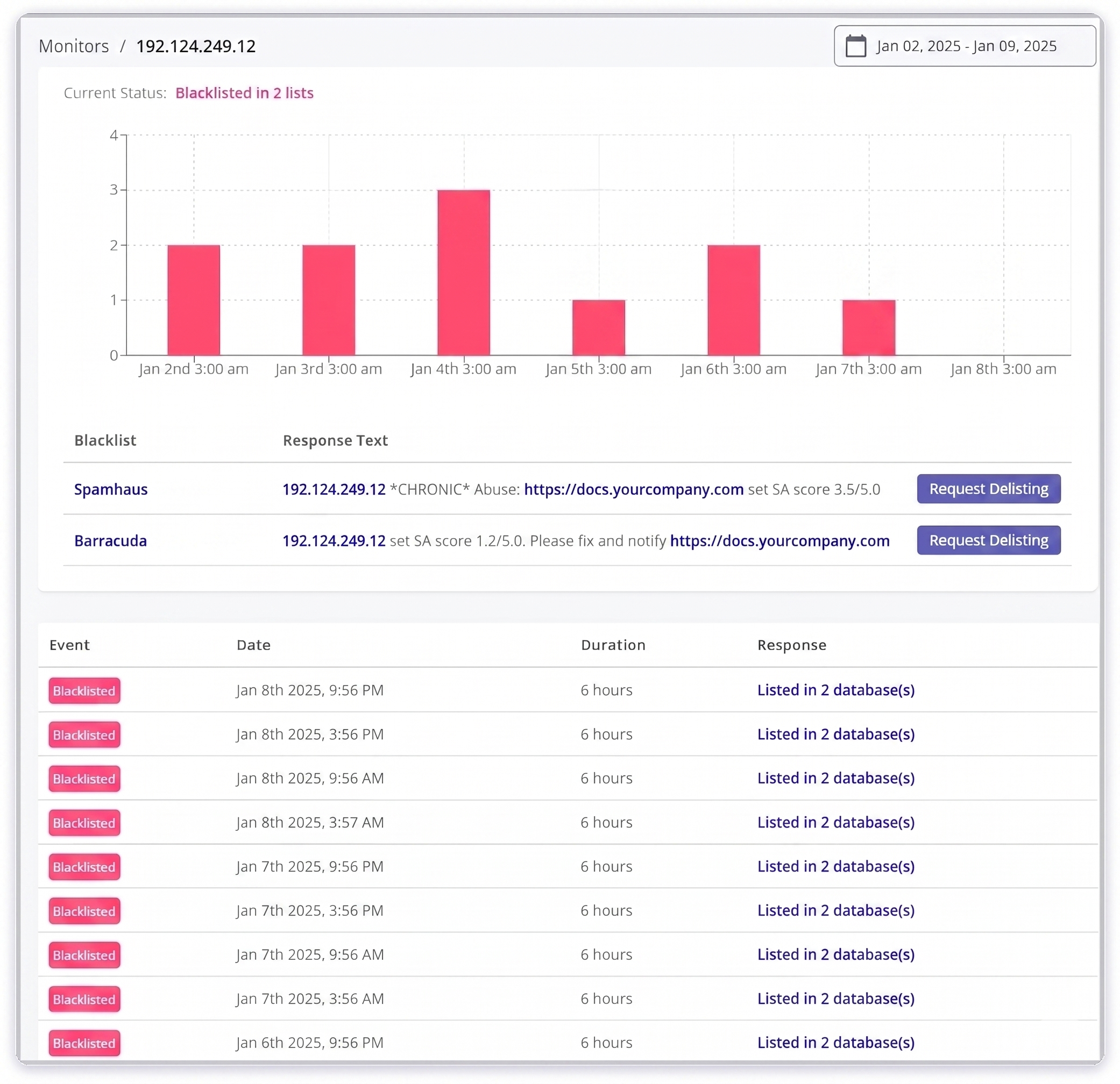
Blocklist status is also tracked over time in a separate Uptime Monitor view, which is where the “monitoring” claim actually holds up: it logs each blacklisting event with the specific list, response text, and duration, useful for something like Spamhaus and Barracuda both flagging a chronically abused IP repeatedly across a week.
Strengths: The most thorough single-test report in this list, deliverability, content, and authentication in one run, with real per-provider icons rather than an aggregate percentage. Blocklist monitoring across 50-plus lists is broader than any check tool reviewed above. DMARC Analytics is a genuine second product bundled into the same account, with digest reporting and up to a year of retained history once a domain has been monitored that long. 15-plus years in operation is a real trust signal for a category that sees frequent churn.
Weaknesses: We only tested the Manual flow in depth, build or reuse a seed list, copy a test ID, send it yourself, then read the result, so this review can’t speak to exactly how the Mailchimp, Automatic, or Smart Test modes trigger a run or what they capture. What’s certain regardless of mode is the credit ceiling: credits are metered per seed address, so a 30-address seed list on the $59/mo Essential plan’s 360 monthly credits caps out at 12 tests, and a brand sending more campaigns than that goes uncovered the rest of the month. The 2% “missing” result on our test run had no explanation anywhere in the interface. Manually uploading a DMARC report you already have, rather than waiting for one to arrive, is gated behind a further plan upgrade even on paid DMARC tiers.
Ecommerce relevance: Solid as a QA gate before a send, a new template, a new domain, a subject-line change, and the DMARC-plus-blocklist bundle is a real reason to pick it over a bare check tool. The credit ceiling is the real constraint for a brand sending several campaigns a week, worth checking against your actual send volume before committing to a plan. For the mechanism difference between seed-list testing and continuous, per-campaign monitoring, seed-list testing vs. real-world inbox monitoring goes deeper, and our InboxEagle vs. GlockApps comparison breaks down the credit math and DMARC pricing side by side in more detail than fits here.
Pricing: Free covers 2 tests on 1 account. Paid plans are sold as a bundle of spam-test credits plus DMARC Analytics: Essential is $59/mo (annual billing) for 360 credits/mo on 1 account, Growth is $99/mo for 1,080 credits/mo on 10 accounts, and Enterprise is $129/mo for 1,800 credits/mo on 20 accounts, with DMARC overages billed at $2 to $7.50 per 100K messages beyond the plan allowance. DMARC Analytics can also be purchased as its own standalone module outside the bundle, priced separately from the spam-test credits. Monthly (non-annual) billing runs higher across all tiers. Verified September 2026.
Mailshake
Category: Optimization (cold outbound sales engagement, flagged for ecommerce fit below) Website: mailshake.com
Positioning: “Email Automation That Lands in Inboxes, Gets Replies, and Books Meetings.”
Quick verdict: A capable cold-outbound sequencing tool with solid ease-of-use scores, but it’s built for SDRs and agencies doing 1:1 prospecting rather than ecommerce brands sending bulk campaigns through Klaviyo. Included here for completeness of the category. It’s a poor primary-tool fit for this article’s audience.
Best for: Sales teams, recruiters, and agencies running cold email outreach at the individual-mailbox level, not ecommerce or CRM marketers.
Capabilities: automated follow-up sequences, mailbox connection for Gmail, Google Workspace, Microsoft 365, and SMTP, sending-limit and schedule controls, CSV and CRM prospect import, campaign-level deliverability tracking covering sent, delivered, and bounced, and engagement tracking for opens, clicks, and replies.
Setup experience: Simple, self-serve account creation asking for name, email, password, and an intended-use-case dropdown.
After account creation, you choose a pricing plan before reaching the workspace.
From there, onboarding walks through connecting an email mailbox, setting daily sending limits and schedule, and importing prospects before building the first sequence.
Product review: Clean and uncluttered. This shows up consistently in third-party review data too, where Mailshake scores especially well on ease of admin and ease of use relative to competitors. The sequence builder, moving from email to wait to follow-up to wait to follow-up, is visual and easy to reason about.
Testing results: Sign-up and plan-selection flow completed without friction. The product is architected entirely around single-mailbox, 1:1 sequence sending, and there is no concept of a bulk campaign to a segmented list, which is the core ecommerce marketing use case. This isn’t a bug. It’s the product working exactly as designed for its actual audience, just a fundamentally different workflow than sending a Klaviyo flow or campaign.
Strengths: Genuinely easy to set up and use, reflected in strong ease-of-use and support-quality marks in third-party review data. Automated follow-up sequencing is well built. Reasonable entry pricing for solo users.
Weaknesses: Not built for bulk or segmented ecommerce sending at all, with no list-based campaign model. Per-mailbox pricing scales expensive quickly for teams needing more than one or two sending addresses. No Klaviyo or Shopify integration. Its deliverability features protect the individual sending mailbox rather than a marketing domain’s broader reputation.
Ecommerce relevance: Low. This is the clearest example in the category of “not the wrong tool, the wrong use case.” A Shopify or Klaviyo brand doesn’t need cold-outbound sequencing, and Mailshake doesn’t offer bulk campaign deliverability monitoring. If your brand also runs cold B2B or affiliate outreach alongside consumer marketing, it’s worth evaluating for that separate workflow, just not as a deliverability tool for your Klaviyo sends.
Pricing: As tested, Starter is $29/mo, Email Outreach $49/mo, and Sales Engagement $99/mo, billed monthly, verified against Mailshake’s own pricing page and consistent with current Capterra listings. Annual billing brings the effective per-month rate down further. Verified August 2026.
Public reviews: G2: 4.7/5 (~350 reviews). Capterra: 4.6/5 (~135 reviews). Reviewers consistently highlight ease of setup and admin, responsive support, and effective warmup for cold outreach. Recurring criticism centers on per-mailbox pricing scaling poorly for larger teams and a dated interface relative to newer entrants. Verified August 2026.
Orita AI
Category: Optimization Website: orita.ai
Positioning: “Maximize Revenue with AI Customer Segmentation.” An AI segmentation and list-optimization layer that connects directly to Klaviyo via OAuth.
Quick verdict: The most Klaviyo-native tool reviewed in this batch, built exclusively for Klaviyo brands rather than a generic tool with an ecommerce angle bolted on. It doesn’t test or monitor deliverability directly. It works one layer upstream, on list quality and engagement segmentation, which affects deliverability indirectly but meaningfully.
Best for: Established Klaviyo brands that suspect list quality is dragging down engagement and, by extension, deliverability. Case studies and third-party reviews point to lists of meaningful size, and smaller lists reportedly don’t give the underlying ML model enough signal to work with. How segmentation affects inbox placement covers the mechanism behind that link.
Capabilities: AI-driven engagement and purchase-intent scoring per subscriber, automatic segment generation synced back to Klaviyo, bot and non-human contact detection, smart suppression and reactivation recommendations, and a free “engagement audit” as the entry point.
Setup experience: Sign-up offers Google sign-in or an email and company-name form.
The core onboarding step is a direct Klaviyo OAuth connection, with no API key handling required on the user’s end.
Orita’s own materials describe this connection step as taking under a minute, after which the platform begins building a brand-specific machine learning model from the connected Klaviyo data.
Product review: The pre-connection dashboard is clean and resource-forward, with FAQs, strategy guides, and a clear single call-to-action to connect Klaviyo. We were not able to observe the populated post-audit dashboard, meaning segment results and engagement scoring output, within this testing window, since the audit runs asynchronously after OAuth connection and Orita notifies the user once it’s ready. We’re noting that gap explicitly rather than describing results we haven’t seen.
Testing results: Account creation and the Klaviyo OAuth connection flow both completed as documented, with no friction in the steps observed. The actual segmentation output, which is the product’s core value, was not something we could evaluate hands-on in this pass, since it depends on a processed audit tied to a real, sufficiently large Klaviyo account. This section will be updated with real output once that’s available.
Strengths: Purpose-built for Klaviyo specifically rather than a generic tool retrofitted for ecommerce, with direct OAuth connection and no manual data exports. Addresses a real and often-overlooked deliverability lever in list quality and engagement segmentation, rather than authentication or placement testing. SOC 2 Type II compliance is noted on the marketing site, which is relevant for brands with data-handling requirements.
Weaknesses: Pricing is fully custom and quote-based with nothing published, which is a real friction point for a self-serve comparison like this one. Third-party sources indicate the underlying ML model needs a meaningfully sized list to be effective, making it a poor fit for smaller or newer Klaviyo accounts. It’s a list-optimization tool rather than a deliverability check, test, or monitoring tool. It doesn’t tell you where your last campaign landed or check your authentication records, and it complements those tools rather than replacing any of them.
Ecommerce relevance: High, by design. This is the only tool reviewed in this batch built exclusively around a single ESP rather than being provider-agnostic. Genuinely useful as a complementary layer alongside placement-testing and monitoring tools, not a substitute for either.
Pricing: Not publicly published. Orita’s own site and third-party reviews describe pricing as custom, based on list size and email volume, available after connecting a Klaviyo account and completing the free audit. Verified August 2026.
Postmark
Category: Platforms (transactional email infrastructure, see ecommerce relevance below) Website: postmarkapp.com
Positioning: “The email delivery service that people actually like.” A transactional-email-only API and SMTP service, owned by ActiveCampaign, explicitly built around isolating transactional sends from bulk and marketing email for reputation protection.
Quick verdict: A developer-facing transactional email platform with an industry-strong deliverability reputation, but it’s positioned for transactional mail such as order confirmations, password resets, and shipping notifications rather than marketing campaigns. It plays a narrower and different role than the platform-category tools built for bulk sending.
Best for: An ecommerce brand’s engineering team looking to move transactional email onto dedicated infrastructure kept separate from marketing and campaign sending. Not a replacement for a marketing ESP like Klaviyo.
Capabilities: transactional and broadcast message streams kept on separate infrastructure, REST API and SMTP sending, delivery analytics and activity log, inbound email processing, DMARC monitoring as a paid add-on, and a dedicated IP option as a paid add-on that Postmark itself discourages below meaningful volume.
Setup experience: Sign-up asks for full name and work email, then account creation.
Existing users log in with a standard username and password screen, and the login page doubles as light marketing for Postmark’s DMARC Digests product.
Product review: Once inside, the server-level dashboard organizes sending around “Message Streams,” separate lanes for Broadcast, Transactional, and Inbound traffic, each tracked independently for messages sent, bounced, and marked spam.
This separation is Postmark’s core deliverability pitch made visible in the UI. A spike in bounces or complaints on the broadcast stream doesn’t touch the reputation of the transactional stream sending password resets. It’s the same logic behind subdomain sending strategies on the marketing side.
Testing results: Account creation and login flows completed as documented. We were able to view the default server structure, meaning the three pre-created message streams, but did not run live transactional sends through the platform in this pass. This review reflects the account-creation and dashboard-structure experience rather than a full sending or deliverability test. We’re flagging that distinction explicitly, and a hands-on sending test will be added when available.
Strengths: Strong, consistently cited deliverability reputation for transactional mail specifically, including in independent placement benchmarks. Stream separation is a genuinely sound architectural approach to reputation protection. Fast, developer-friendly setup, and third-party reviews describe getting a first email sent within minutes of account creation.
Weaknesses: Transactional-first positioning means it doesn’t compete directly with campaign-focused ESPs or with placement-testing tools, and it’s solving a different, narrower problem than most other entries in this list. The free tier is thin at 100 emails per month compared to some competitors. Reviewers have flagged concern about future pricing direction following the change in ownership, and the entry paid tier is priced above some transactional competitors for the same included volume.
Ecommerce relevance: Relevant specifically for the transactional side of an ecommerce brand’s email, covering order confirmations, shipping updates, and password resets, rather than marketing campaigns and flows, which stay in Klaviyo, Mailchimp, or SFMC. Worth evaluating if transactional email currently rides on the same infrastructure as marketing sends, which is a common and risky setup, since separating the two protects marketing deliverability from transactional bounce and complaint spikes, and vice versa.
Pricing: Free covers 100 emails per month with no expiry. Basic is $15/mo for 10,000 emails with $1.80 per 1,000 overage. Pro is $16.50/mo for 10,000 emails with $1.30 per 1,000 overage, marked “Most Popular.” Platform is $18/mo for 10,000 emails with $1.20 per 1,000 overage. Add-ons include a dedicated IP at $50/mo, which requires 300K+ emails per month and which Postmark’s own guidance discourages below that volume, and DMARC monitoring at $14/mo. Monthly billing only, with no annual option as of this writing. Verified August 2026.
Public reviews: G2: 4.6/5 (~28 reviews). Capterra: 4.7/5 (~35 reviews), with sub-scores around 4.9 for ease of use. Reviewers consistently praise fast, reliable transactional delivery, a simple UI, and responsive support. Recurring criticism centers on pricing relative to competitors and concern about pricing direction following the ownership change. Verified August 2026.
InboxEagle
Category: Platforms Website: inboxeagle.com
Positioning: “Elevating Email & SMS Marketing with AI Insights.” A deliverability intelligence platform built around always-on AI agents that monitor reputation and campaign placement, with multi-brand management, the same account-level feature whether that’s one brand or several, and Klaviyo-specific scoring.
Disclosure: InboxEagle is the publisher of this article. This review follows the same template and rubric applied to every other tool above, including the weaknesses section below. It isn’t placed here as a default number one, and it isn’t the right fit for every reader of this piece. See Ecommerce relevance.
Quick verdict: The standout here is automation. AI agents watch deliverability signals continuously and alert you, rather than requiring a manual check-in like most of the check and monitoring tools in this list, and a competitor-tracking agent is genuinely unusual in this category. It’s deliverability-first, not agency-first: the same account and the same Command Center work the same way whether you’re running one ecommerce brand or several. As of September 2026, provider coverage across Continuous Placement Monitoring also expanded to Gmail, Outlook, Yahoo, and Apple Mail, closing the Outlook gap this review used to flag.
Best for: A Klaviyo-connected ecommerce brand, or an agency managing several, that wants continuous automated monitoring and per-campaign and per-competitor placement reporting rather than running manual checks across separate tools.
Capabilities: Deliverability Incident Agent, which monitors domain reputation, IP reputation, and spam rate pulled from Google Postmaster and classifies changes as incidents or recoveries. Post-Campaign Deliverability Agent, which emails an automatic per-campaign inbox, promotions, and spam breakdown by provider after each send. Competitor Campaign Analysis Agent, which tracks a competitor’s sends and reports their inbox placement. Deliverability Test for seed-list placement checks pre-launch. Deliverability Report for aggregate inbox, promotions, and spam rates, IP and sending-domain counts, and subject-line pattern tracking. IP Insights for per-brand IP health scores and blocklist status. A multi-brand Command Center for portfolio-level oversight. And, as of September 2026, a DMARC Processing add-on that ingests DMARC RUA aggregate reports into an Authentication Intelligence dashboard, with the Deliverability Incident Agent extended to classify SPF, DKIM, and DMARC failures the same way it already handled reputation and spam-rate incidents.
Setup experience: Login is a standard email and password flow with no unusual steps. The Klaviyo integration guide covers the connection steps in detail.
Product review: InboxEagle spreads its feature set across a dozen named views rather than one dashboard. Here’s each one.
Command Center
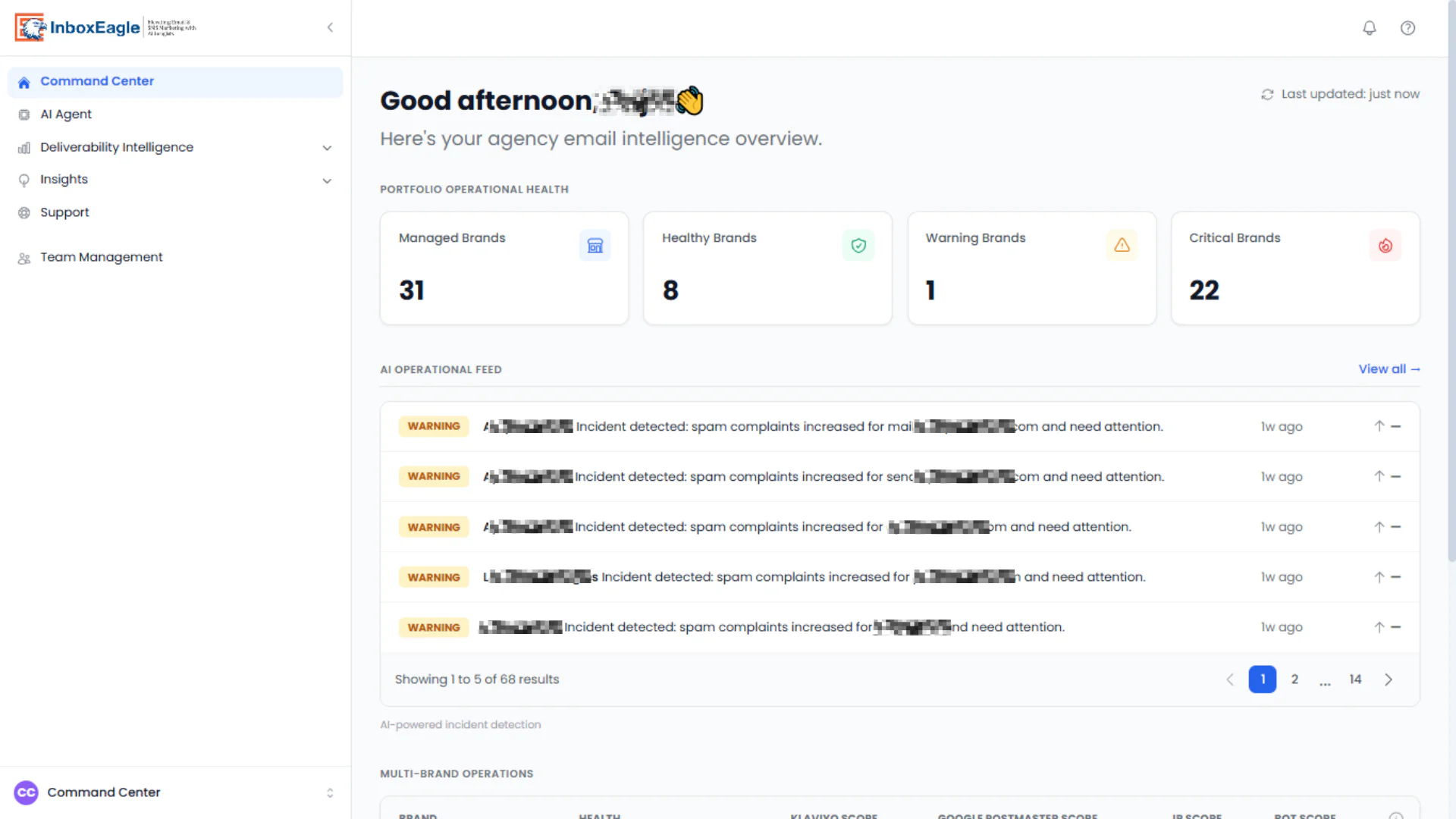
The clearest multi-brand overview reviewed in this piece, useful the same way for a single brand tracking several sending domains as for an agency’s client roster, with a portfolio health split across managed, healthy, warning, and critical brands, plus a running “AI Operational Feed” of incident alerts across every account at once. In the account we tested, 22 of 31 managed brands sat in “critical,” which illustrates the tool’s purpose well. The feed surfaces spam-complaint incidents per brand rather than making you check each one manually.
AI Agent hub
The three AI agents each get a dedicated page explaining what they monitor and a sample output before you enable them, with a per-agent enable and disable toggle.
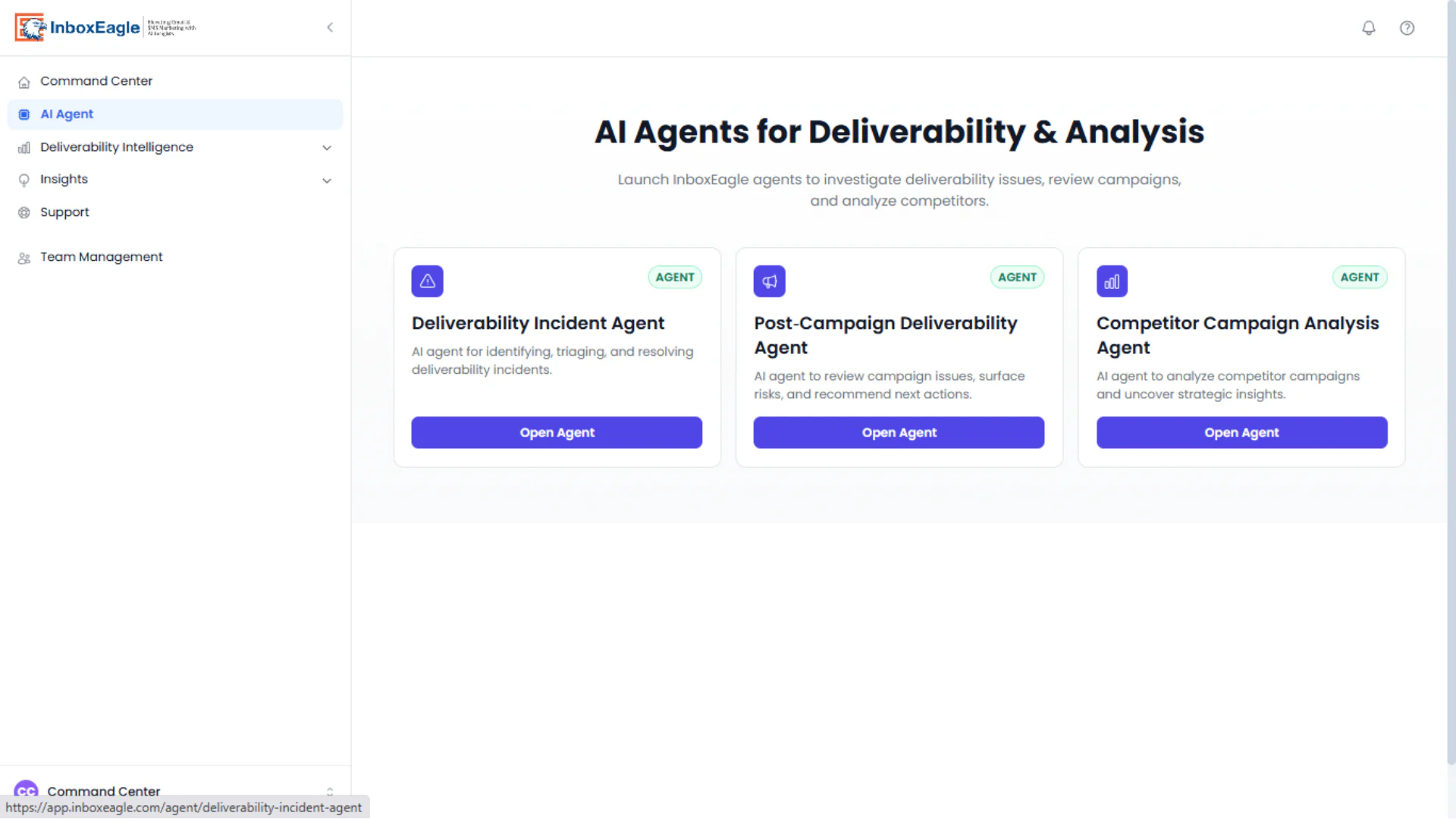
Deliverability Incident Agent
Pulls specifically from Google Postmaster data, covering domain reputation, IP reputation, and spam rate, and classifies meaningful movements as either a Deliverability Incident or a Deliverability Recovery, logging the affected domain, metric, previous value, current value, and date. An auto-close setting controls how long an incident stays open. As of September 2026, the same agent also watches SPF, DKIM, and DMARC authentication signals from the DMARC Processing add-on, raising Info, Warning, or Critical incidents on authentication failures the same way it already handled reputation and spam-rate movements. How AI monitors email deliverability explains the approach behind this.
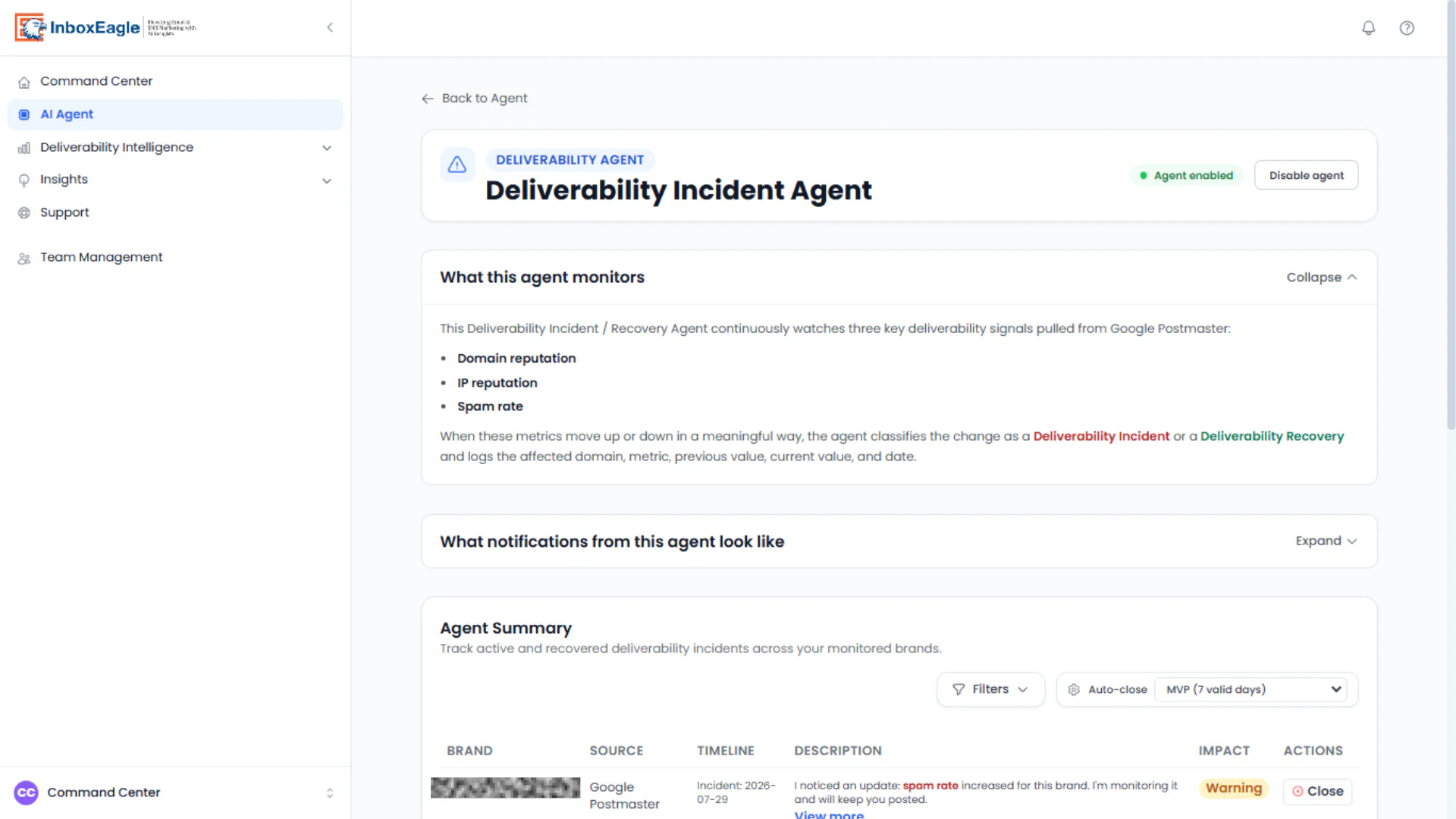
Post-Campaign Deliverability Agent
Emails a deliverability report after each send, broken down by mailbox provider with authentication badges alongside each.
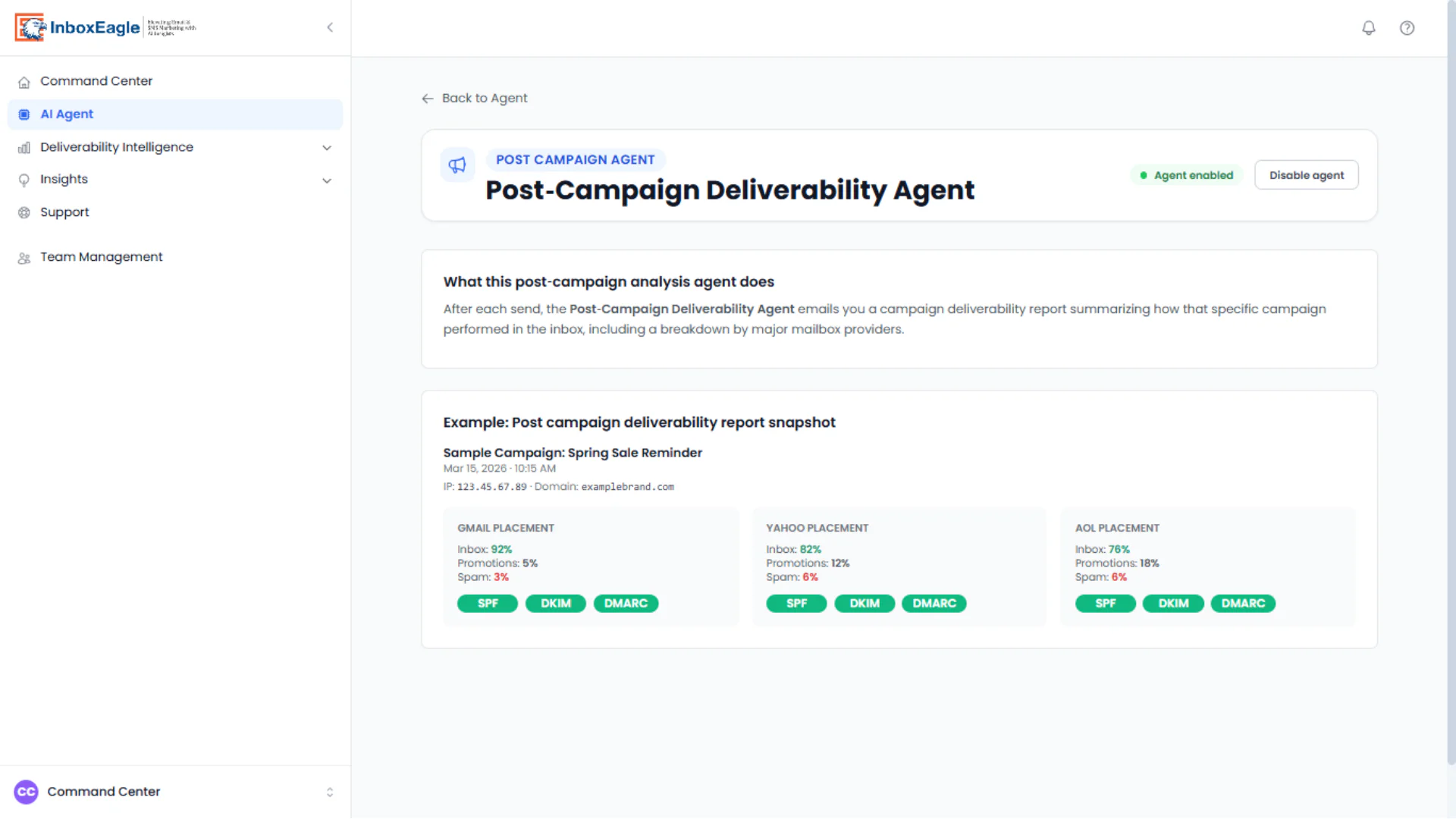
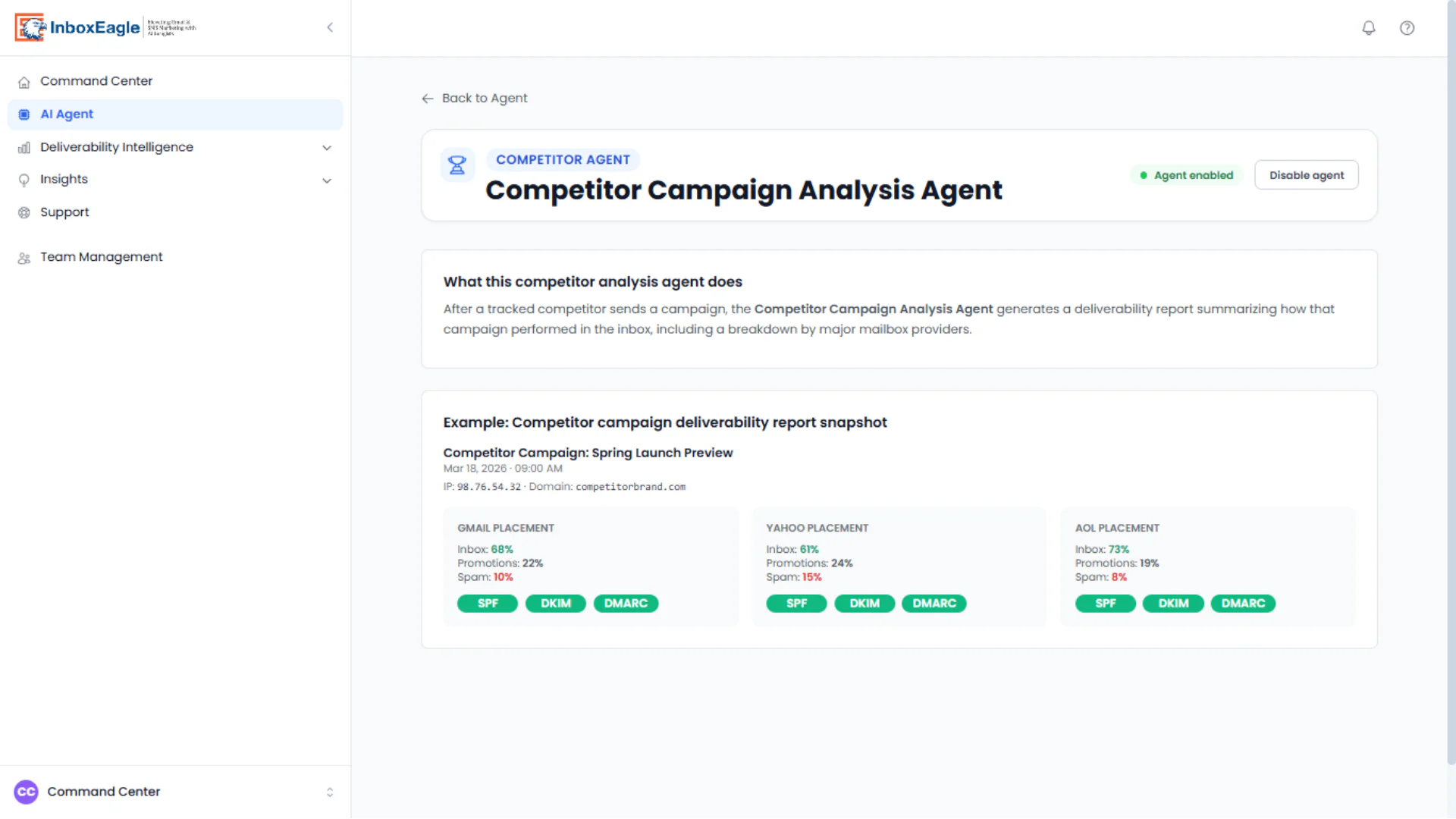
Competitor Campaign Analysis Agent
Uses that identical report format for a tracked competitor’s sends, which makes your campaigns and theirs directly comparable at a glance. The example below shows a competitor at 68% Gmail inbox and 10% spam against the 92% and 3% in the post-campaign example above. Monitoring competitor email strategies covers what that data is actually good for.
Deliverability Report
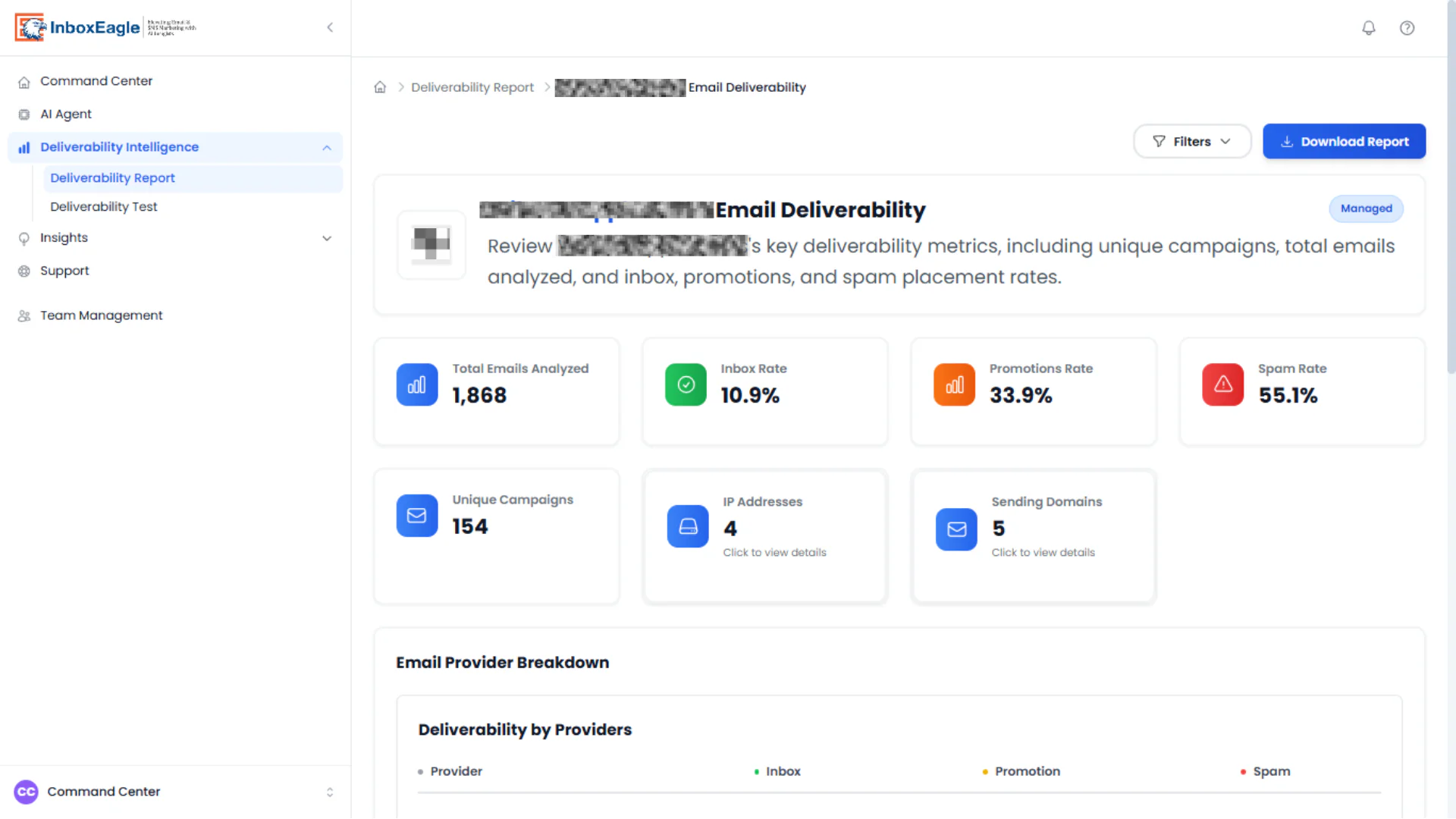
Aggregates placement over time per brand, covering total emails analyzed, inbox, promotions, and spam rate, unique campaigns, and IP and sending-domain counts, with a downloadable report.
Provider breakdown
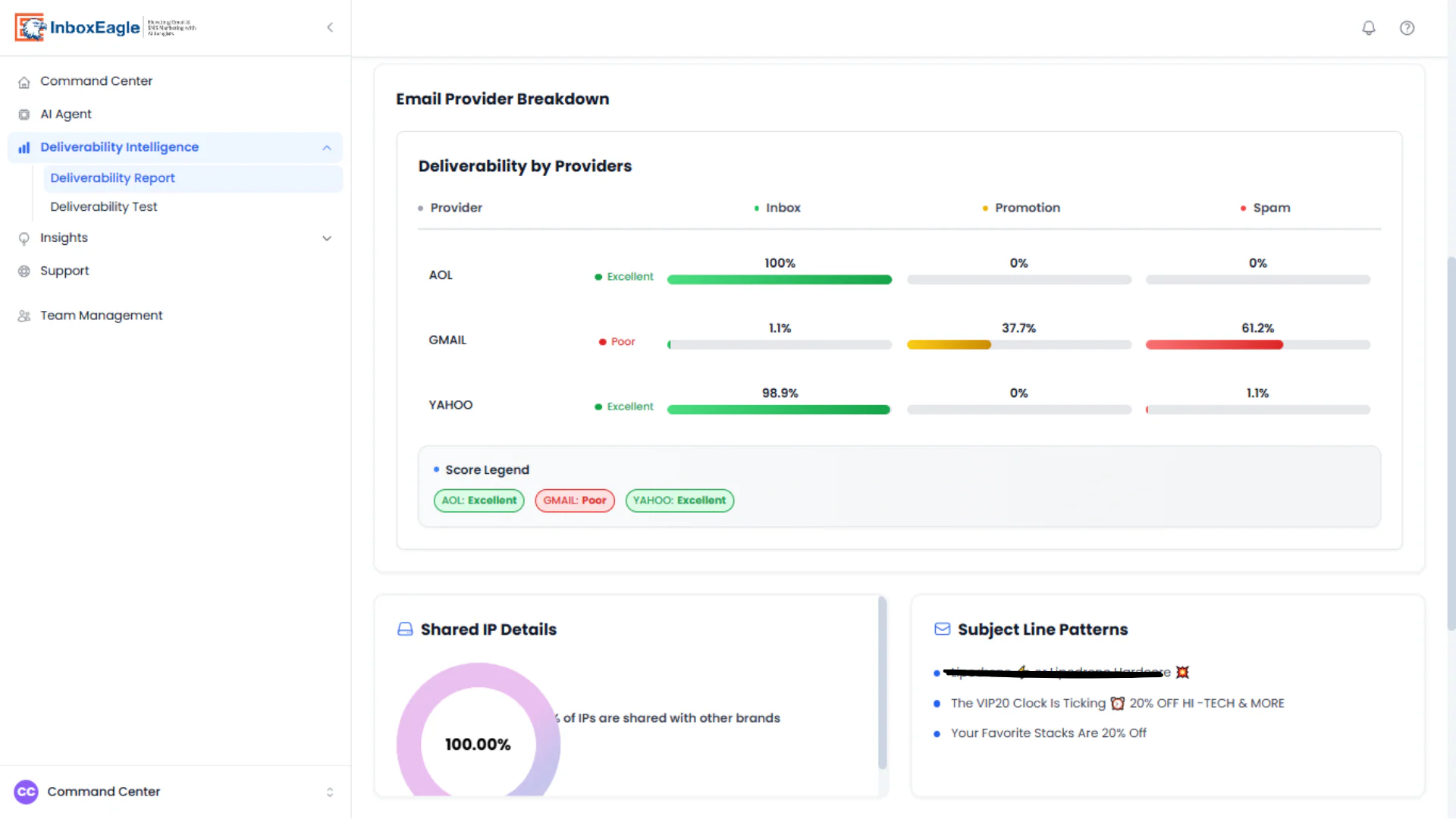
Sits below the Deliverability Report, and the per-provider split does the real diagnostic work. In the brand shown, AOL and Yahoo are near-perfect while Gmail sits at 1.1% inbox and 61.2% spam. That’s a Gmail-specific reputation problem rather than a general one, and it’s the kind of split a single aggregate score would hide entirely. A shared-IP indicator and subject-line pattern list sit alongside it.
DMARC Processing and Authentication Intelligence
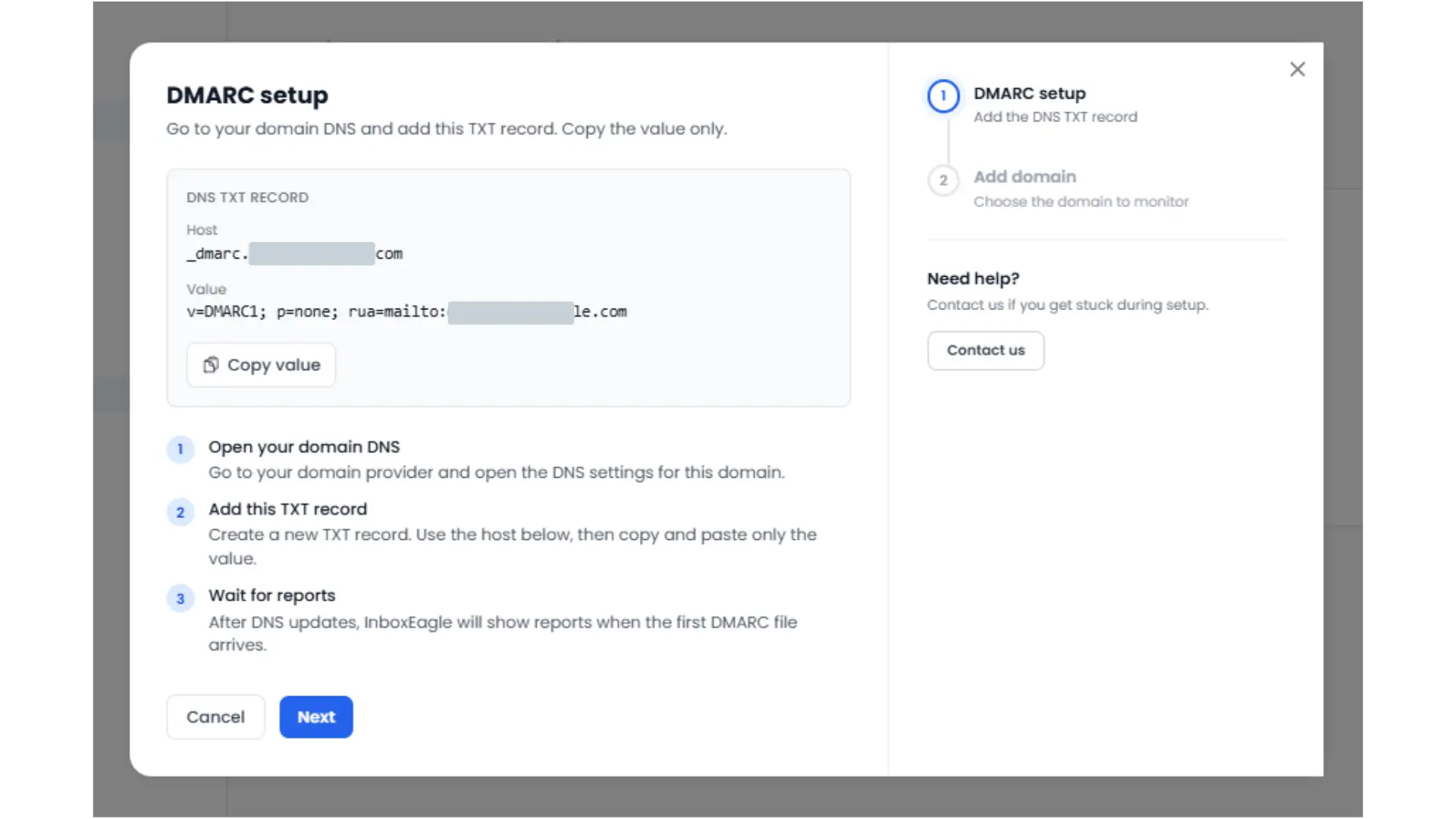
As of September 2026, InboxEagle also ships a DMARC Processing add-on, ingesting DMARC RUA aggregate reports and surfacing them in an Authentication Intelligence view alongside the placement data above. Setup is one DNS TXT record: InboxEagle generates the exact host and value, you publish it, and the view sits in “Waiting for Reports” until the first file arrives, typically within a day or two.
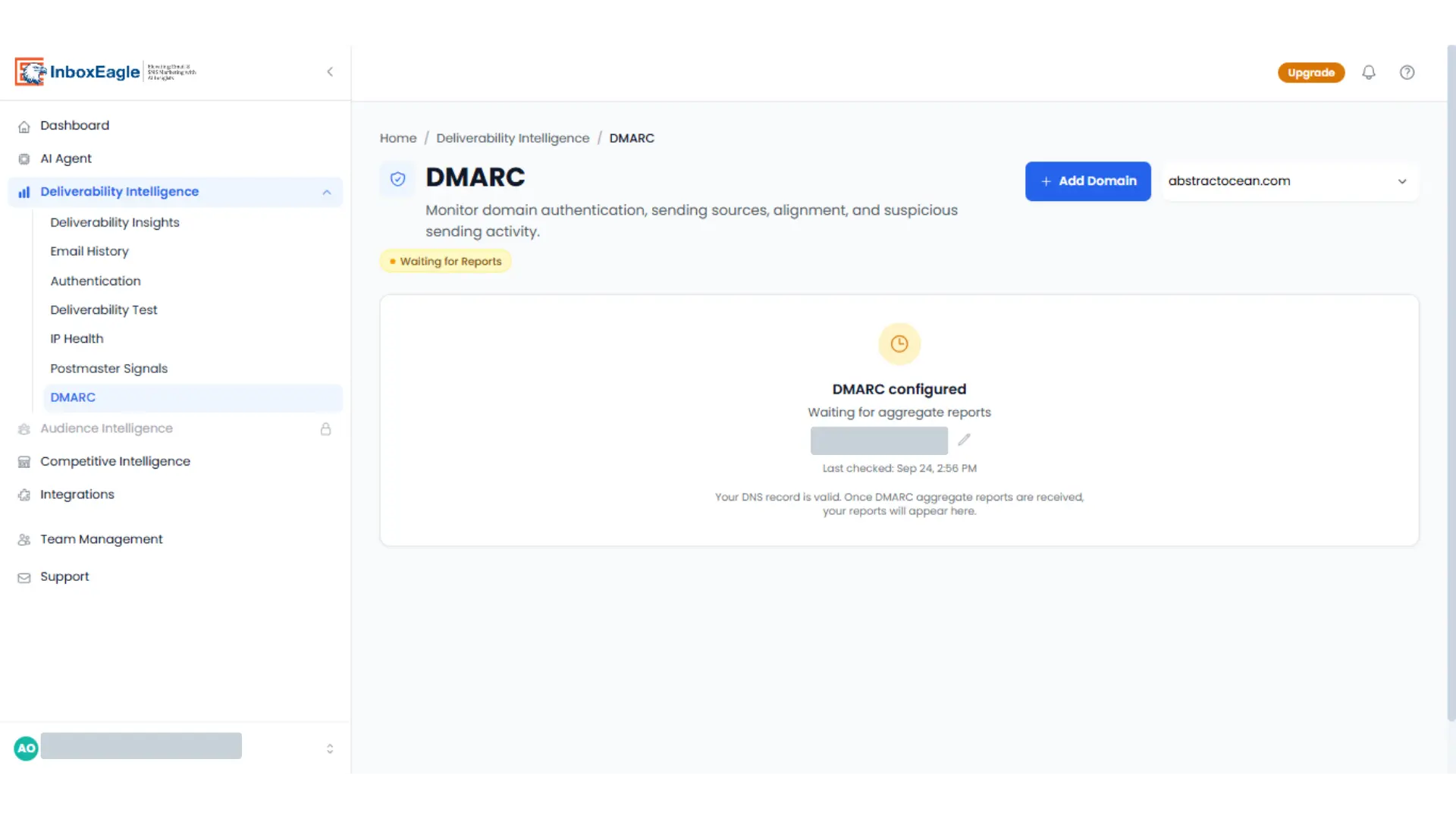
Once reports arrive, DMARC lives inside the same Deliverability Intelligence sidebar as placement, IP health, and Postmaster data, rather than as a separate product to log into. Report history itself isn’t a launch-date disadvantage on either tool: it starts accruing the day you add the DNS record, whichever product you’re on, not the day the feature shipped. Where GlockApps’ DMARC Analytics is still ahead is elsewhere, bundled into its plans from Essential up rather than sold as a separate add-on, and running on a faster 2-hour monitoring cadence. Our InboxEagle vs. GlockApps comparison breaks down the pricing difference in more detail than fits here.
Deliverability Test
Runs seed-list placement checks before launch, listing each test with per-provider placement, sending domain, IP, and SPF, DKIM, and DMARC verdicts. The seed-list tests shown below are live runs, not mockups. Placement resolved per provider within the test window, with sending domain, IP, and authentication verdicts attached to each result, and the per-provider split was specific enough to act on. On one Klaviyo shared-IP send the test returned 0% Gmail inbox, 7% promotions, and 93% spam against 100% AOL inbox, with SPF and DKIM passing and DMARC failing. That combination points at domain alignment rather than content or list quality, which is the diagnosis you want a pre-send test to hand you.
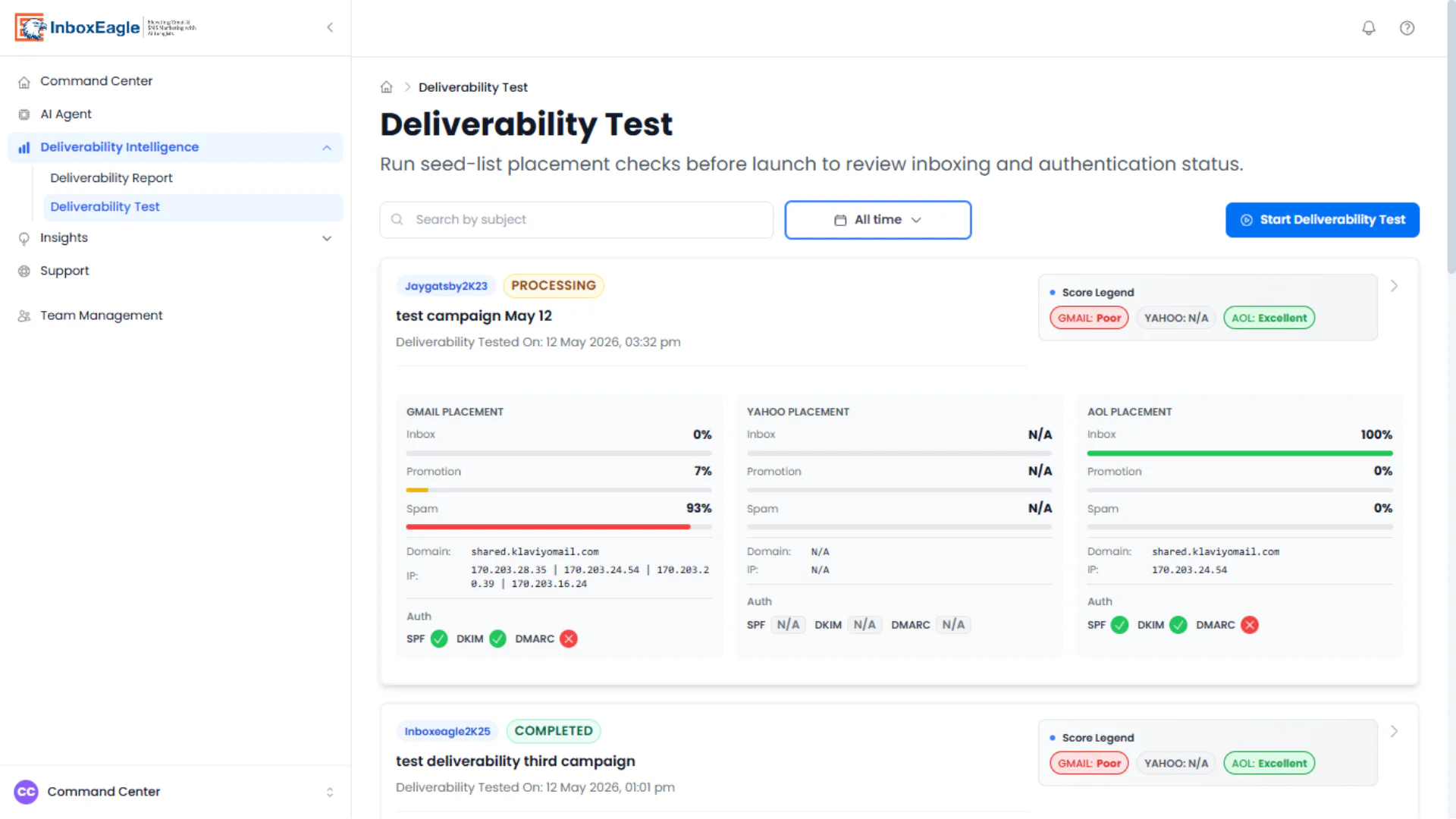
Two things are worth flagging from the same runs. A test still labeled “PROCESSING” was already displaying complete Gmail and AOL placement percentages, so the status badge lags the data and an in-progress test can read as final. And Yahoo returned “N/A” across every field on that run, including its authentication verdicts, rather than a zero or an explicit error, so there’s no way to tell from the interface whether the Yahoo seed failed to deliver or simply wasn’t checked. Neither affects the Gmail and AOL numbers, but both are worth understanding before acting on a test that hasn’t finished.
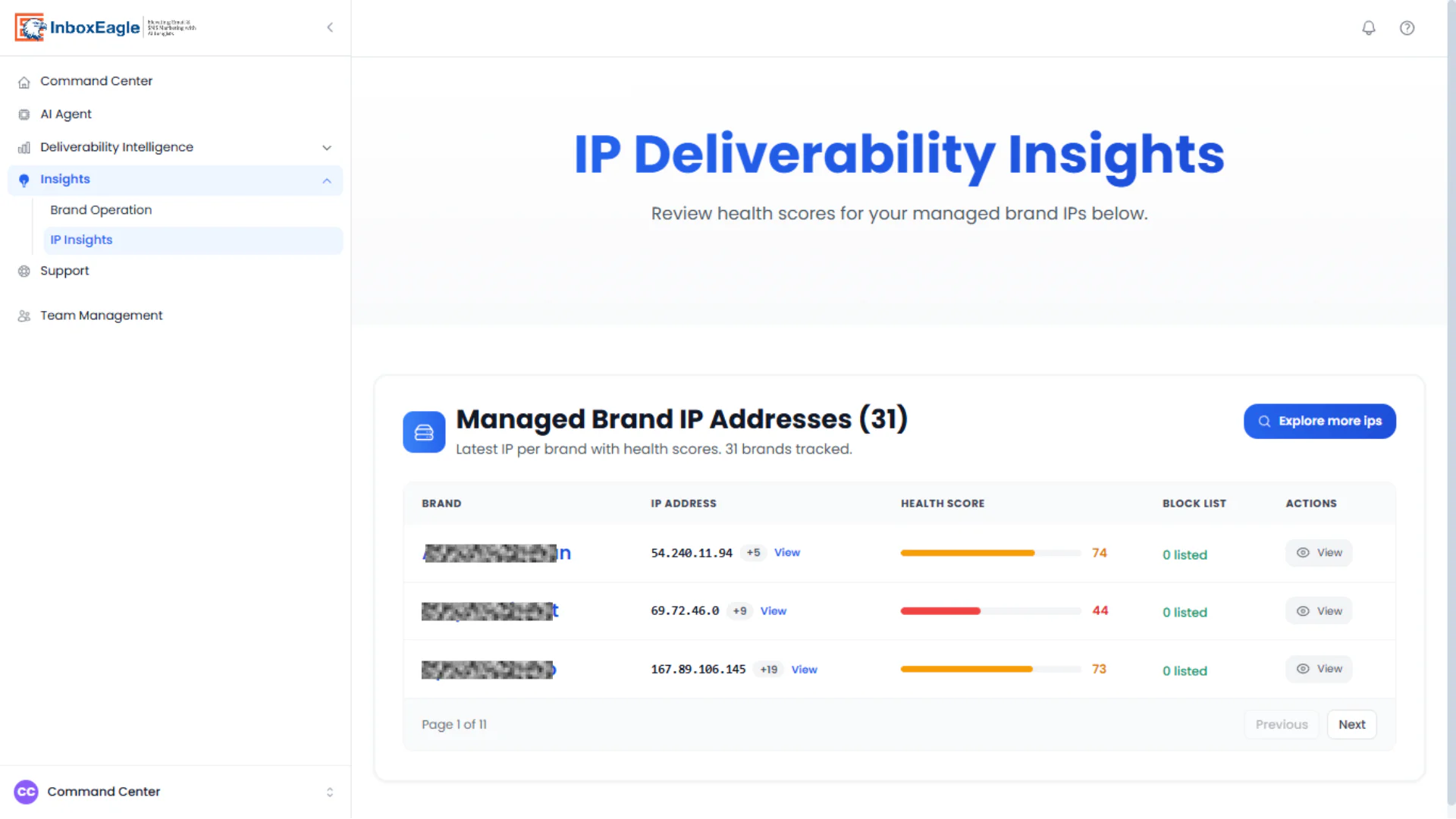
IP Insights
Lists the latest IP per managed brand with a health score from 0 to 100 and blocklist status.
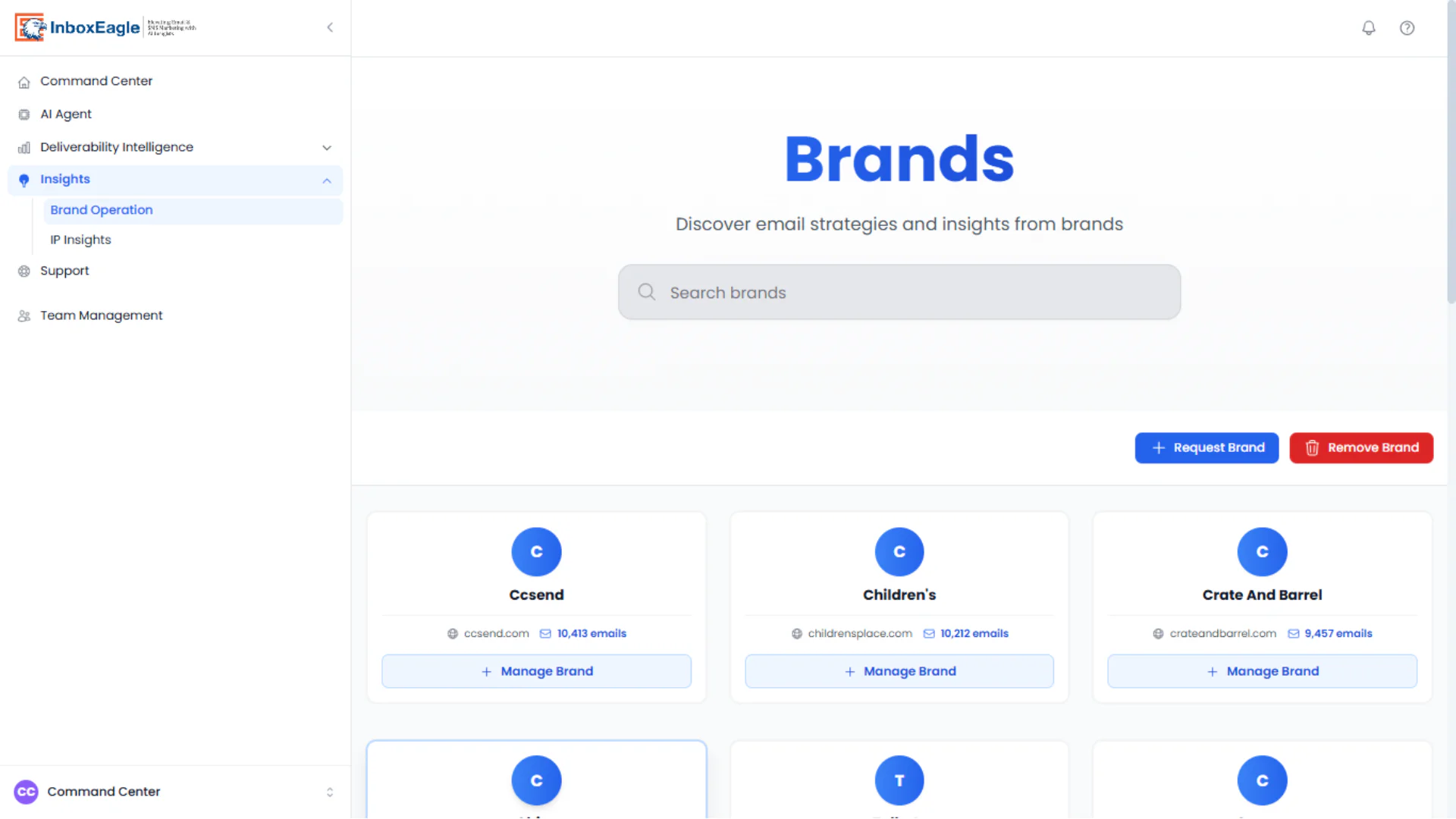
Brand Operation
The multi-brand switcher underlying the Command Center, letting you search, request, and manage individual brand accounts from one place, with each card showing the brand’s domain and analyzed email volume. It’s the same feature whether those brands are all yours or a mix of client accounts.
Strengths: The Competitor Campaign Analysis Agent is a genuinely distinctive capability, and no other tool reviewed in this piece tracks and reports on a competitor’s inbox placement. Automated, always-on incident detection is a real time-saver relative to check and monitoring tools that require a manual visit to see anything. Per-provider, per-campaign reporting with authentication status in one view is clean and immediately actionable. Provider coverage on Continuous Placement Monitoring now runs Gmail, Outlook, Yahoo, and Apple Mail, closing the Outlook gap flagged in earlier testing. The multi-brand Command Center works identically whether it’s one ecommerce brand watching a handful of sending domains or an agency handling several client accounts, since it’s the same account-level feature either way, not a separate agency tier.
Weaknesses: The Klaviyo Score column in the Command Center’s multi-brand table reflects where the deepest integration sits, similar to Orita AI’s positioning earlier in this piece, so it’s worth confirming direct fit if your stack is Mailchimp or SFMC rather than Klaviyo. DMARC Processing is a newer, separate add-on priced on top of Email Deliverability, unlike GlockApps’ DMARC Analytics, which is bundled into its plans from Essential up and runs on a faster 2-hour monitoring cadence. The processing and results status mismatch noted above is also worth a closer look.
Ecommerce relevance: Strong for the specific case this piece is written for, a Klaviyo-connected ecommerce brand, or an agency managing several, that wants continuous automated deliverability monitoring rather than manually running separate checks. The September 2026 provider expansion to Gmail, Outlook, Yahoo, and Apple Mail also makes it a better fit now for brands with a heavier Outlook or corporate-adjacent audience than it was before. It isn’t a fit for a brand primarily on Mailchimp or SFMC, and it isn’t a replacement for check tools like MXToolbox or Barracuda that don’t require an account at all.
Pricing: Two independent subscriptions, either or both. Email Deliverability is a flat monthly rate whatever your list size; Audience Selection is priced to Klaviyo profile count. No feature is gated by tier within either one. DMARC Processing is a separate add-on, from $20/month, layered on top of Email Deliverability rather than bundled into it.
InboxEagle pricing
Two independent subscriptions — take either on its own, or both. Email Deliverability is a flat $20/mo whatever your list size. Audience Selection is priced to your Klaviyo profile count: $39/mo covers up to 10,000 profiles, scaling to $459/mo at 250,000. Above that, pricing is custom. Annual billing is 2 months free. Deliverability consulting is quoted per engagement.
Email Deliverability
$20/mo · flat, any list size
- Real-time deliverability monitoring
- 10 seed inboxes for inbox placement testing (Gmail, Yahoo, AOL) — add them to every campaign send
- Google Postmaster Tools integration
- Klaviyo integration — syncs campaign name, subject line, send date/time, lists & segments (audience data requires Audience Selection)
- DMARC monitoring — DNS record checked every 24 hours, with alerts on any change (data retained 90 days)
- DNS monitoring — SPF, DKIM & MX records checked every 24 hours, with alerts on any change
- Blocklist and domain reputation tracking
- AI agent tracking reputation, IP changes & key incidents
Audience Selection
$39–459/mo · by Klaviyo profile count
- AI segments for audience selection
- Suppressed profile monitoring & win-back opportunities
- Competitor analysis
- Klaviyo integration
The verdict: stack email deliverability tools, don’t stop at one
No single tool reviewed above covers check, test, monitor, and optimize at once, and the free layer of this list isn’t optional infrastructure you graduate past once you’re on a paid platform. It runs alongside it. Here’s the stack we’d actually run for a Klaviyo, Mailchimp, or SFMC brand, InboxEagle included, not InboxEagle alone.
The baseline, free, and non-negotiable:
- Google Postmaster Tools for Gmail-specific reputation and spam-rate monitoring, since Gmail is typically the largest single inbox provider on a US, UK, or CA ecommerce list.
- MXToolbox as a pre-send checklist item: DNS, DMARC, and BIMI diagnostics on a new sending domain, a template change, or before scaling into a new region.
The paid layer, one platform instead of three subscriptions:
InboxEagle is the tool in this list built to run continuously rather than through a periodic check-in: Continuous Placement Monitoring after every real campaign send, a 10-seed Deliverability Test for a manual pre-launch check, and, as of September 2026, DMARC Processing with Authentication Intelligence, three jobs that would otherwise mean three separate line items on a deliverability budget. Add Postmark separately if transactional mail (order confirmations, password resets, shipping updates) is still riding on the same infrastructure as marketing campaigns, since isolating that traffic protects both reputations at once.
Where the InboxEagle stack specifically earns its keep:
If you’re on Klaviyo, the case for InboxEagle strengthens further, and it’s worth running Email Deliverability alongside Audience Selection rather than Email Deliverability on its own. Audience Selection is where placement data stops being a dashboard number and starts tying to revenue: AI-built segments from real engagement data, suppressed-profile win-back campaigns, and competitor placement analysis, all against the same Klaviyo account the deliverability monitoring is already watching. A Gmail placement drop shows up in the same workspace as the suppression list that could be dragging it down, and the audience action to fix it is one click away rather than a separate export into a different tool. That combination, deliverability monitoring and audience action against one shared dataset, is the part a Mailchimp or SFMC brand doesn’t get from InboxEagle at the same depth, and it’s the clearest reason to pick the full InboxEagle stack over running Email Deliverability by itself.
Frequently asked questions
What is an email deliverability tool? It’s a tool that helps you understand and improve whether your emails reach the inbox rather than the spam folder or a filtered tab. The category splits into five jobs: instant checks, placement tests, continuous monitoring, optimization, and all-in-one platforms.
Are free deliverability tools good enough? For diagnostics, often yes. Google Postmaster Tools and Microsoft SNDS come straight from the mailbox providers themselves and are the most authoritative reputation signal available at any price. What free tools don’t give you is continuous monitoring with alerting, per-campaign placement by provider, or ecommerce-specific context.
Do I need more than one tool? Usually. A realistic ecommerce stack is Google Postmaster Tools for Gmail reputation, a free check tool for authentication diagnostics, and one paid platform for continuous monitoring and per-campaign placement, with a list-hygiene layer added once list quality becomes the bottleneck.