



Inbox placement is a single outcome but there are two distinct ways to measure it. Both matter. And confusing them leads to using the wrong tool for the wrong question.
Seed list testing and real-world inbox monitoring both tell you something about where your email landed. But they’re measuring different things, at different stages, with different diagnostic value. Understanding the difference determines whether you’re catching problems early, understanding them deeply, or missing them entirely.
Across eCommerce senders at every volume level, the most common pattern is the same: teams pick one approach, assume it covers the whole picture, and end up with a blind spot that costs them quietly over months. Seed-only senders miss slow reputation erosion. Monitoring-only senders miss provider-specific placement failures on individual campaigns. The fix is straightforward once you understand what each method actually measures.
InboxEagle offers both. This post explains how each works, what each is good at, and why the two together give you a deliverability picture that neither can provide alone.
What Seed List Testing Does
A seed list is a set of real email addresses at major mailbox providers that InboxEagle controls. InboxEagle’s seed network covers four providers: Gmail, Yahoo, AOL and Outlook. Apple Mail and iCloud are not covered, so a problem that exists only there will not show up in a seed result. For Yahoo and AOL specifically, the Yahoo and AOL seed-mailbox placement page shows how the two are reported separately.
The workflow is simple. You download the seed list CSV from InboxEagle, import those addresses into your ESP as a list or segment, and add them to your campaigns. From that point, every campaign that includes the seed addresses is automatically monitored. You don’t have to do anything differently per send.
When your campaign fires, those seed addresses receive the email alongside your real subscribers. InboxEagle checks each seed inbox and reports back after every send: inbox, promotions tab, or spam, broken down by provider (Gmail, Yahoo, AOL and Outlook).
What seed testing is uniquely good at:
- Catching placement issues at a specific provider before you know something is wrong
- Pre-send testing: send only to seed addresses first, check results, fix any issues, then send to your full list
- Getting simultaneous placement data at Gmail, Yahoo, AOL and Outlook from a single send
- Full header analysis on each seed result, including authentication verdicts and spam filter reason codes as seen by each provider
The key characteristic of seed testing is that it’s controlled and consistent. The same addresses, the same providers, every time. That consistency makes it easy to compare placement across campaigns and spot changes.
What Real-World Inbox Monitoring Does
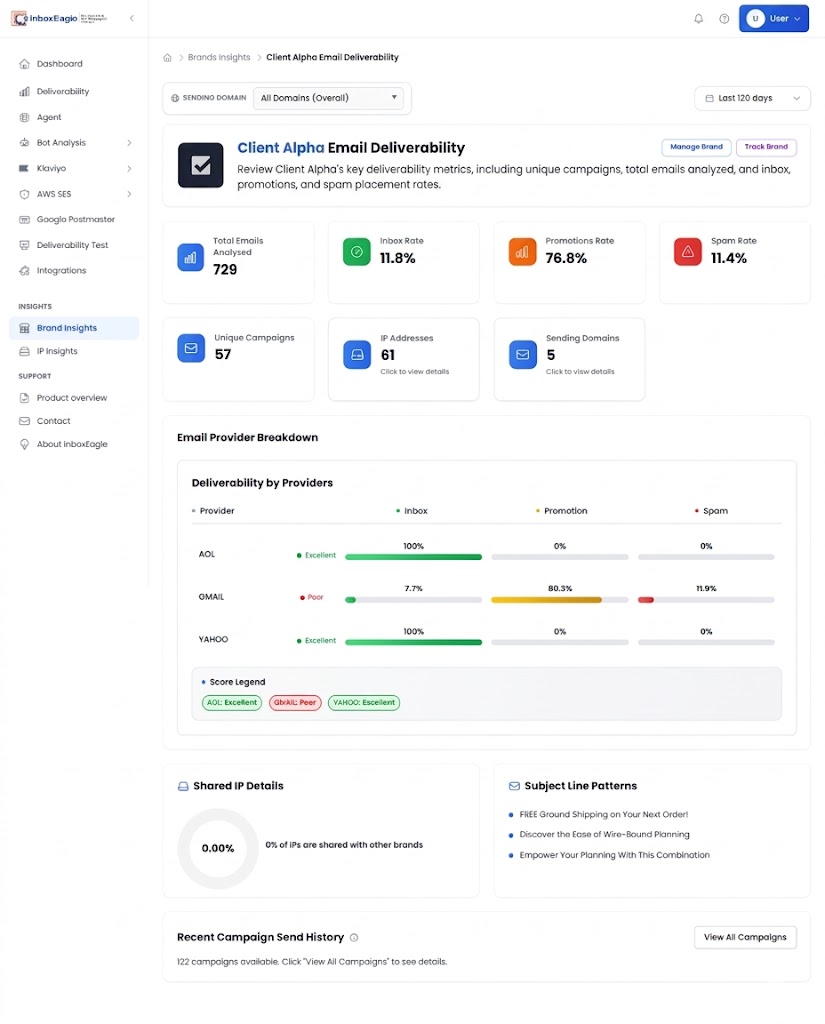
Real-world inbox monitoring tracks your live campaigns as they send to your actual subscriber list. In InboxEagle, this is the campaign monitoring layer: every campaign you send is tracked and shows up in the dashboard with its placement result by provider, performance score out of 100, sending domain, sending IP, subject line, received timestamp, and authentication results for SPF, DKIM, and DMARC.
This isn’t based on seed addresses. It reflects what your actual sending infrastructure produced with your real domain, your real IP, and your full list volume, at the time the campaign was sent.
What real-world monitoring is uniquely good at:
- Tracking performance trends across your full campaign history
- Surfacing program-level patterns: is your average score trending up or down over the last 20 campaigns?
- Showing which sending domain and IP were used and whether they affected placement
- Correlating authentication failures with placement outcomes on the same send
- Identifying which campaigns performed best and worst, and what they had in common
The key characteristic of real-world monitoring is that it reflects your actual program, not a controlled test. It captures the effects of list quality, sending volume, reputation changes, and infrastructure decisions in a way that seed testing, by design, cannot.
The Core Difference: What Question Each Answers
The table below maps the key dimensions of each approach side by side. The most important column is the first row: what question each method is actually designed to answer.
| Seed List Testing | Real-World Monitoring | |
|---|---|---|
| Primary question | Where did this specific campaign land? | How is my sending program performing over time? |
| When results appear | After every send | Per campaign, ongoing |
| Provider coverage | Gmail, Yahoo, AOL, Outlook | Gmail, Yahoo, AOL, Outlook (campaign dashboard) |
| Pre-send capability | Yes, send only to seeds first | No, tracks live sends |
| Trend analysis | Compare across sends | Full campaign history with scores |
| Authentication detail | Per-provider header analysis | SPF, DKIM, DMARC per campaign |
| List quality signal | Not captured | Reflected in performance scores over time |
Neither replaces the other. They’re complementary lenses on the same underlying question.
Where Seed Testing Alone Falls Short
Seed list addresses are clean, consistent, and managed. They behave the same way every time. That’s exactly what makes them useful for controlled placement checks, and exactly what limits them as a complete picture of your program.
Your real subscriber list is not clean, consistent, or managed in the same way. It has inactive addresses, bot addresses, addresses with varying engagement histories, and addresses at providers not in the seed network, such as Apple Mail and iCloud. The placement outcome for your seed addresses tells you what happened to a controlled subset. It doesn’t tell you how your overall program health is trending.
A sender with a gradually deteriorating domain reputation might pass seed tests for several campaigns in a row because their reputation hasn’t crossed a threshold yet. Gmail’s sender guidelines define the spam rate thresholds that trigger deliverability impact, but reputation degrades gradually well before those thresholds are crossed. The real signal, declining performance scores across live campaigns, only shows up in the monitoring layer.
Similarly, if your list has a significant bot problem, seed testing won’t surface it. Bots show up in your engagement data, not in placement tests. InboxEagle’s Bot Finder classifies clicks as bot, suspicious, or human, including Apple Mail Privacy Protection prefetch and Microsoft SafeLinks scans, and feeds the monitoring picture rather than the seed testing picture. Bot clicks in Klaviyo shows what that looks like in a Klaviyo account.
Where Real-World Monitoring Alone Falls Short
Real-world monitoring reflects everything that happened on a live send: good and bad, clean and messy. That’s its strength for trend analysis. But it has limits for diagnosis.
If a campaign’s Gmail placement drops, real-world monitoring tells you the outcome and shows you the authentication signals. What it can’t tell you is whether the placement would have been different with a slightly different template, subject line, or list segment. Answering that kind of question requires the controlled environment of a seed test, where you can isolate a variable and test it against the same provider network.
Real-world monitoring also doesn’t give you pre-send visibility. If you’re about to send a reactivation campaign to a cold segment and you want to check placement before it hits 80,000 subscribers, only seed testing lets you do that.
How InboxEagle Combines Both
InboxEagle is built so the two features work together rather than in parallel silos.
The seed list is set up once. You import the addresses into your ESP, add them to your standard send list, and from that point every campaign automatically includes seed addresses without any additional setup. Results appear in InboxEagle after every send.
The campaign monitoring layer captures every send independently: placement by provider, performance score, authentication status, sending domain, sending IP, subject line, and received timestamp. This builds a historical record across your full campaign history that you can trend over time.
For a brand, the workflow looks like this: the seed test for a campaign tells you quickly whether that specific send landed where it should. The monitoring layer tells you whether this campaign’s score fits the broader pattern of your program, and whether you’re improving, holding, or declining. If a seed test shows a Gmail problem, you open the campaign in the monitoring dashboard, check the authentication result, look at the sending domain and IP, and have the full technical context for the diagnosis.
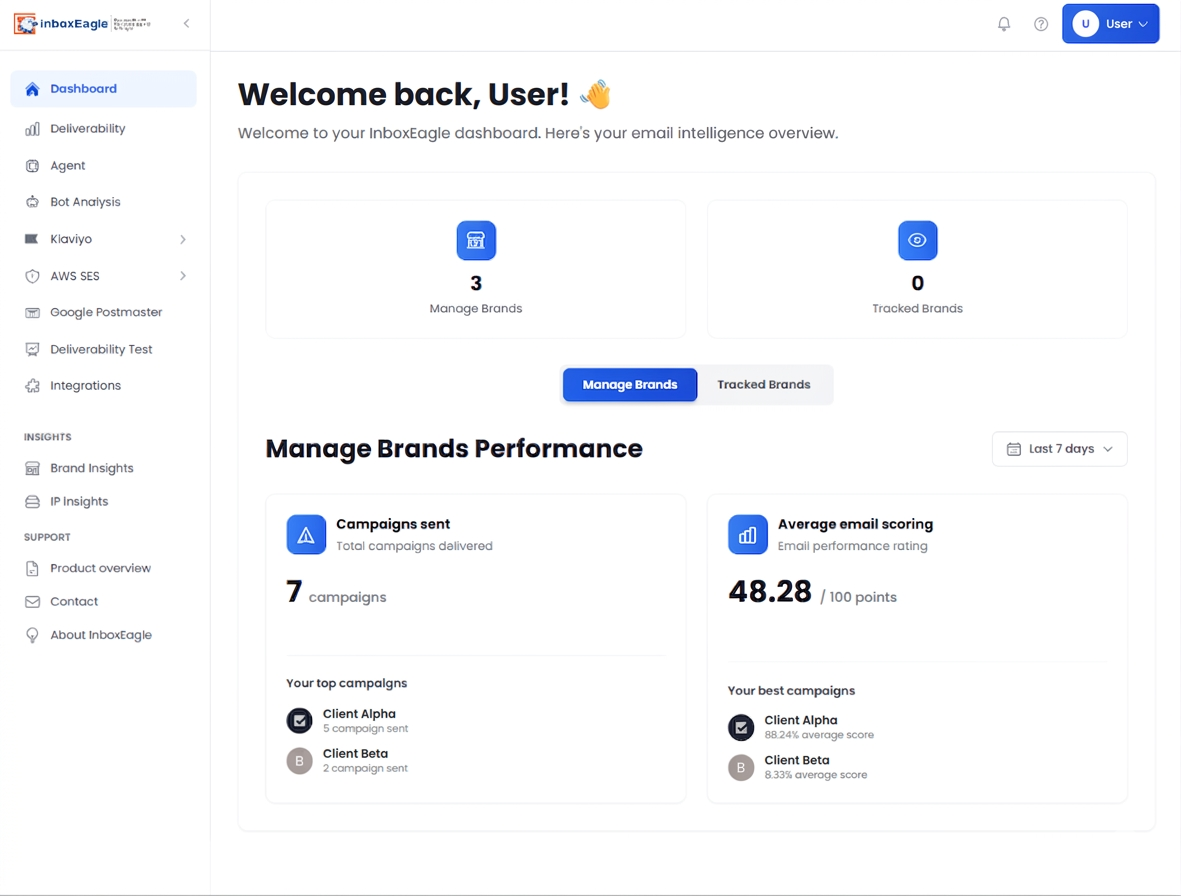
For an agency, the Manage Brands section of the dashboard shows this picture across every client simultaneously: each brand’s campaign count, top-performing campaigns, average performance score, and best campaigns. When a client’s score trends down, you drill into their campaign history, check the seed results for the affected sends, and arrive at the client conversation with the full picture rather than a guess.
A Practical Example of Using Both Together
Say you run a promotional campaign to 60,000 subscribers. The seed test results come back after the send. The numbers here are illustrative, not measured data: Gmail inbox 89%, Yahoo inbox 94%, AOL inbox 82%, all clean. By 2026 inbox placement benchmarks, those are healthy numbers. Authentication passes across the board. You’re satisfied and move on.
Two weeks later, you look at your campaign history in InboxEagle and notice your average performance score has dropped from 87 to 71 over the last six campaigns. None of the individual seed tests flagged a serious problem, but the trend is clearly down.
You look at what changed across those six campaigns. The sending domain is consistent. Authentication is passing. But the performance scores started dropping around the same time you added a re-engagement segment to your sends. The monitoring layer shows the pattern. The seed tests showed clean results per campaign but didn’t capture the cumulative reputation signal those re-engagement addresses were generating.
You remove the re-engagement segment, clean that audience separately, and run the next three campaigns without it. Performance scores come back up to 84. The seed tests were fine all along. The monitoring layer caught what the seed tests couldn’t.
This is the gap that using both fills. Seed testing for per-campaign placement verification. Monitoring for program-level health.
Setting Up Both in InboxEagle
Seed list setup: Go to your InboxEagle account and download the seed list CSV. Import those addresses into Klaviyo (or your ESP) as a new list or segment. Add that segment to every campaign you send. From your next send, placement results appear in InboxEagle automatically.
Campaign monitoring: Connect your sending domain and integrate your ESP via the Klaviyo integration. Every campaign sends automatically populate the monitoring dashboard with placement results, performance scores, and authentication data. If you’re using Google Postmaster Tools, connecting it to InboxEagle adds Gmail spam rate, authentication pass rates, and Compliance Status to the same view. Google publishes that data 24 to 48 hours late, so it trails the seed result. InboxEagle also checks your DMARC policy record every 24 hours and alerts on change.
Both are active from the same account with no separate configuration required beyond the initial setup. For a complete picture of every signal InboxEagle surfaces beyond placement, including Postmaster spam rate and Compliance Status, seed placement at Gmail, Yahoo, AOL and Outlook, and DMARC policy record checks, see what a deliverability dashboard should show.
The Bottom Line
Seed list testing answers: did this campaign land in the inbox?
Run that test on every campaign, and on a flow when the template or the link domain changes. A weekly spot-check of one message does not describe the other six sends. A pre-send test to seeds, before the full list is attached, is the right extra step when the HTML or the tracking host is new. It is still Gmail, Yahoo, AOL and Outlook. It still does not show Apple Mail. Multi-provider monitoring covers how to cover the providers a seed list misses, and provider-specific inbox placement explains how to read a split result.
Real-world monitoring answers: is my sending program healthy, and is it getting better or worse?
Both questions matter. A sender who only uses seed testing has per-campaign visibility but can miss gradual reputation erosion. A sender who only uses monitoring has trend data but lacks the controlled, pre-send placement check that catches issues before they hit 60,000 subscribers.
InboxEagle gives you both from a single platform. If you’re currently using one without the other, you have a blind spot.
You can create a free InboxEagle account at app.inboxeagle.com/register. Both seed list testing and campaign monitoring are active from your next send, with no separate configuration required for each. If a Gmail result looks off, the free spam complaint rate calculator is a quick check on your own numbers.
Note: Content created with the help of AI and human-edited and fact-checked to avoid AI hallucinations.