

InboxEagle vs GlockApps
GlockApps shows you where a test email lands. InboxEagle shows you where your real campaigns land, after every send, automatically. If you manage email revenue for an eCommerce brand on Klaviyo, that is not a small distinction.
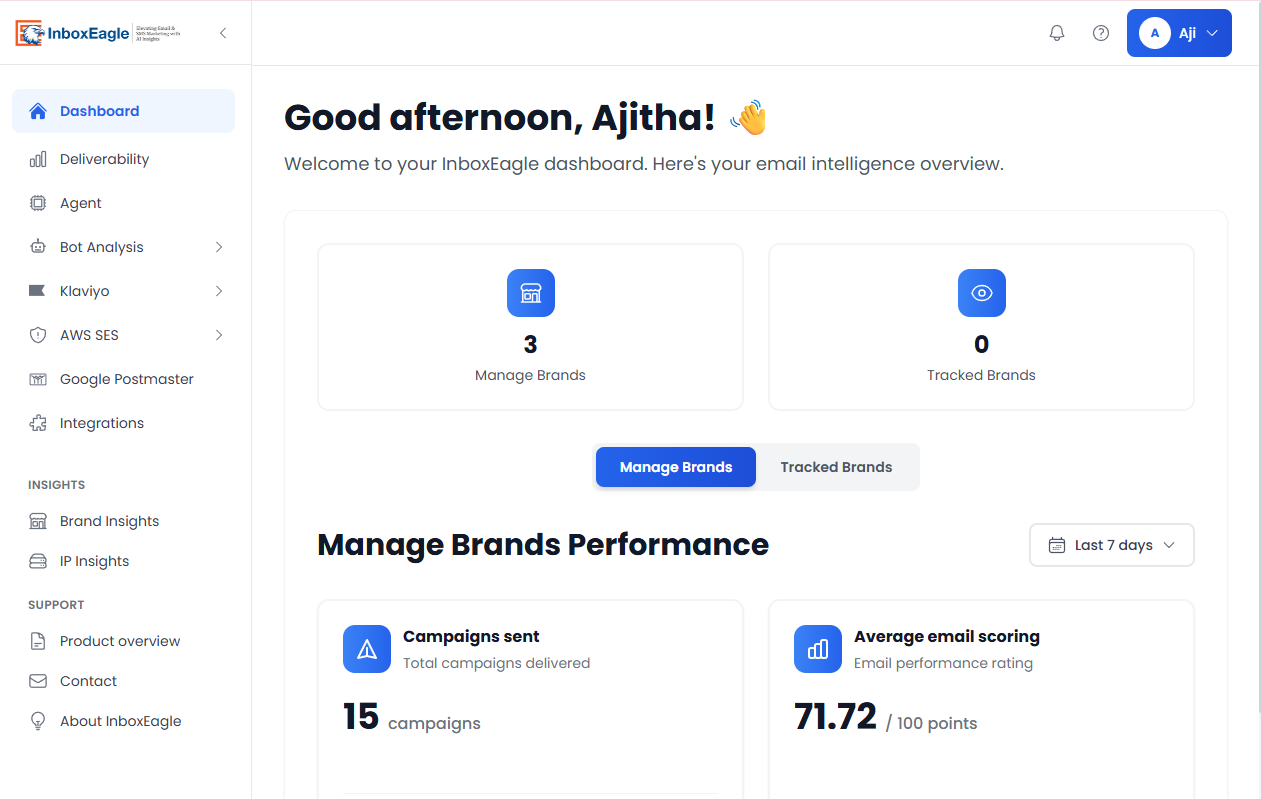
InboxEagle dashboard: inbox placement tracked automatically after every send, across all major providers.
30 seconds: which one is right for you?
Choose InboxEagle if...
- ✓You send via Klaviyo or AWS SES and want placement data after every campaign without submitting manual tests
- ✓You run an agency managing 3+ client deliverability programs from one dashboard
- ✓You need a CSM included from day one, not just ticket support
- ✓You want competitor campaign intelligence alongside your own placement data
Choose GlockApps if...
- →Your primary need is DMARC analytics and XML report processing
- →You send low volume and want occasional spot-checks, not continuous monitoring
- →You need blocklist monitoring across 50+ lists as a standalone feature
- →You want a free entry-level tier with no time limit
InboxEagle: 14-day free trial · No credit card required · Connect Klaviyo in minutes
Start 14-Day Free Trial →Product Overview
What Each Tool Does
InboxEagle
- ·Connects to Klaviyo and AWS SES
- ·Records placement automatically after every campaign send
- ·Covers Gmail, Outlook, Yahoo, and Apple Mail
- ·Includes Deliverability Agent, competitor monitoring, dedicated CSM
Built for: eCommerce brands and agencies where email revenue depends on consistent inbox placement.
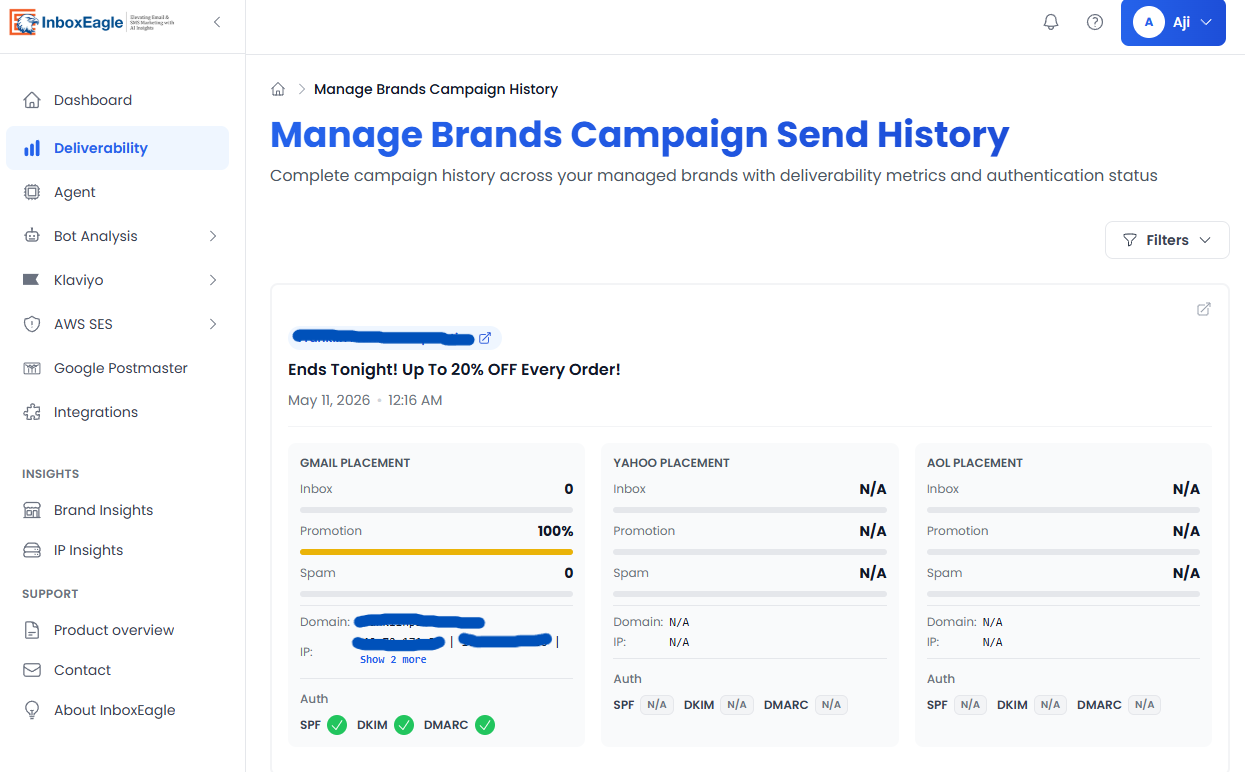
Automatic placement results per provider, recorded after every live send — no manual submission required.
GlockApps
- ·Credit-based spam testing, submit a test, consume credits, see results
- ·DMARC analytics engine (1-year history, 2-hour monitoring)
- ·Blocklist monitoring across 50+ lists
- ·DNS record uptime and IP reputation tracking · 15+ years in operation
Built for: IT teams and email marketers who need pre-send testing and DMARC compliance monitoring.
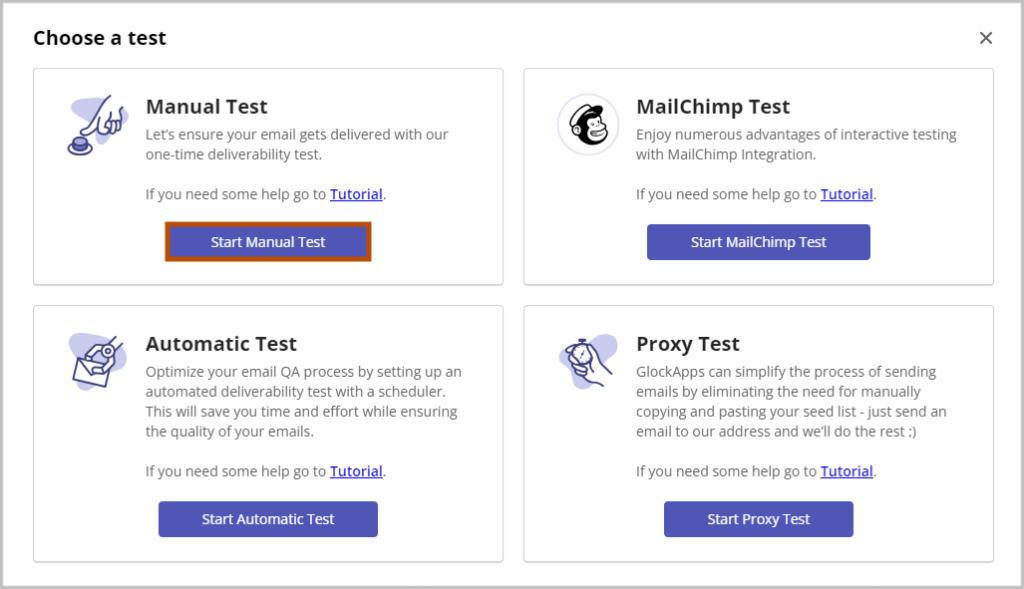
GlockApps requires a manual test submission and consumes credits each time. Results reflect the test email, not your live campaign sends.
The Price Gap
$59 vs $20: What That Gap Actually Means
GlockApps Essential is $59/month. You get 360 spam test credits. Each test consumes credits per seed address in their list, so for a 30-seed panel that is 12 tests per month. If you send 20 campaigns, 8 go unmonitored. You submit a test manually before a send, read the result, and move on. Nothing captures what happens after the email actually reaches your list.
The gap: Deliverability doesn't only break at send time. A domain reputation issue that develops mid-month, a sudden spam complaint spike from a segment, a provider-specific placement drop on Outlook while Gmail looks fine, none of that is visible through pre-send spot testing. You find out when open rates fall, which is typically 2 to 4 weeks after the damage started.
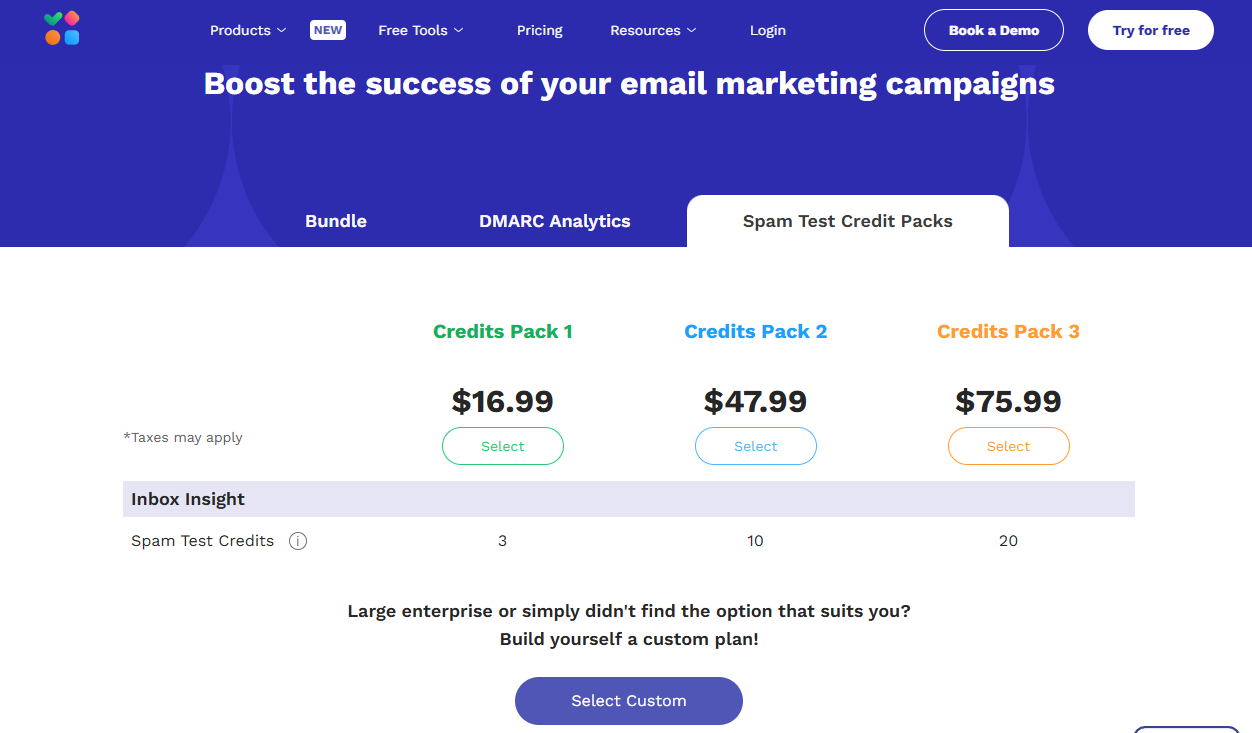
GlockApps credit pack add-ons: when monthly credits run out, additional tests require purchasing more.
InboxEagle's Email Deliverability subscription, at $20/month flat, monitors every campaign automatically after it sends to your real list, no credits, no manual triggers, no gaps between sends. Placement across Gmail, Outlook, Yahoo, and Apple Mail is recorded after each live send.
At $20/month, InboxEagle already costs less than GlockApps Essential's $59/month, and it removes the credit ceiling entirely. The real comparison isn't which plan costs more. It's whether a single campaign landing in Gmail spam, discovered weeks later through falling open rates, costs your brand more than $20 a month to avoid.
Feature Comparison
Side-by-Side Features
| Feature | InboxEagle | GlockApps |
|---|---|---|
| Monitoring | ||
| Inbox placement monitoring | ✓ Automatic after every send | Manual, credit-based only |
| Gmail | ✓ | ✓ |
| Outlook | ✓ | ✓ |
| Yahoo | ✓ | ✓ |
| Apple Mail | ✓ | Not stated |
| IP reputation monitoring | ✓ | ✓ (10–25 IPs by plan) |
| Integrations | ||
| Klaviyo integration | ✓ Native, campaigns, lists, segments, metrics | ESP send integration only |
| AWS SES integration | ✓ Included | ✓ |
| Google Postmaster Tools | ✓ All plans | ✓ |
| Intelligence | ||
| Competitor campaign monitoring | ✓ Included with Audience Selection | Not available |
| Post-campaign Deliverability Agent | ✓ Included | Not available |
| Bot event detection | ✓ All plans | Not available |
| Deliverability Incident Agent | ✓ Included | Not available |
| DMARC analytics | Not available | ✓ Core feature (1yr history, 2hr monitoring) |
| Blocklist monitoring | Not available | ✓ 50+ blocklists |
| DNS uptime monitoring | Not available | ✓ |
| Agency & Support | ||
| Multi-client agency dashboard | ✓ Manage every client brand from one workspace | Multiple accounts, no unified view |
| Dedicated CSM | ✓ Included | Not listed |
| White-label reporting | ✓ Included | DMARC digest only |
| Free tier | 14-day trial | Permanent free plan (2 tests on signup) |
Highlighted rows = features that most commonly drive the decision between these two tools.
See InboxEagle's placement monitoring in action on your own Klaviyo account, free for 14 days.
Start 14-Day Free Trial →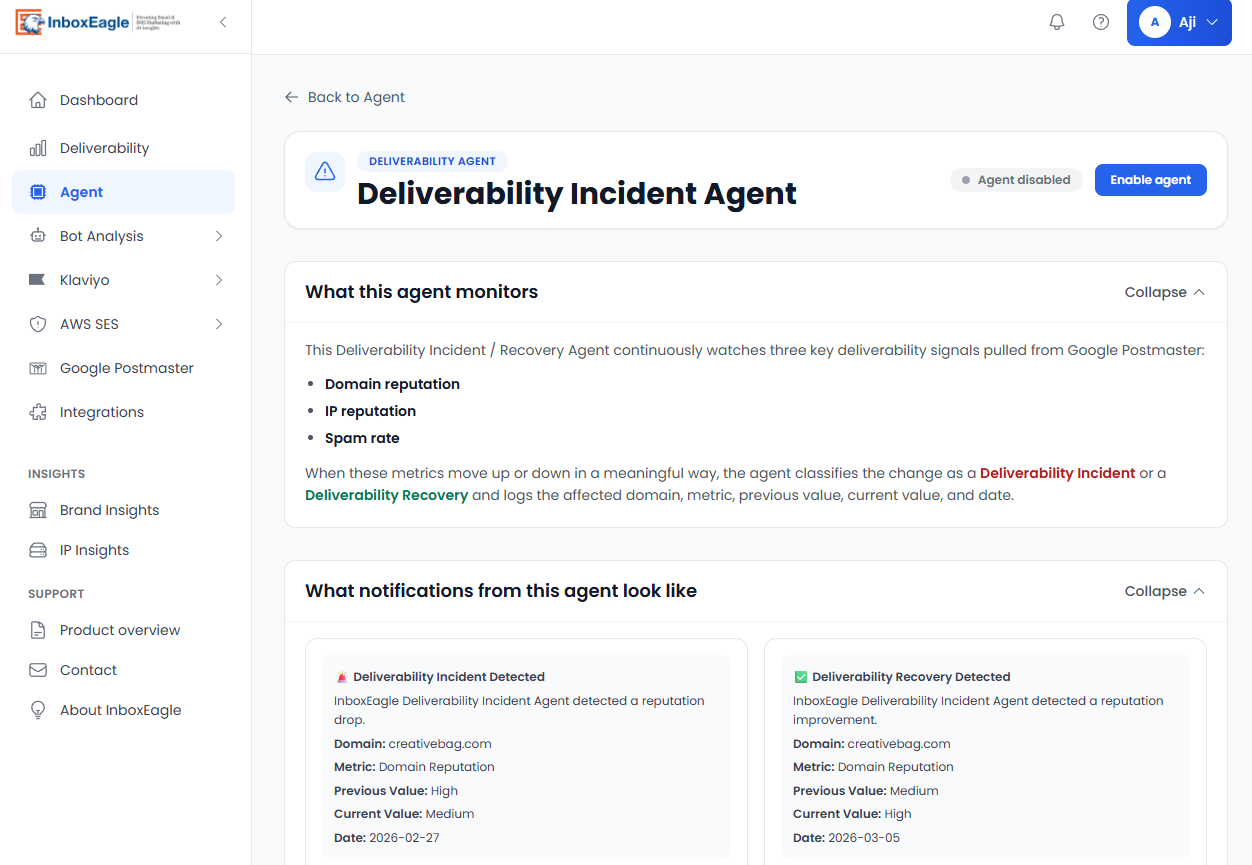
InboxEagle Deliverability Agent: AI-powered analysis surfaced automatically after every campaign send. No GlockApps equivalent.
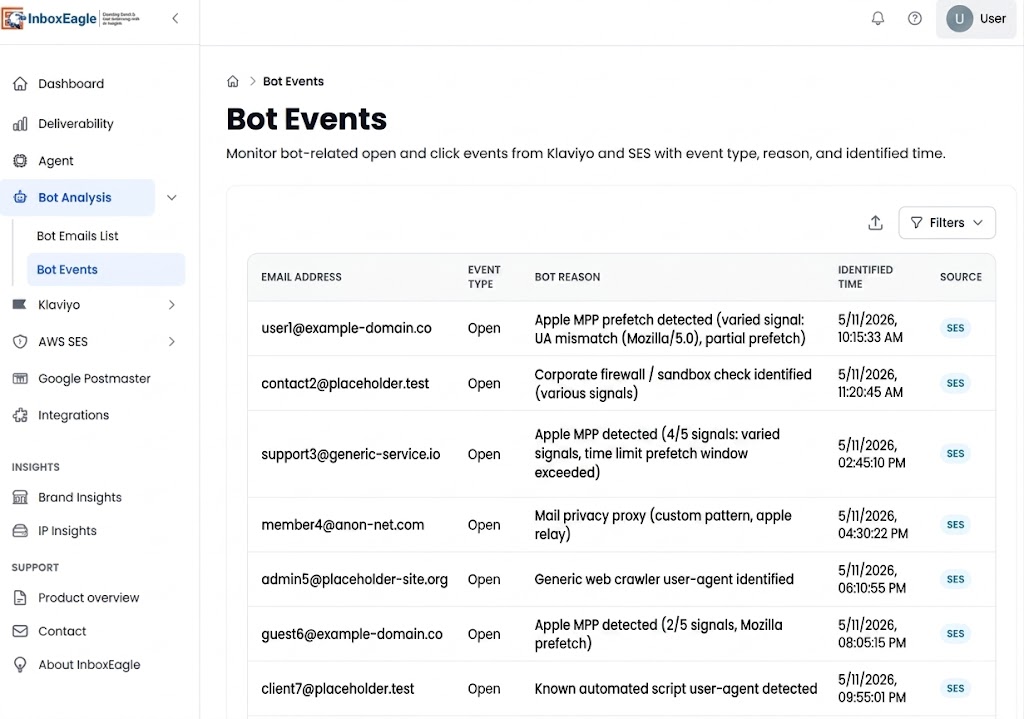
InboxEagle bot event detection: separates genuine engagement from automated opens and clicks so your deliverability signals stay accurate. No GlockApps equivalent.
Where GlockApps is genuinely strong
Two areas where GlockApps has a real advantage: DMARC analytics and infrastructure monitoring. If either is your primary use case, that matters more than anything else in this comparison.
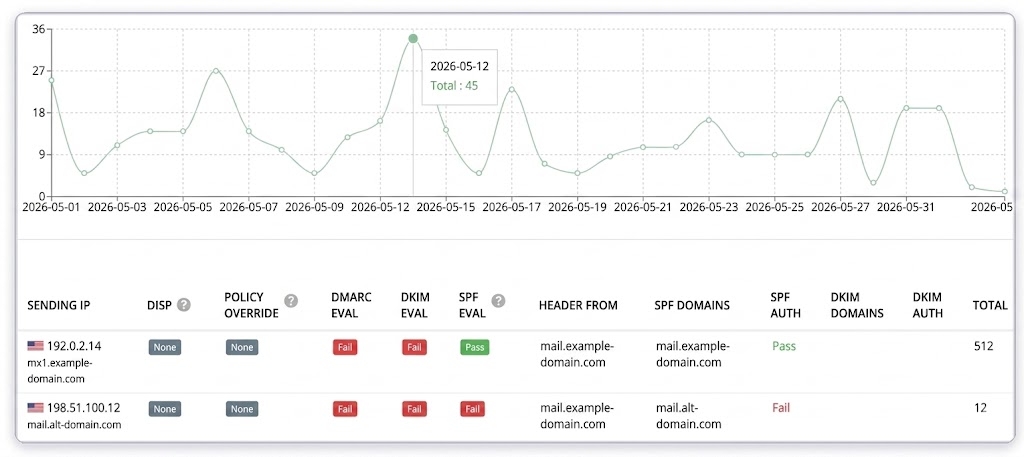
GlockApps DMARC analytics: one-year history, 2-hour monitoring cadence. InboxEagle does not offer DMARC analytics.
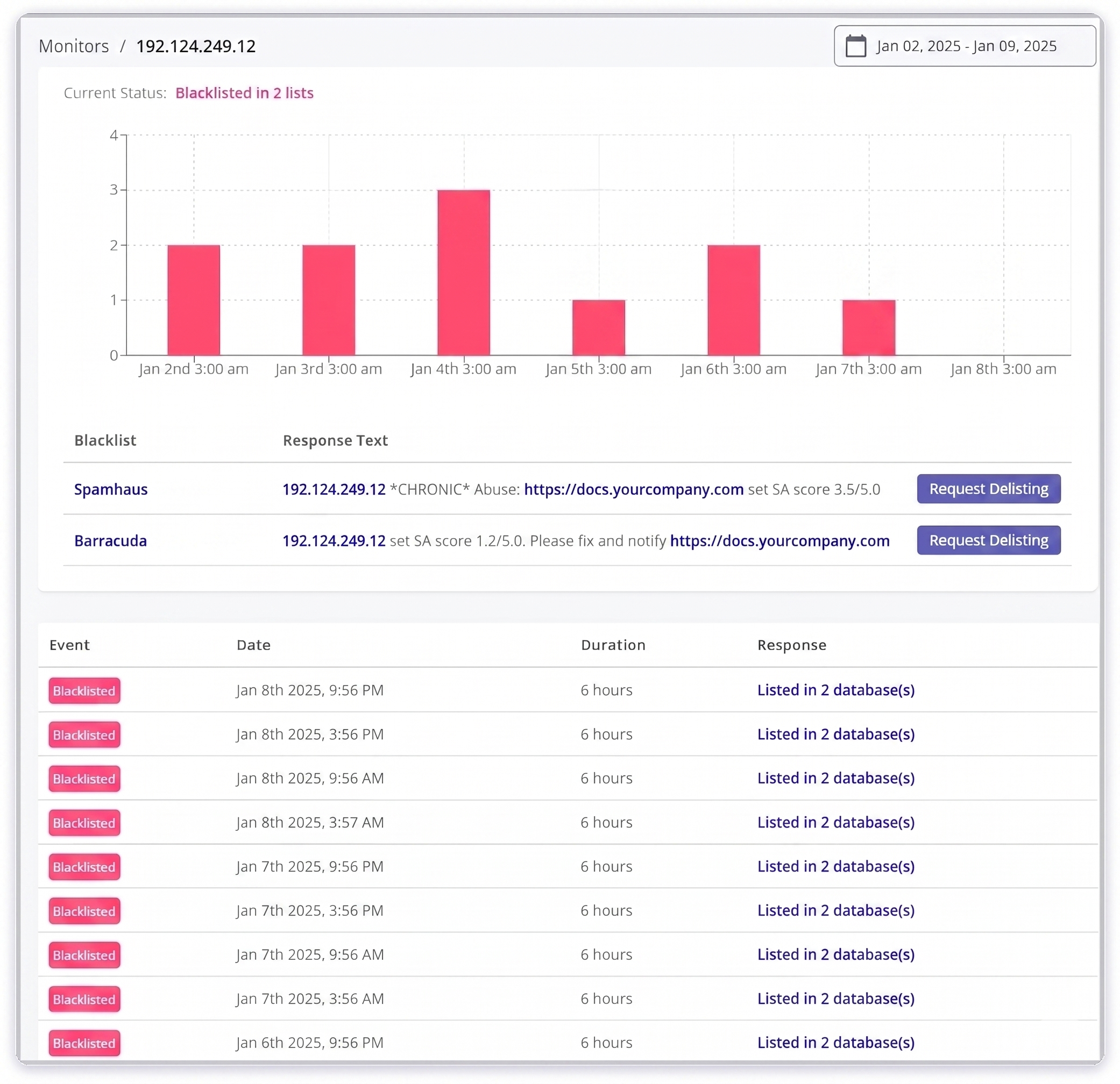
GlockApps DNS uptime and IP reputation monitoring: a genuine strength for teams managing their own sending infrastructure.
Pricing
Pricing Side by Side
Monthly pricing shown for InboxEagle. GlockApps annual billing shown; GlockApps saves ~30% versus month-to-month.
InboxEagle
Independent products. No credits. No per-test charges.
Email Deliverability
$20/mo flat
Placement monitoring · 10-seed panel · Postmaster · DMARC/SPF/DKIM/MX monitoring · AI incident agents
Audience Selection
from $39/mo
AI segments · suppressed-profile win-backs · competitor analysis · priced to your Klaviyo list
Seed List Testing & DMARC Processing
from $20/mo
Standalone add-ons: DMARC Processing from $20/mo, Seed List Testing from $49/mo
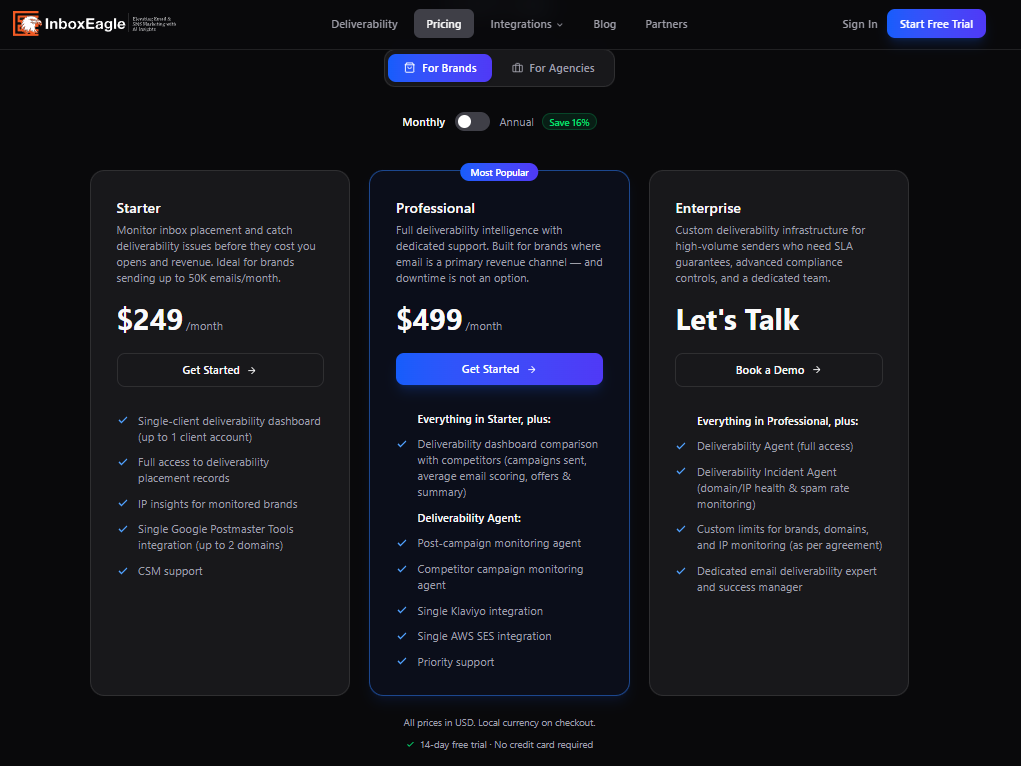
InboxEagle brand pricing: flat monthly rate, unlimited monitoring, no credits.
GlockApps
Credit-based. Each spam test consumes credits per seed address.
Free
2 tests · 1 account
$0
Essential
360 credits/mo · 1 account
$59/mo
Growth
1,080 credits/mo · 10 accounts
$99/mo
Enterprise
1,800 credits/mo · 20 accounts
$129/mo
Annual billing. DMARC overages: $2–$7.50 per 100K messages. No CSM.
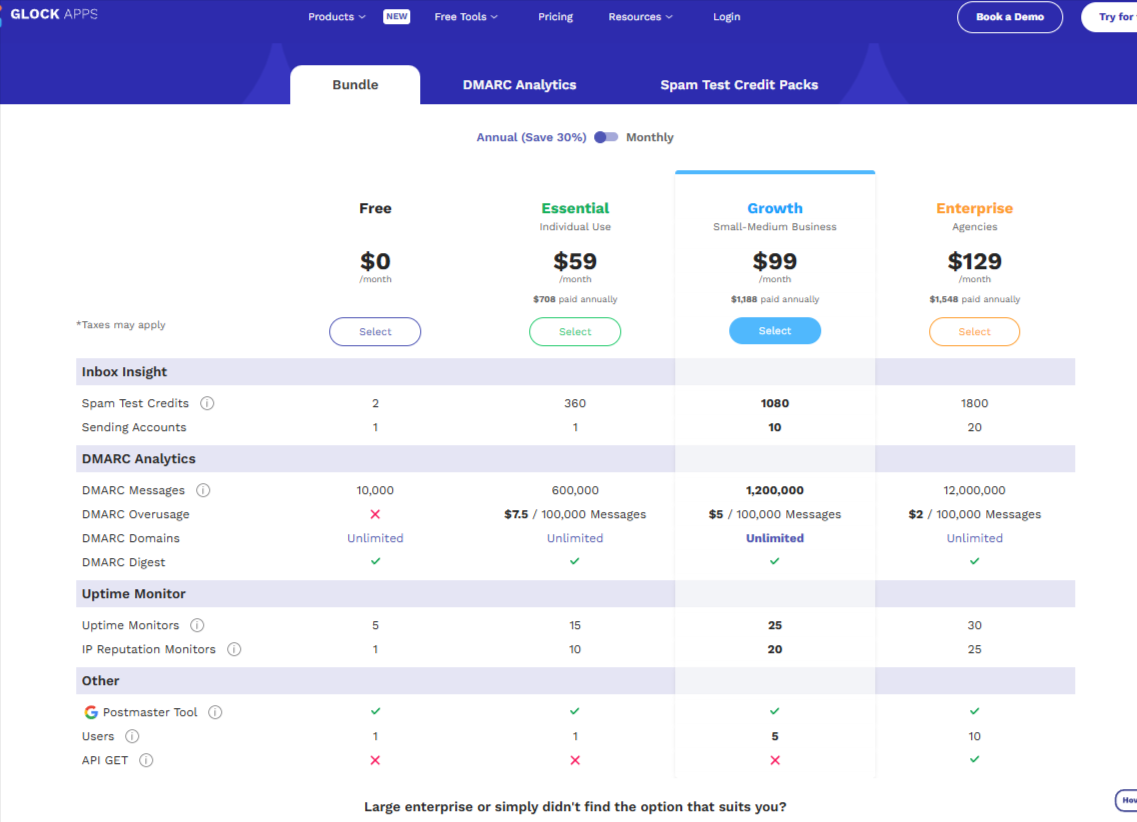
GlockApps bundled pricing: spam testing, DMARC analytics, and add-ons are priced separately by tier. Note the DMARC overage charges per 100K messages.
For Agencies
Managing Multiple Clients
If you manage deliverability for three clients today, you know what it costs to log in and out of separate accounts, stitch together placement data from different dashboards, and produce a client-ready report from scratch every month. GlockApps supports multiple sending accounts but each operates independently, with no shared view and no client reporting workflow. InboxEagle is built for the opposite of that: invite your team, scope each person to the brands they work on, and track placement automatically for every client brand from one workspace, each still billed at the same flat $20/month Email Deliverability rate.
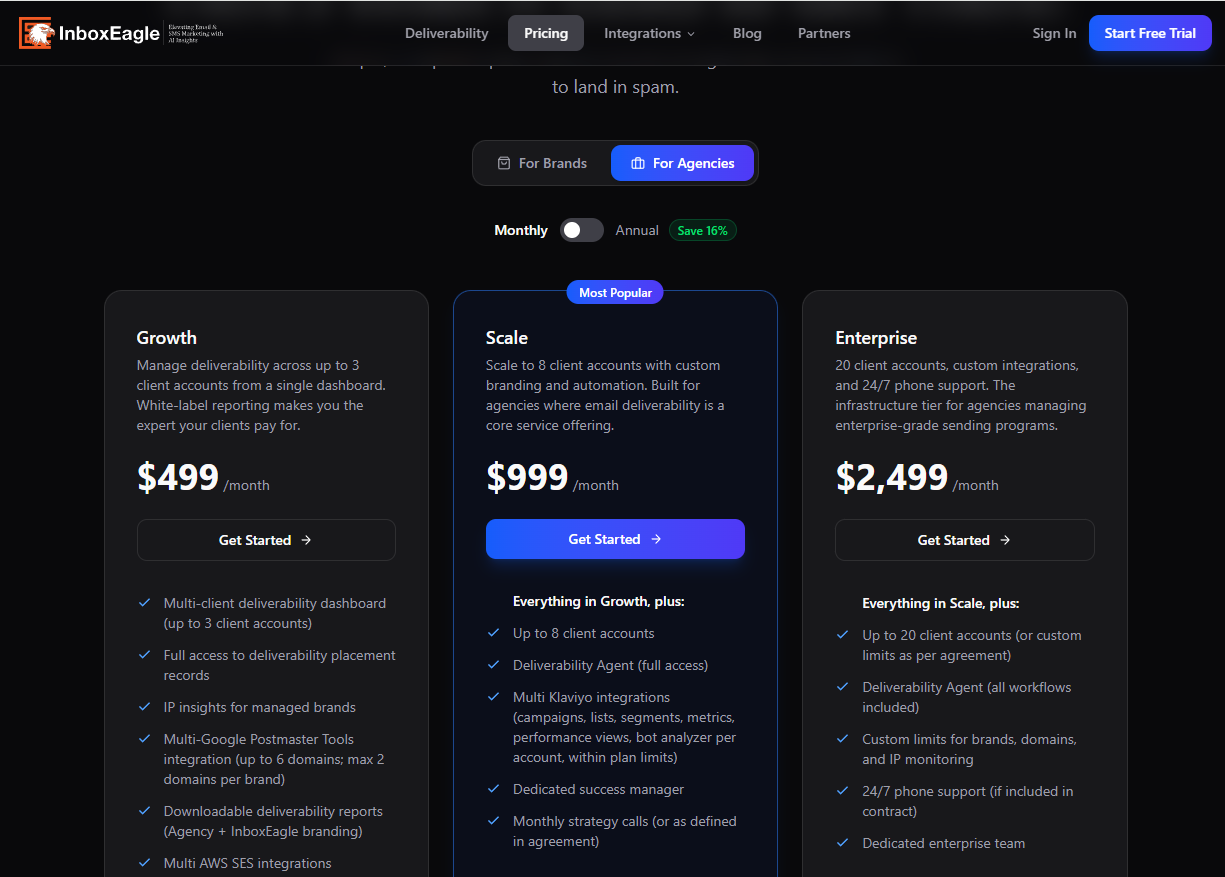
InboxEagle pricing: every client brand billed independently at the same flat $20/month Email Deliverability rate, with no agency-specific software tier. GlockApps has no multi-client workspace at all.
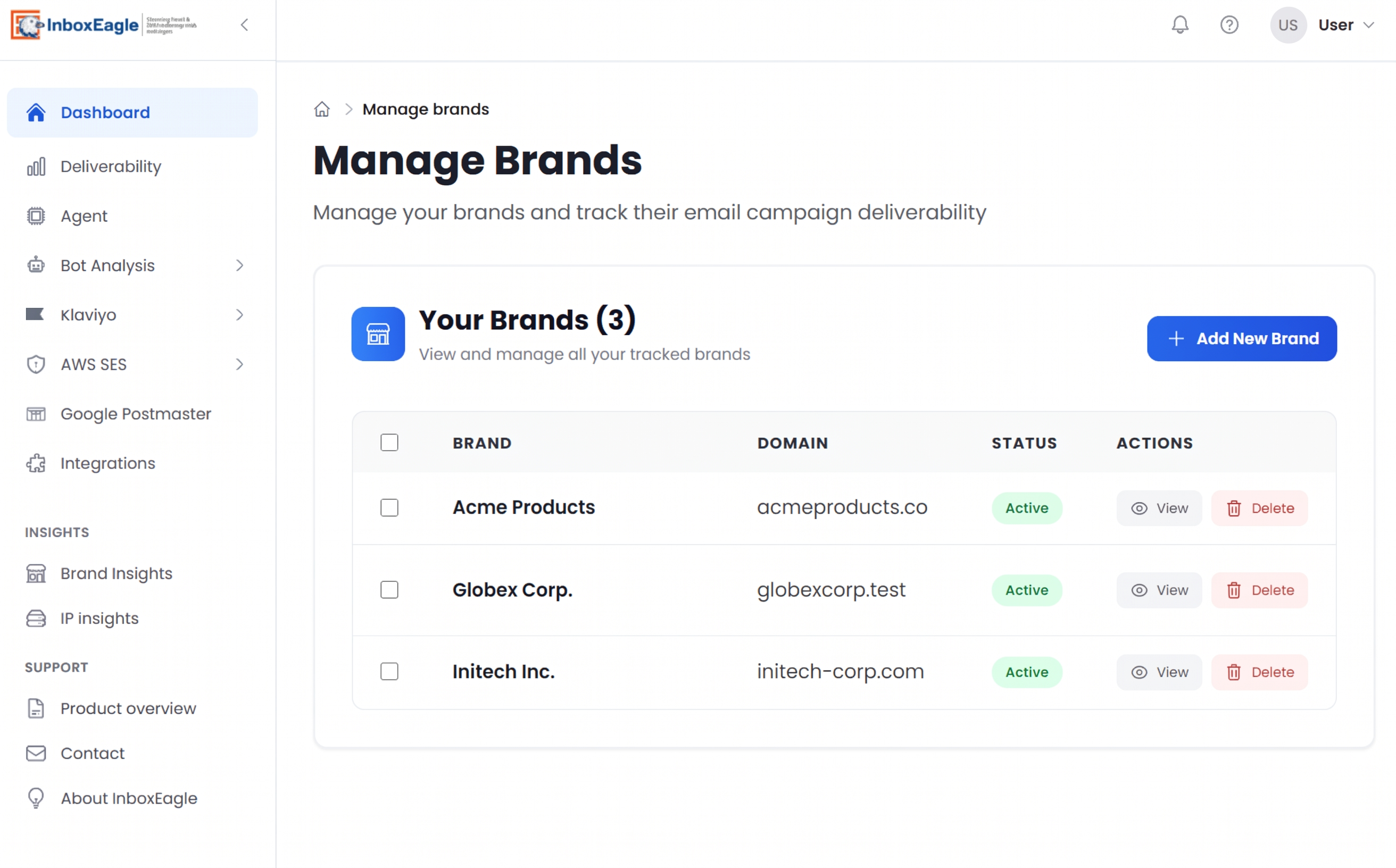
InboxEagle multi-brand dashboard: all clients in one workspace, each with their own placement data, deliverability health score, and Klaviyo integration. GlockApps has no equivalent view.
FAQ
Frequently Asked Questions
What is the difference between InboxEagle and GlockApps?
InboxEagle monitors placement continuously. It connects to your ESP and records where every real campaign lands, automatically. GlockApps requires you to manually submit a test email and spend a credit each time. GlockApps also has a full DMARC analytics suite; InboxEagle does not.
If you need ongoing visibility into live campaign placement on Klaviyo: InboxEagle. If you need DMARC analytics or occasional pre-send spot-checks: GlockApps.
Is InboxEagle more expensive than GlockApps?
No. InboxEagle's Email Deliverability subscription is $20/month flat, less than GlockApps Essential's $59/month, and it comes with no credit limit. GlockApps Essential gives you 360 credits per month, and each test consumes credits per seed address, so actual test volume depends on list size. InboxEagle monitors every send automatically, with no test limit to manage.
If you also want Klaviyo audience data (AI segments, suppressed-profile win-backs, competitor analysis), that's a separate Audience Selection subscription starting at $39/month, priced to your list size rather than bundled into a single higher-priced plan.
Does GlockApps integrate with Klaviyo?
GlockApps lets you route test emails through Klaviyo as the sending ESP. InboxEagle's Klaviyo integration connects directly to your Klaviyo account, pulling campaigns, lists, segments, metrics, performance views, and bot analysis, and monitors placement after each live send automatically.
Which is better for agencies managing multiple clients?
InboxEagle doesn't have agency-specific software tiers. Each client brand runs on the same flat $20/month Email Deliverability rate no matter how many clients you manage, and you can invite teammates and scope them to the brands they work on from a single workspace. Agencies who also want Klaviyo audience data per client can add Audience Selection for that brand, priced to its list size starting at $39/month.
GlockApps supports multiple sending accounts but has no unified client dashboard, no client-facing reports, and no agency workflow built in.
Your last campaign already sent. Do you know where it landed?
InboxEagle connects to Klaviyo and records placement across Gmail, Outlook, Yahoo, and Apple Mail after every send, automatically. No credits to manage, no manual submissions, no blind spots between tests. Start a 14-day free trial and see where your campaigns are actually landing.
Trusted by eCommerce brands and agencies on Klaviyo · Gmail, Outlook, Yahoo, Apple Mail coverage

Ajitha Victor is an email deliverability consultant with a background in product marketing. She writes about inbox placement, sender reputation, and getting the most out of Klaviyo without the jargon.
LinkedInScreenshot Notice
Product screenshots shown on this page are used for illustrative and comparison purposes only. Any brand names, company names, domain names, or identifying information visible in screenshots have been replaced with placeholders or anonymised to protect the privacy of the individuals and organisations involved. Screenshots do not represent any specific customer's account or data.
Accuracy Disclaimer
All pricing, feature descriptions, and product information relating to GlockApps on this page are based solely on publicly available information from GlockApps' official website and documentation, last verified May 2026. Software products are updated frequently. Pricing, plan structures, and features may have changed since this page was last reviewed. We make every reasonable effort to keep this information current, but we cannot guarantee its accuracy at any given time. Readers are strongly encouraged to verify all details directly with GlockApps at glockapps.com before making any purchasing decision. InboxEagle accepts no liability for decisions made based on information that has since changed.
No Affiliation
InboxEagle is not affiliated with, endorsed by, or in any way officially connected with GlockApps or its parent company. The name "GlockApps" and any associated trademarks are the property of their respective owners and are referenced here solely for the purpose of factual product comparison under nominative fair use. This comparison page is produced independently by InboxEagle.
Corrections Welcome
If you are a representative of GlockApps and believe any information on this page is inaccurate, outdated, or misrepresents your product, we welcome the opportunity to correct it promptly. Please contact us at inboxeagle.com/contact and we will review and update the page as quickly as possible. Accuracy matters to us, for our readers and for the products we compare.
This page represents the opinion and independent analysis of InboxEagle based on publicly available product information. All comparisons are made in good faith for informational purposes. Product features, pricing, and capabilities are subject to change by their respective vendors at any time without notice. InboxEagle updates this page periodically but cannot guarantee real-time accuracy. Last reviewed: May 2026.