


InboxEagle’s analysis of 721,351 eCommerce emails found that roughly 1 in 6 never reaches the primary inbox. For a brand sending 100,000 emails per campaign, that is 16,000 emails that never had a chance to generate a click, a visit, or a sale, regardless of the subject line, the offer, or the creative.
The frustrating part is that none of this shows up in your ESP dashboard. Your delivery rate says 99%. Your open rate looks reasonable. Everything appears healthy while a meaningful portion of your list is receiving your emails in spam or Promotions, where open and click rates are a fraction of what they would be in the primary inbox.
This guide is focused specifically on eCommerce senders and Klaviyo users. It covers the structural risks unique to eCommerce email programs, the Klaviyo-specific setup that matters, and how to manage deliverability through the seasonal volume spikes that define the eCommerce calendar. For a general overview of email deliverability fundamentals, the 2026 Email Deliverability Guide is the broader reference. If you are running an eCommerce program on Klaviyo, this is the one to read.
TL;DR
- Delivery rate and inbox placement rate are different metrics. Delivery rate tells you the server accepted the email. Inbox placement rate tells you which folder it landed in. Your ESP shows delivery; it does not show placement.
- Gmail and Yahoo domain reputation is built from aggregate engagement signals across every send. List quality is the single biggest driver of reputation over time.
- Authentication (SPF, DKIM, DMARC) is the non-negotiable foundation. DMARC at p=none is non-compliant with Gmail and Yahoo bulk sender requirements introduced in early 2024.
- Seasonal volume spikes (Prime Day, back-to-school, BFCM) are the highest-risk periods for eCommerce deliverability. Preparation starts 6 to 8 weeks before peak.
- Inbox placement monitoring, separate from your ESP, is the only way to see where your mail is actually landing at Gmail, Yahoo, and Outlook.
What Is eCommerce Email Deliverability?
eCommerce email deliverability is the ability of your marketing emails to reach your subscribers’ primary inboxes rather than the spam folder or Promotions tab. It is not the same as delivery rate. Delivery rate measures whether the receiving mail server accepted the email. Deliverability is about what happens next: which folder it lands in, how many subscribers actually see it, and how that affects your email revenue. For eCommerce brands, deliverability is one of the highest-leverage variables in the program because volume is high, list quality degrades faster, and the seasonal calendar creates structural risk that does not exist in B2B programs.
Delivery rate vs. inbox placement rate: the gap your ESP hides
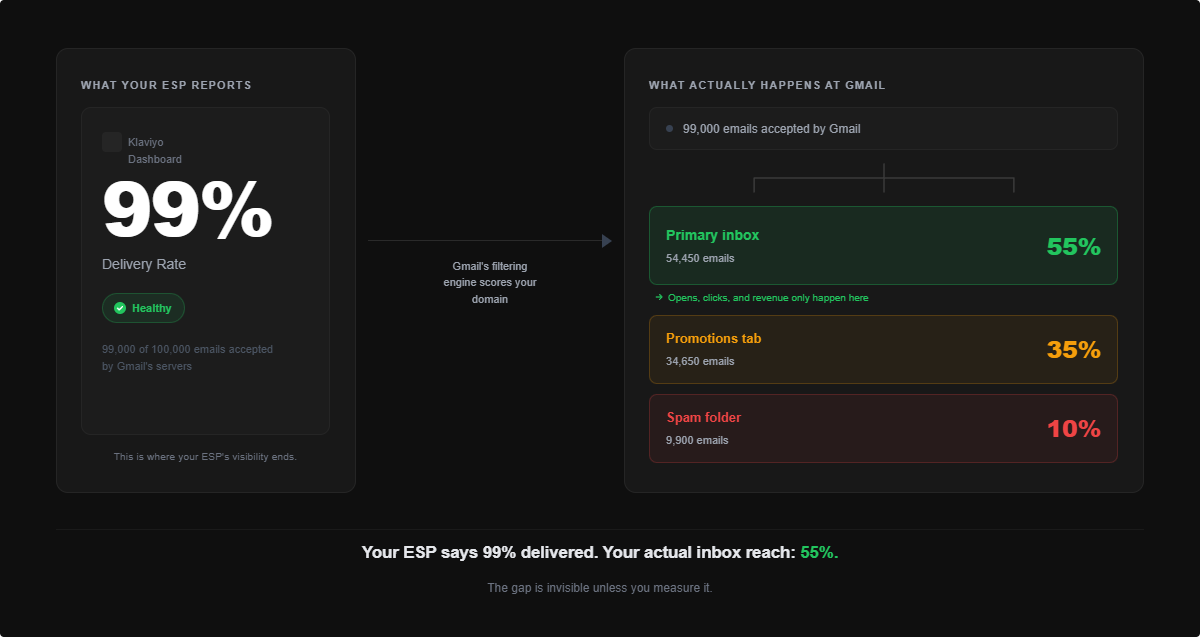
Delivery rate measures whether the receiving mail server accepted your email. A 99% delivery rate means 99% of your sends were accepted by the server. That is all it means.
Inbox placement rate measures what happened next: which folder the accepted email landed in. Inbox, Promotions, or spam. This is the number that determines whether your subscriber actually sees your campaign, and it is completely invisible in your ESP dashboard.
A brand can have 99% delivery rate and 55% inbox placement rate at the same time. The server accepted every email. Gmail then routed 45% of them away from the primary inbox based on the sending domain’s reputation signals. The brand’s Klaviyo dashboard shows a clean delivery metric and has no idea that nearly half its sends are generating near-zero engagement because they landed in folders nobody checks.
This gap between delivery rate and inbox placement rate is where most eCommerce email revenue is lost, and most teams are not measuring it.
Why eCommerce email programs face higher deliverability risk
eCommerce email programs have structural characteristics that create elevated deliverability risk compared to B2B senders.
Volume spikes are built into the calendar. Prime Day, back-to-school, BFCM, and holiday all require sharp increases in send frequency and volume. Mailbox providers respond to sudden volume increases from any domain with heightened scrutiny, even domains with historically strong reputations. InboxEagle’s Q1 2026 data shows inbox placement rates drop an average of 8 to 12 percentage points during peak sending weeks for brands that have not completed a pre-peak warm-up.
List composition ages faster. eCommerce subscribers often sign up for a discount at checkout and disengage within 60 to 90 days. A list that was 80% engaged at acquisition can be 40% engaged twelve months later if no suppression is in place. Sending to that full list year-round generates a slow, compounding reputation drain.
Send frequency is higher. A typical eCommerce brand sends 3 to 5 campaigns per week during peak periods, plus automated flows running continuously. More sends mean more engagement signals, positive and negative, accumulating against the sending domain faster than in a lower-frequency program.
The four signals mailbox providers use to score your domain
Gmail, Yahoo, and Outlook each run their own reputation scoring, but all use variations of the same four signal categories.
Engagement signals. Opens, clicks, moves to inbox, and spam reports are all logged against the sending domain. The ratio of positive to negative engagement across recent sends is the primary input into domain scoring. High complaint rates and low engagement rates are the fastest path to reputation degradation.
Authentication compliance. Whether your SPF, DKIM, and DMARC records are correctly configured and passing on every send. Failed authentication reduces the trust weight of positive engagement signals and, in some cases, causes outright filtering.
Sending behavior patterns. Sudden volume increases, new sending infrastructure, or unusual frequency patterns all trigger additional scrutiny. Mailbox providers distinguish between senders who have built reputation gradually and those who appear to be ramping aggressively. The latter receives less benefit of the doubt.
Infrastructure signals. Whether your sending IP is shared or dedicated, your reverse DNS configuration, and whether your sending subdomain is consistent across campaigns and flows. These signals carry less weight than engagement and authentication in 2026, but they matter for Outlook specifically, which tracks IP reputation via Microsoft SNDS.
Email Authentication for eCommerce: SPF, DKIM, DMARC, and BIMI
What SPF, DKIM, and DMARC do and why all three are required
Authentication is the technical foundation that tells mailbox providers your email is legitimately from you, not a spoofed or forged sender. All three records work together.
SPF (Sender Policy Framework) is a DNS record that lists which mail servers are authorized to send email on behalf of your domain. When a receiving server gets an email from your domain, it checks the SPF record to verify the sending server is on the approved list. If the server is not listed, the email fails SPF.
DKIM (DomainKeys Identified Mail) adds a cryptographic signature to your outgoing emails, signed with a private key that corresponds to a public key in your DNS. The receiving server verifies the signature to confirm the email content was not altered in transit and that it genuinely originated from an authorized sender. DKIM pass rate should be at 100%. Anything below that means at least one sending source is misconfigured.
DMARC (Domain-based Message Authentication, Reporting and Conformance) is the policy layer that sits on top of SPF and DKIM. It tells receiving servers what to do when an email fails authentication: nothing (p=none), quarantine it (p=quarantine), or reject it (p=reject). It also specifies where to send aggregate reports so you can monitor your authentication compliance.
The full setup and configuration walkthrough, including Klaviyo-specific alignment requirements, is in the SPF, DKIM, and DMARC guide.
Why DMARC p=none is not enough in 2026
Gmail and Yahoo introduced bulk sender requirements in early 2024 that include DMARC compliance as a condition of inbox placement. A DMARC policy of p=none means you have set up the record but are not enforcing it. You are telling receiving servers to do nothing when authentication fails, which provides zero protection against spoofing and does not meet the bulk sender requirements.
The correct progression is:
- Get SPF and DKIM passing at 100% for all legitimate sending sources
- Move to
p=quarantine: failed authentication sends go to spam rather than inbox - Move to
p=rejectonce you have confidence that all legitimate sending sources are passing: failed authentication sends are rejected outright
Staying on p=none is an increasingly risky position. Google has been progressively tightening enforcement, and brands that have not moved to at least p=quarantine are more exposed to filtering consequences as enforcement increases.
Setting up authentication in Klaviyo
Klaviyo requires a custom sending domain to build an independent domain reputation. Sending from Klaviyo’s default shared domain means your reputation is pooled with every other brand on that infrastructure. One bad actor on the shared pool can affect your inbox placement without any action on your part.
A custom sending domain isolates your reputation to your own domain. The configuration involves adding DKIM and SPF records to your DNS for the sending subdomain (typically email.yourbrand.com or mail.yourbrand.com), then verifying the setup in Klaviyo’s account settings. DMARC for your root domain (yourbrand.com) needs to align with the subdomain signing to pass DMARC correctly.
BIMI: brand logo in the inbox
BIMI (Brand Indicators for Message Identification) displays your brand logo in the Gmail and Apple Mail inbox next to your sender name. It requires a DMARC policy of p=quarantine or p=reject as a prerequisite, plus a Verified Mark Certificate (VMC) or Common Mark Certificate (CMC).
Google’s introduction of CMC support in 2025 made BIMI significantly more accessible. A CMC requires one year of consistent logo use and no trademark registration, which removes the main barrier that previously limited BIMI to large brands. A VMC still requires trademark registration and costs $1,000+ per year, but the CMC path is now viable for most eCommerce brands with an established logo. For eCommerce brands, the inbox logo visibility is a brand recognition signal that improves open rates and distinguishes your emails in a crowded inbox. The BIMI 2026 guide covers the current certificate landscape and setup process.
Authentication monitoring across all your domains
DKIM pass rate, DMARC status, and SPF issues in one view.
InboxEagle monitors your authentication compliance continuously and alerts you the moment a sending source starts failing, before it affects your sending reputation.
Sender Reputation: How Mailbox Providers Score Your Domain
Domain reputation vs. IP reputation
Domain reputation and IP reputation are both inputs into mailbox provider filtering decisions, but they carry different weights in 2026.
IP reputation was historically the primary signal. A clean dedicated IP was a strong deliverability advantage. As mailbox providers have shifted toward domain-based filtering, domain reputation has become the dominant factor for most senders. Your sending domain builds reputation based on the aggregate engagement signals it generates across every send, regardless of which IP it sends from.
The practical implication: shared IP deliverability problems used to be a significant concern for Klaviyo senders on default infrastructure. Today, a well-maintained sending domain on a shared IP typically outperforms a poorly maintained domain on a dedicated IP. That said, dedicated IPs are the right choice for very high-volume senders who want full control over their sending infrastructure. For Klaviyo specifically, dedicated IPs are available on higher-tier plans and recommended for senders at 1,000,000+ emails per month. Below that volume, a well-configured custom sending domain on Klaviyo’s shared infrastructure is sufficient.
How to check your sending health in Google Postmaster Tools
Google Postmaster Tools is the authoritative source for your sending performance signals at Gmail. You access it at postmaster.google.com after verifying ownership of your sending domain via a DNS TXT record.
Google Postmaster Tools v2 (updated in September 2025) shows a Compliance Dashboard with pass/fail signals across three areas:
- Authentication — whether SPF, DKIM, and DMARC are passing on your sends
- Spam rate — whether your reported complaint rate is within Gmail’s acceptable threshold
- Bulk sending practices — whether your sending behavior aligns with Gmail’s guidelines for bulk senders
In addition to the compliance signals, Postmaster Tools displays a spam rate chart showing your reported complaint rate trend over time. This is the most actionable data point for identifying campaigns or flow triggers that are generating complaint spikes.
Klaviyo’s Deliverability Hub connects to Postmaster Tools and surfaces these signals inside Klaviyo. For the full setup walkthrough and what each signal means, the Google Postmaster Tools guide covers the current v2 interface in detail.
Gmail spam rate thresholds: what the numbers mean
Gmail’s published thresholds for spam rate (visible in Postmaster Tools) are:
- Below 0.10% — acceptable range
- 0.10% to 0.30% — filtering consequences begin, inbox placement affected
- Above 0.30% — severe filtering, potential sending restrictions
The practical threshold to act on is 0.08%, not the published 0.10%. Postmaster Tools shows a sample of complaint data, not the complete picture. A reported rate of 0.08% almost certainly represents an actual rate that is at or approaching 0.10%. Treating 0.08% as the action threshold gives you a margin to correct before consequences begin. The Gmail spam rate guide covers exactly what each threshold means and how to bring a rising rate down.
Yahoo’s complaint rate thresholds are similar to Gmail’s. Yahoo tends to respond faster to engagement signals. A Yahoo inbox rate declining while Gmail holds steady is often the first visible sign of a list quality problem building. Monitor both.
Email List Hygiene for eCommerce: Suppression, Validation, and Sunset Policies
Why list size is the wrong metric
The size of your email list is one of the least useful metrics in email marketing from a deliverability standpoint. A list of 200,000 subscribers where 60,000 are actively engaged will consistently outperform a list of 500,000 where only 80,000 are engaged, across inbox placement, sending health, and revenue per send.
The reason is engagement math. Mailbox providers score your domain based on the engagement rate of your sends, not the raw volume. Sending to 500,000 subscribers where 84% never open contributes a continuous stream of low-engagement signals to your domain reputation. Sending to 200,000 subscribers where 60% regularly engage builds positive reputation with every campaign.
The hardest mindset shift for eCommerce teams is that suppressing unengaged subscribers and reducing the sendable list is a revenue-positive action, not a revenue-negative one. Inbox placement on the engaged segment improves, which improves open rates, which improves revenue per send. The math almost always works out in favor of the smaller, cleaner list.
Engagement-based suppression: the 90-day rule
The standard suppression threshold for high-frequency eCommerce senders (more than four campaigns per month) is 90 days. Subscribers who have not opened or clicked in 90 days should be excluded from campaigns.
For lower-frequency programs (one to two campaigns per week), extend the threshold to 180 days. The engagement window for less-frequent sending naturally stretches longer.
This does not mean deleting those subscribers permanently. Build a suppressed segment, and revisit them with a structured re-engagement campaign after a 30-day break from sending. Run email verification on the segment before attempting re-engagement to remove addresses that have gone invalid. The email list hygiene guide covers the Klaviyo segment builds for this approach.
Spam traps: what they are and how they get on your list
Spam traps are email addresses that exist specifically to identify senders with poor list hygiene. There are two types:
Pristine spam traps have never belonged to a real person. They are seeded into the internet in various ways: form directories, scraping targets, bought lists. If one ends up on your list, it means you acquired it through a method other than genuine opt-in.
Recycled spam traps are former real addresses that were abandoned, hard-bounced for a period, and then repurposed by ISPs or blocklist operators. They accumulate in lists that are never cleaned: addresses that were valid subscribers two or three years ago but have since become traps.
The most effective defenses against spam trap hits are: never purchasing or renting lists, validating email addresses at the point of collection, and running verification passes on segments that have not been mailed in 90 days or more.
Email validation vs. verification: when to use each
These two terms describe different processes at different stages of the email lifecycle. Using the wrong one at the wrong stage leaves gaps.
Email validation runs at the point of collection. It checks whether an address is correctly formatted, the domain exists and has mail exchange records, and whether the domain is associated with a disposable email service. Validation is a real-time gate at signup. It prevents garbage from entering the list in the first place.
Email verification runs on your existing list. It connects to the recipient mail server and checks whether the specific mailbox is still active and able to receive mail, without sending an actual email. Verification is how you find addresses that were valid at signup but have since been abandoned or become invalid.
Run validation at every collection point. Run verification before any segment that has not been mailed in 90+ days, before seasonal peaks, and after any CRM import.
Sunset policies: knowing when to let subscribers go
A sunset policy is a defined rule for when to permanently suppress subscribers who have not re-engaged despite multiple attempts. The typical structure for eCommerce: suppress at 90 days of non-engagement, attempt re-engagement at 120 days, permanently sunset at 180 days if no response.
Brands without a sunset policy accumulate years of unengaged profiles that slowly degrade domain reputation with every campaign they receive.
Inbox Placement Monitoring: Seeing What Your ESP Does Not Show You
What seed list testing is and how it works
Seed list testing is the mechanism that lets you see your actual inbox, Promotions, and spam split per campaign per mailbox provider.
A seed list is a set of real email addresses at Gmail, Yahoo, Outlook, and other providers. When you send a campaign, a copy goes to the seed list simultaneously. An inbox placement monitoring tool reads the seed inboxes and reports back exactly where the email landed: primary inbox, Promotions, or spam, at each provider.
This is fundamentally different from relying on open rate as a proxy for inbox placement. Open rate is influenced by Apple Mail Privacy Protection pre-fetching, bot opens, and engagement variation across your list. Seed list data shows you the actual folder destination for a controlled send to known inboxes. The seed list testing vs. inbox monitoring guide covers the methodology in detail.
What good inbox placement looks like for eCommerce (2026 benchmarks)
| Provider | Strong | Average | Needs Attention |
|---|---|---|---|
| Gmail | 90%+ inbox | 83–89% | Below 80% |
| Yahoo | 88%+ inbox | 80–87% | Below 75% |
| Outlook | 85%+ inbox | 78–84% | Below 72% |
Yahoo is typically the leading indicator. It responds to engagement signals faster than Gmail. A Yahoo inbox rate declining while Gmail holds is usually the first sign of a list quality problem. If it goes unaddressed for 4 to 8 weeks, Gmail sending health typically follows.
Provider-level gaps: why Yahoo often breaks before Gmail
Different mailbox providers apply different filtering logic and respond to engagement signals at different speeds. The general pattern for eCommerce senders:
Yahoo moves fastest: engagement signal changes show up in Yahoo inbox rates within days or a few weeks. Gmail is slower to respond but more consequential when it does. Outlook tracks Microsoft SNDS IP reputation data in ways that can diverge from Gmail and Yahoo patterns.
Monitoring inbox placement separately by provider rather than as a blended average is what allows you to catch a Yahoo problem before it becomes a Gmail problem. A blended 87% average can hide a 74% Yahoo rate masked by a 95% Gmail rate.
Setting up real-time placement monitoring
InboxEagle’s seed list monitoring sends your campaigns to a distributed seed list across Gmail, Yahoo, and Outlook and returns inbox placement results within minutes of each send. Campaign-level placement data means you can see exactly which sends are degrading, not just whether there is a problem in aggregate. The screenshot below shows what a campaign-level placement report looks like: inbox, Promotions, and spam split broken out per provider for a single send.
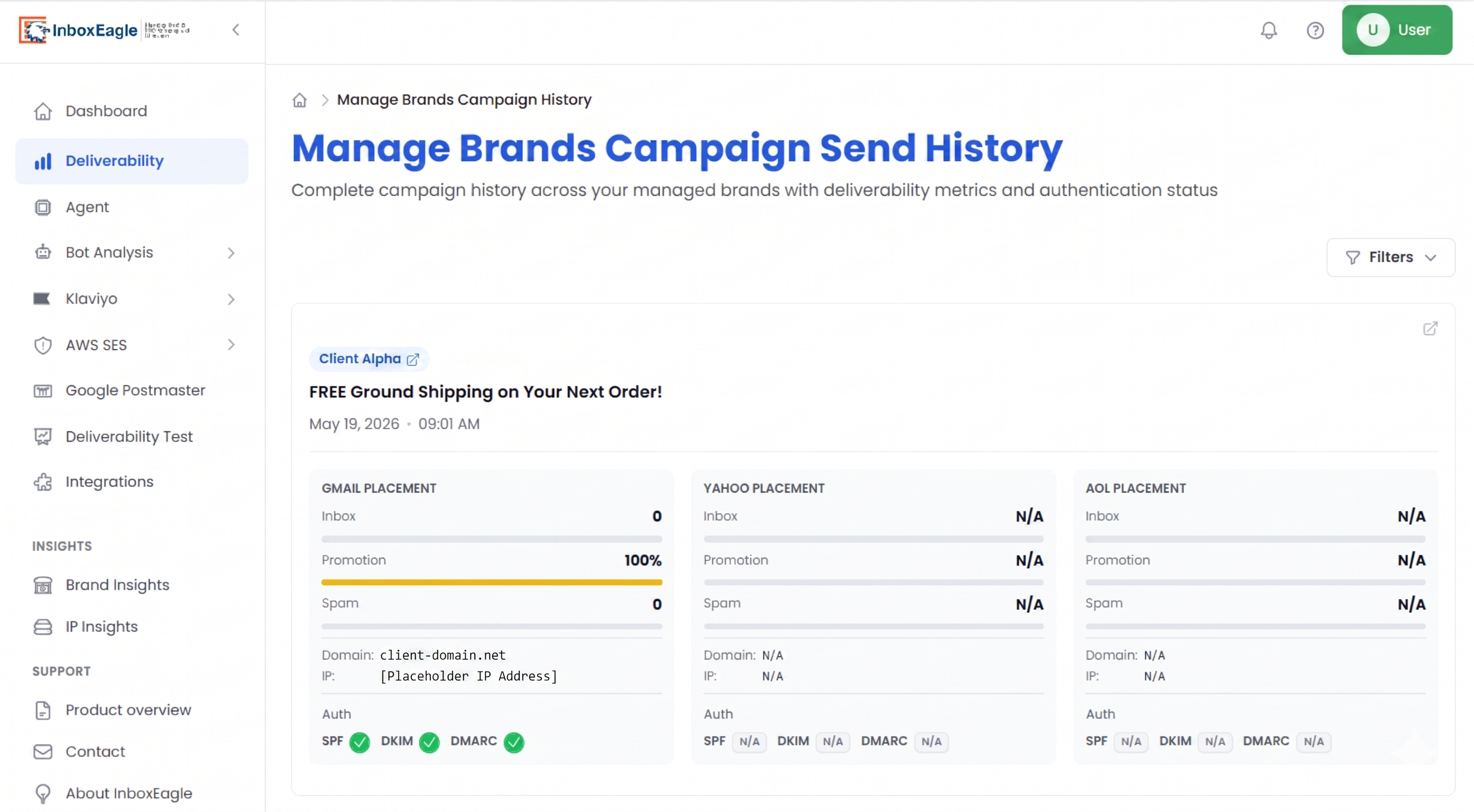
For the reputation signal layer, InboxEagle’s Google Postmaster Tools integration pulls compliance signals into the same dashboard as your inbox placement data. Having both in one view is what makes it possible to correlate a campaign-level complaint spike with a placement change before the damage compounds.
Seasonal Deliverability: How to Protect Your Reputation Through Peak Periods
Why volume spikes damage email deliverability
The deliverability risk of seasonal campaigns is not the content or the offer. It is the behavior change. A brand that normally sends three campaigns per week suddenly sending daily or twice-daily is a domain that looks different to mailbox providers than it did last month. That pattern of sudden volume increase is one of the conditions that triggers elevated filtering scrutiny.
The compounding factor specific to eCommerce is list expansion. When peak season arrives, the temptation is to send to the full list to maximize reach. For a brand where 40% of the list has not opened in 90 days, that full-list send generates a concentration of low-engagement signals at the moment when mailbox providers are already watching your domain more closely. The two factors together, volume spike plus list expansion, produce the reputation damage that shows up three to four weeks later, often just as the next seasonal event is ramping up.
The compounding seasonal risk: Prime Day to back-to-school to BFCM
The three major eCommerce email events in the second half of the year are causally linked for deliverability purposes.
Amazon Prime Day (mid-July) triggers an industry-wide send volume increase of roughly 35% compared to surrounding weeks. Brands that run competing sales and expand to their full list during Prime Day week generate sending compliance damage that takes 3 to 6 weeks to recover from, putting recovery squarely in the middle of back-to-school season.
Back-to-school (late July through August) is the third-largest US eCommerce sending period. A brand still recovering from Prime Day enters back-to-school with weakened sending signals. If the back-to-school campaigns also expand to the full list, the damage compounds rather than recovers.
BFCM (November) is where compounded damage from July and August becomes catastrophic. A brand that enters October with sending compliance issues still unresolved from back-to-school has very little margin for the volume increase and full-list sends that BFCM demands.
The BFCM email deliverability guide covers the 8-week preparation timeline and the full playbook for the highest-risk period on the eCommerce calendar.
How to warm up send volume before a seasonal peak
Volume warm-up means gradually increasing your send frequency and audience size in the 3 to 4 weeks before a peak sending period, rather than jumping directly from normal cadence to full campaign intensity.
A typical warm-up sequence for an August peak:
- Weeks 6 to 4 before peak (late June to early July): Resume normal send cadence if you reduced over summer. Send to 30-day engaged segment only. Monitor Postmaster Tools compliance signals daily.
- Weeks 3 to 2 before peak (mid to late July): Expand audience to 60-day engaged segment. Increase frequency by one campaign per week maximum.
- Week 1 before peak: Confirm your Postmaster Tools compliance signals are all passing and spam rate is below 0.08% before expanding further. If either is off, hold the audience size for one more send cycle.
The principle is the same regardless of the seasonal event: gradual ramp, engaged-only audience expansion, daily Postmaster Tools monitoring during the ramp window.
Klaviyo Deliverability Setup: The Complete Configuration Guide
Shared IP vs. dedicated IP in Klaviyo
Klaviyo’s default sending infrastructure uses shared IPs across its sender pool. For most eCommerce brands, a well-configured custom sending domain on Klaviyo’s shared IPs provides adequate deliverability. The domain reputation layer matters more than the IP for the vast majority of senders.
Klaviyo recommends dedicated IPs for senders at 1,000,000+ emails per month. Below that volume, the engagement signals your domain builds through consistent, clean sending are more important than which infrastructure you are sending from. Requesting a dedicated IP before you have the volume to maintain it actually creates a warm-up risk with no corresponding benefit.
Smart sending and frequency caps
Klaviyo’s smart sending feature limits how frequently a profile receives emails within a configurable window. The default smart sending window is 16 hours. For flows, this prevents a subscriber from receiving multiple automated emails in a short period: a welcome series, an abandoned cart trigger, and a browse abandonment flow all firing within the same day, for example.
For deliverability purposes, frequency stacking is one of the most common sources of elevated complaint rates in otherwise well-managed Klaviyo accounts. A subscriber who receives five emails in three days during a sale period is significantly more likely to mark one as spam than a subscriber receiving two. Smart sending at the flow level, combined with global frequency caps at the account level, prevents the stacking problem.
Flows vs. campaigns: different inbox placement risks
Flows and campaigns behave differently from a deliverability standpoint because they send to different audience compositions at different times.
Campaigns send to a defined segment at a specific moment. The audience is chosen deliberately, and the send is a discrete event you can monitor.
Flows send continuously to whoever triggers the entry condition, which means their audience composition and engagement rate changes over time without deliberate intervention. A welcome series that was well-configured 18 months ago may now be sending to a different profile of subscriber, one that converts differently and generates different engagement signals, because your acquisition mix has changed.
Auditing your flows for deliverability risk on a quarterly cadence is one of the most commonly skipped maintenance tasks in Klaviyo accounts.
Klaviyo Deliverability Hub: what it shows and what it misses
Klaviyo’s built-in Deliverability Hub connects to Google Postmaster Tools and surfaces compliance signals and spam rate data within the Klaviyo interface. For brands that were not previously monitoring Postmaster Tools separately, this is a meaningful improvement.
What the Deliverability Hub does not show: inbox placement rate per campaign at Gmail, Promotions tab placement, Yahoo inbox rate, Outlook inbox rate, or per-campaign placement variation. The Hub shows you compliance signals from Gmail’s side. It does not show you what actually happened to each campaign after it was delivered. That gap is where most eCommerce deliverability problems hide. A brand can have clean Postmaster Tools compliance signals while 30% of sends are routing to Promotions. You need seed list monitoring to see that.
The Klaviyo Deliverability Hub guide covers what each section of the Hub shows, how to interpret it, and what to monitor outside the Hub for a complete picture.
Diagnosing and Fixing eCommerce Email Deliverability Problems
How to tell if the problem is deliverability, not creative
When email performance is declining, the first instinct is to test new subject lines or refresh the creative. If the underlying problem is deliverability, creative changes will not move the needle. You are optimizing a message that a significant portion of your audience is never seeing. The common pattern: open rates falling across the board, A/B test results inconsistent with no clear winner, and Yahoo subscribers underperforming Gmail subscribers significantly. That last signal, provider-level divergence, almost always points to placement rather than creative. The 5 signs your email program has a deliverability problem covers the full diagnostic path and how to confirm a placement issue vs. a creative issue vs. a list quality issue.
How to recover from an email deliverability crisis
If Google Postmaster Tools shows failing compliance signals, your spam rate is above 0.10%, or an active blacklist listing has been confirmed, the recovery sequence is:
- Stop sending to unengaged segments immediately. Pull back to opens or clicks in the last 30 days. Do not send another campaign to your full list until Postmaster Tools compliance signals are passing and spam rate is back below 0.08%.
- Fix the root cause. Authentication misconfiguration, a spam trap hit, or a specific campaign that generated complaint spikes: identify and address before resuming sends.
- Send 3 to 5 campaigns to your most engaged audience only. This rebuilds positive engagement signals without adding additional negative ones.
- Monitor Postmaster Tools daily. Spam rate recovery at Gmail typically takes 3 to 6 weeks from when clean sending begins. Yahoo moves faster.
- Do not run a re-engagement campaign during recovery. The instinct to recover the suppressed revenue is understandable, but sending to dormant subscribers while signals are recovering extends the timeline. Re-engagement comes after compliance is restored.
The email deliverability crisis recovery guide covers the full repair sequence including blacklist removal timelines.
Blacklists: how to get listed and how to get removed
A blacklist listing does not automatically mean your emails are going to spam at Gmail or Yahoo. The major consumer mailbox providers run their own reputation scoring rather than relying directly on third-party blacklists. However, a listing is a signal that something went wrong and is worth investigating regardless of whether it is currently affecting inbox placement.
The blacklists most relevant for eCommerce senders: Spamhaus DBL (domain-based), Spamhaus SBL (IP-based), Barracuda, and Microsoft SNDS for Outlook-specific placement. Each has a different removal process. Most allow a self-service removal request once the underlying cause, a complaint spike, a spam trap hit, or a compromised sending source, has been addressed.
Run your sending subdomain and sending IP through a blacklist checker before any seasonal peak. A listing you are not aware of will suppress placement at providers that do use blocklist data (many corporate email filters, for example) and signals a list quality problem that needs addressing. The email blacklist removal guide covers the process for each major operator.
Catch deliverability problems before they become a crisis
Spam rate alerts, compliance monitoring, and inbox placement in one dashboard.
InboxEagle monitors your sending health continuously and alerts you when a metric crosses a threshold, so you are not discovering a problem during your BFCM sends.
eCommerce Email Deliverability Benchmarks (2026)
The ranges below are drawn from InboxEagle’s Q1 2026 analysis of 721,351 emails across 3,474 eCommerce sender domains. Placement figures reflect seed list testing results, not self-reported ESP delivery metrics.
| Metric | Top Performers | Industry Average | Needs Attention |
|---|---|---|---|
| Gmail inbox placement | 93–97% | 83–89% | Below 80% |
| Yahoo inbox placement | 90–95% | 80–87% | Below 75% |
| Outlook inbox placement | 88–93% | 78–84% | Below 72% |
| Spam complaint rate (Gmail) | Below 0.03% | 0.04–0.08% | Above 0.10% |
| DKIM pass rate | 100% | 96–99% | Below 95% |
| Hard bounce rate per campaign | Below 0.3% | 0.3–0.8% | Above 1% |
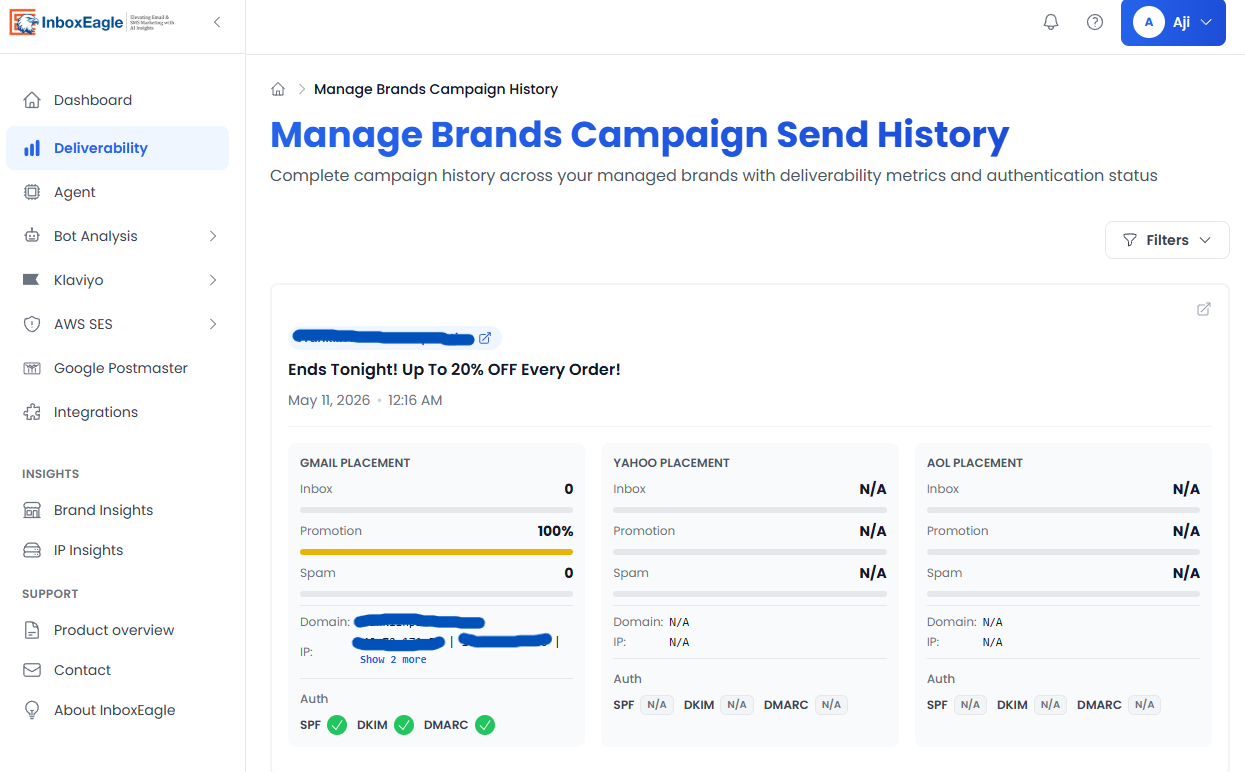
The median sender domain in InboxEagle’s Q1 2026 dataset achieved a 96.1% combined inbox placement rate. The bottom decile sat at or below 24%. The top-quartile brands shared three consistent behaviors: dedicated sending subdomains, engagement-based suppression, and campaign-level inbox monitoring rather than relying on ESP delivery rate. The screenshot below shows InboxEagle’s per-campaign placement breakdown — the view that reveals the inbox vs. Promotions vs. spam split that your ESP delivery rate does not show.
Seasonal context: inbox placement rates in August typically run 8 to 12 points lower than May and June across eCommerce senders, driven by the summer volume dip followed by a back-to-school spike. BFCM week shows similar degradation for brands that have not completed a pre-BFCM preparation window.
Quick-Reference Deliverability Checklist
Save this before your next campaign or seasonal prep window.
Authentication
- DKIM pass rate at 100% in Google Postmaster Tools
- DMARC policy at
p=quarantineorp=reject(notp=none) - SPF record includes all current sending sources and is below 10 DNS lookups
- Sending from a branded subdomain, not your root domain
- BIMI record configured (if DMARC is at enforcement)
Sender Reputation
- Google Postmaster Tools compliance signals all passing (authentication, spam rate, bulk sending practices)
- Spam rate consistently below 0.08% over the past 30 days
- No complaint rate spikes tied to a specific campaign or flow
- Sending subdomain and IP clean on Spamhaus, Barracuda, and Microsoft SNDS
List Hygiene
- Non-engagers beyond 90 days (or 180 days for low-frequency senders) excluded from campaigns
- Hard bounce suppression list current and not overwritten by external imports
- Email validation running at every collection point (checkout, popup, landing page)
- Verification pass run on any dormant segment before re-engagement attempt
Inbox Placement Monitoring
- Campaign-level inbox placement data at Gmail, Yahoo, and Outlook, not just delivery rate
- Yahoo inbox rate monitored separately (leading indicator)
- Placement monitoring in place for high-volume flows (welcome series, abandoned cart)
Seasonal Preparation
- Volume warm-up started 3 to 4 weeks before peak
- Audience for peak campaigns limited to 60-day engaged segment
- Postmaster Tools checked daily during ramp-up window
- Complaint rate threshold set (0.08%) with a pause protocol if hit
The email deliverability checklist for 2026 has the full version with explanations for each item and additional checks for Klaviyo-specific configuration.
How InboxEagle Monitors Your eCommerce Deliverability
The five areas this guide covers — authentication, sender reputation, list hygiene, inbox placement, and seasonal preparation — each require a different monitoring layer. Most eCommerce teams are checking some of these manually and missing others entirely. InboxEagle brings them into a single dashboard so you can see your program’s health in one place and act on problems before they compound.
Campaign-level inbox placement
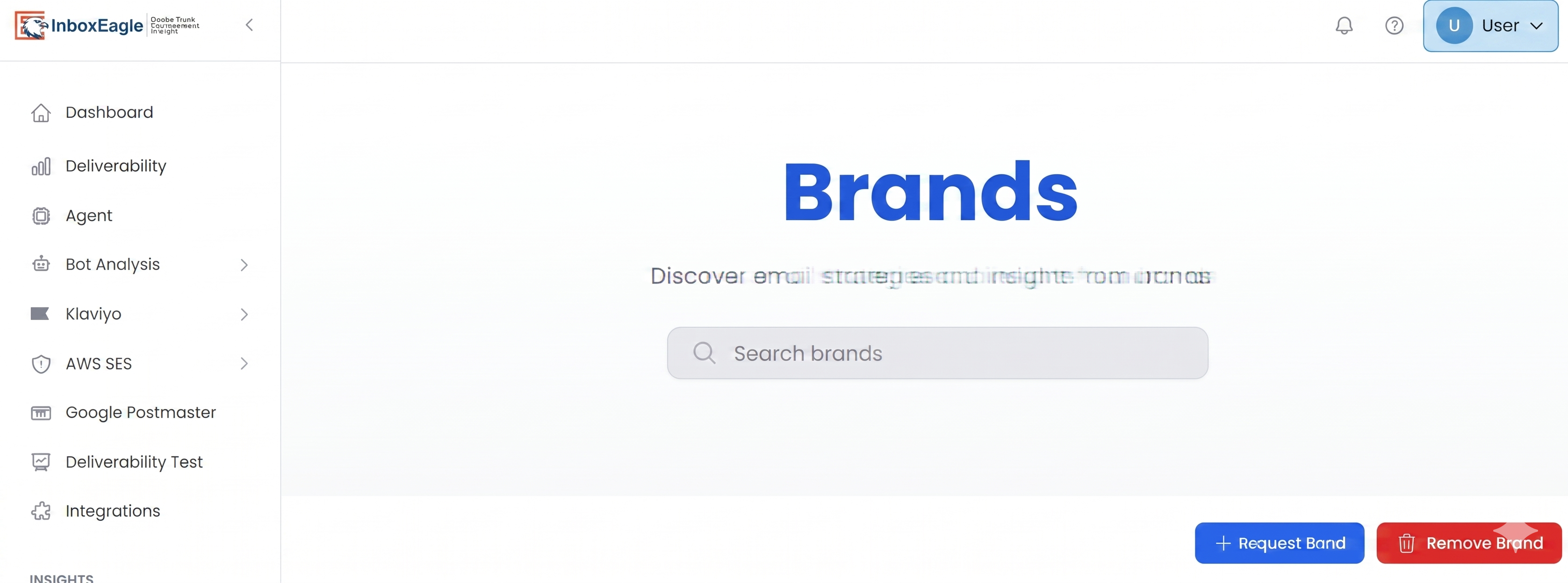
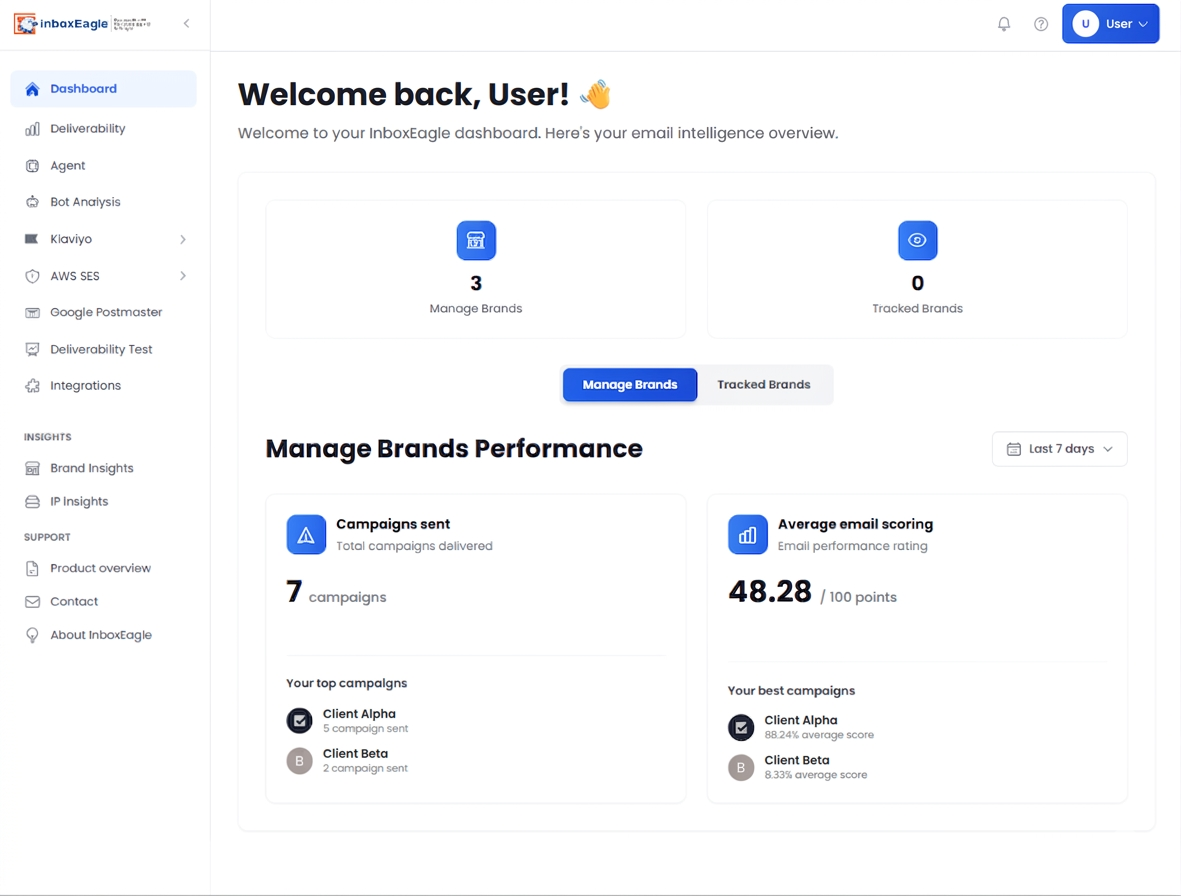
After every send, InboxEagle runs your campaign through a distributed seed list and returns the inbox, Promotions, and spam split per provider (Gmail, Yahoo, and Outlook) within minutes. This is the metric your Klaviyo dashboard cannot show you. A campaign with 99% delivery rate and 62% inbox placement looks fine in Klaviyo and is silently bleeding revenue. The tracked brands view below shows how placement health is monitored continuously across sending domains.
Multi-brand and multi-client monitoring
For agencies and email teams managing more than one sending domain, InboxEagle tracks deliverability health across all your brands in a single view. Authentication status, inbox placement trend, and compliance signals are visible per domain without switching accounts. The brands dashboard below shows an overview of each sending domain’s health in one place.
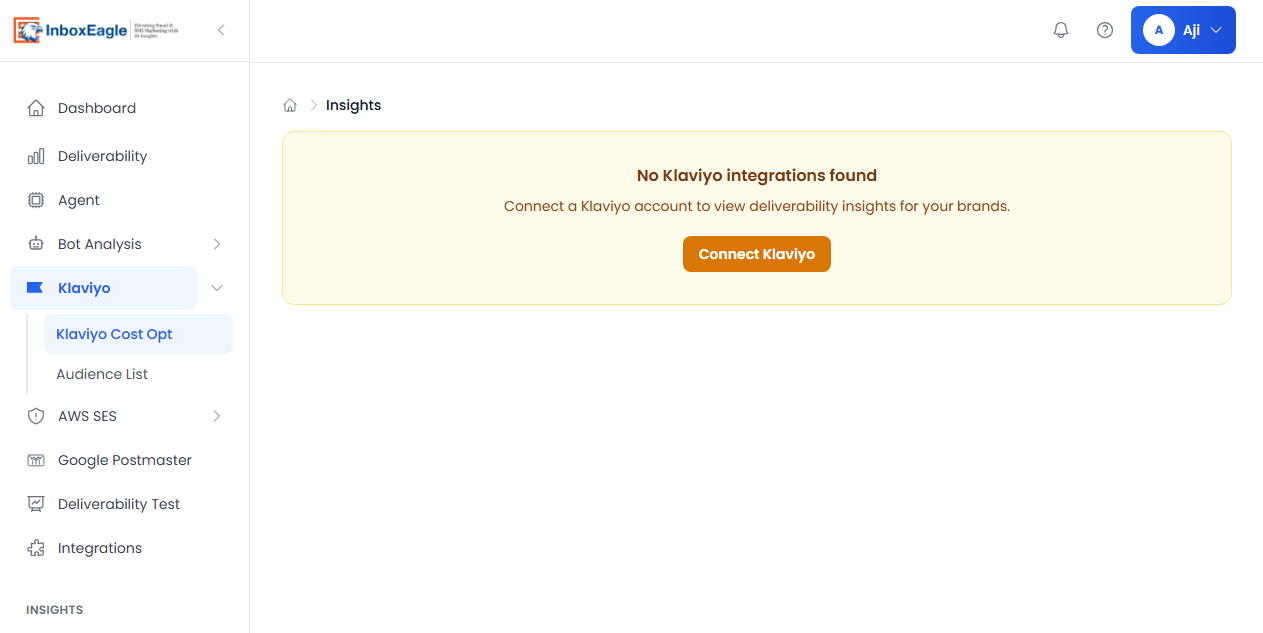
Klaviyo connection
InboxEagle connects directly to Klaviyo via API. Once connected, campaign-level placement data flows automatically after every send without requiring a manual seed list submission for each campaign.
Authentication compliance, placement data, and Postmaster signals are in one place. When a campaign shows a placement drop, you can identify whether it is a list quality issue, an authentication failure, or a volume behavior pattern, and correlate it against the correct fix from this guide, without toggling between five different tools.
Full-stack eCommerce deliverability monitoring
Inbox placement, authentication, and Postmaster signals in one dashboard.
Connect your Klaviyo account and get campaign-level placement data for Gmail, Yahoo, and Outlook after every send. 14-day free trial, no credit card required.
Where to Start: A Decision Tree for eCommerce Senders
If you have never run inbox placement monitoring: Start here. Your ESP’s delivery rate is not telling you what you need to know. Run the InboxEagle domain scanner for a free 30-second check on authentication, blacklist status, and sending signals, then set up campaign-level placement monitoring before your next send. You need to see the actual Gmail, Yahoo, and Outlook split before you can prioritize anything else.
If placement monitoring shows a problem: Work in this order. Authentication first: fix anything below 100% DKIM pass rate, move DMARC to p=quarantine or p=reject. List hygiene second: suppress non-engagers beyond your threshold, run verification on dormant segments. Monitoring third: track compliance signals in Postmaster Tools daily during recovery, with clean sends to your engaged segment only.
If you are approaching a seasonal peak: Start the warm-up process 3 to 4 weeks before the first peak campaign goes out. The time to discover a deliverability problem is not during your BFCM sends. It is in September, when there is enough runway to fix it. The BFCM email deliverability guide has the 8-week preparation timeline.
If your Klaviyo metrics look fine but revenue is declining: Run seed list monitoring on your next three campaigns. Stable delivery rate plus falling revenue is the classic signature of inbox placement leakage. You will see the Gmail Promotions or spam routing that your Klaviyo dashboard cannot show you.
Note: Content created with the help of AI and human-edited and fact-checked to avoid AI hallucinations.
