
The scenario plays out the same way across eCommerce email programs at every sending volume: open rates drop, revenue from email slips, and the first instinct is to open Klaviyo’s Deliverability Hub. Everything looks fine. Spam rate is clean. Domain reputation shows High. Authentication is passing. And yet performance keeps declining.
The Hub is not wrong. It is showing you exactly what it is designed to show. The problem is that most Klaviyo users treat it as a complete deliverability picture when it is actually a narrow slice of one. Knowing what the Hub measures, and more importantly what it does not measure, is what separates a team that diagnoses placement problems in hours from one that spends weeks adjusting the wrong variables.
This post covers every panel in the Klaviyo Deliverability Hub, what each one actually reflects, how to read it correctly, and the specific gaps that require monitoring outside of Klaviyo.
Klaviyo Deliverability Hub: What the Numbers Represent
What the Klaviyo Deliverability Hub Actually Is
The Deliverability Hub sits inside Klaviyo under Analytics. It pulls from three data sources: Google Postmaster Tools (for spam rate and domain reputation), Klaviyo’s own authentication records (for SPF, DKIM, and DMARC pass rates), and account-level sending history (for volume and bounce trends).
That is a genuinely useful combination. Before the Hub existed, getting a health picture meant cross-referencing Postmaster Tools separately, digging through campaign metrics manually, and piecing together signals from three different tabs. The Hub compresses that into one screen.
What it is not is a placement monitoring tool. It tells you about signals, not outcomes. There is a meaningful difference between knowing your spam complaint rate is 0.08% and knowing that 23% of your last campaign went to Gmail’s spam folder. The Hub gives you the first number. It does not give you the second.
You do not have to take that from us. Klaviyo’s own documentation states that it “can confirm whether an email was delivered to the recipient’s inbox, but not where in the inbox it landed” — that is the boundary of the product, stated by the people who built it. Everything in this post follows from that one sentence.
A note on navigation, because Klaviyo has reorganised this area more than once: depending on your account you may see the Hub presented as Score, Reports and Bounce Details tabs rather than the panel names used below. The underlying data is the same — an account-level health score built from open, click, bounce, unsubscribe and spam complaint rate over a rolling 30 days, per-provider breakdowns, and bounce categorisation. Read the sections below by what the panel measures rather than by its label. For the ESP-level view of how Klaviyo compares on deliverability tooling generally, see Klaviyo deliverability.
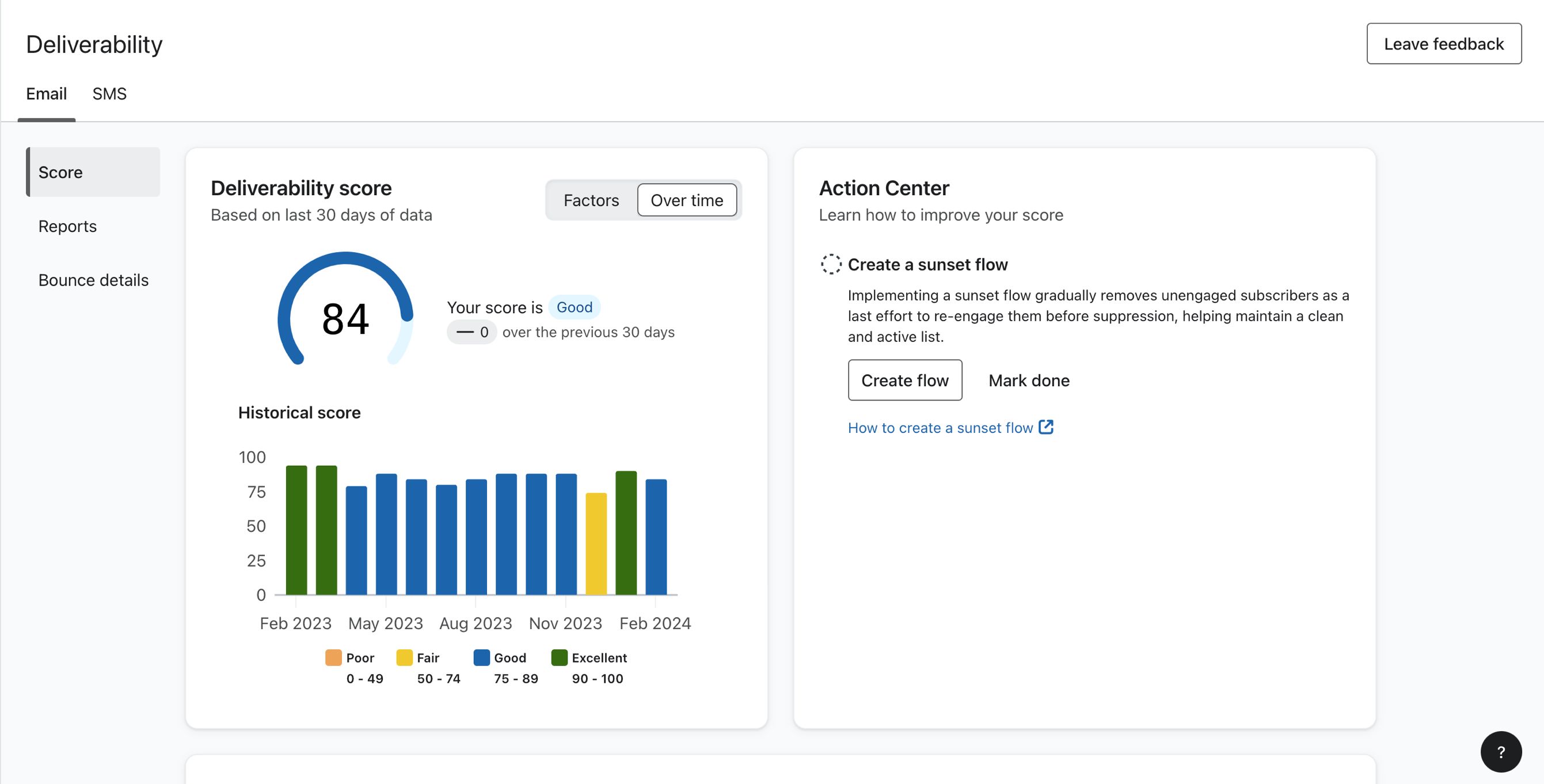
The Klaviyo Deliverability Hub landing view. All panels shown are account-level aggregates. No campaign-specific placement data is available from this screen.
Source: klaviyo.com
The Spam Rate Panel
The spam rate panel is the most-watched metric in the Hub, and the most frequently misread.
The number shown is your Gmail spam complaint rate, pulled directly from Google Postmaster Tools. It reflects the percentage of authenticated emails sent to Gmail recipients that were marked as spam, either via the Gmail spam button or through Gmail’s own filtering signals. Klaviyo surfaces this in the Hub to save you the step of opening Postmaster Tools separately.
Two things about this number are not obvious from the UI.
First, it is Gmail-only. Spam complaints from Outlook users (reported through Microsoft SNDS), Yahoo users (reported through the Yahoo Sender Hub Complaint Feedback Loop), or any other provider do not appear here. If your Outlook complaint rate is elevated while your Gmail rate looks clean, the Hub shows you a healthy number with no indication that a problem exists elsewhere.
This matters more than it used to. Microsoft now refuses bulk mail failing SPF, DKIM or aligned DMARC with a 550 5.7.515 error rather than filtering it — a rejection that appears in your bounce log and nowhere in this panel. A Klaviyo account can show a clean Gmail spam rate while a meaningful share of its Outlook volume is being refused at the door. Outlook bulk sender requirements covers what passing takes.
The thresholds this number is measured against are Gmail’s alone: below 0.10%, never reaching 0.30%. What each threshold actually triggers covers the difference, and the spam complaint rate calculator converts a percentage into complaints-per-send at your volume.
Second, it is a lagging indicator. By the time the spam rate graph shows a meaningful spike, you have already been sending at a damaging complaint rate for several days. The data updates on a delay pulled from Postmaster Tools, not in real time. A campaign that generated a complaint spike on Tuesday may not be fully visible in the Hub until Thursday.
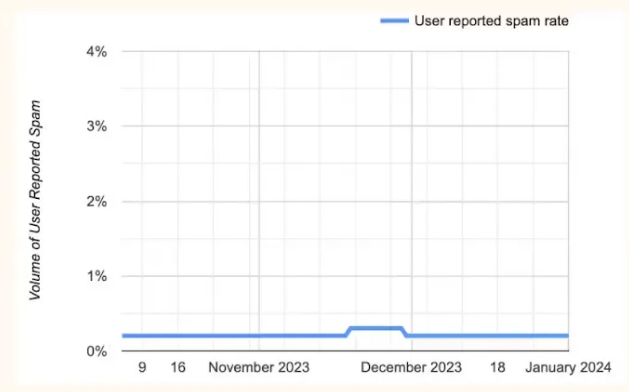
The spam rate graph reflects Gmail complaint rates only. A flat, clean line here does not confirm Outlook or Yahoo complaint rates are equally healthy.
Source: klaviyo.com
How to read it correctly: Treat this panel as your Gmail complaint rate monitor, not your total complaint rate. Below 0.08% is healthy. Between 0.08% and 0.10%, audit your most recent sends for the segment driving the uptick. Above 0.10%, Gmail is actively filtering and reducing complaint rate takes priority over any large campaign sends. For cross-provider complaint monitoring, Yahoo’s Complaint Feedback Loop and Microsoft SNDS need to be checked separately — neither feeds into this panel.
The Domain Reputation Panel
The domain reputation panel shows a reputation classification for your sending domain — High, Medium, Low or Bad — sourced from Google Postmaster Tools and surfaced by Klaviyo.
Read this panel knowing it sits on a foundation Google has said it will remove. Google’s deprecation notice states that every old Postmaster Tools dashboard carries into v2 except Domain and IP Reputation, “which will be retired.” No date has been published, and as of August 2026 both are still live — so the number in your Hub is real and still updating. But it is a rendering of an upstream signal with a stated end, and there are no reputation endpoints in the Postmaster v2 API at all. What replaces it is Compliance status, with a Deliverability analysis section that returns a plain-language verdict and a recommended action rather than a grade. Our Postmaster Tools guide covers how to read it, and InboxEagle’s Postmaster integration pulls it alongside placement data.
The practical consequence: do not build a monthly reporting ritual around screenshotting this panel. Build it around the signals that will still exist.
While the panel is here, it remains the most actionable number in the Hub for Gmail. High means Gmail is routing your mail with trust. Medium means you are in a caution zone where engagement quality decides between inbox and promotions. Low and Bad mean active filtering regardless of content quality. Note this is a Gmail assessment only — Microsoft weighs IP reputation far more heavily through SmartScreen, and IP reputation vs. domain reputation covers which provider leans which way.
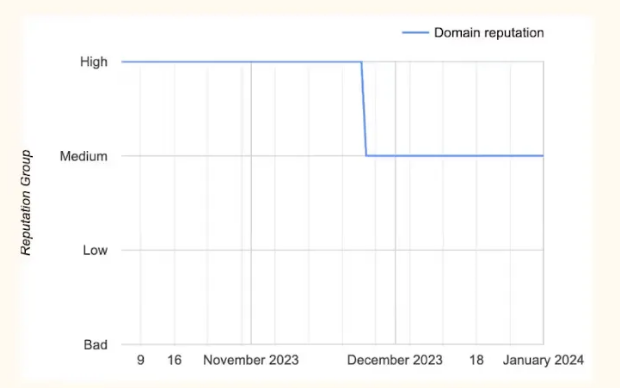
Domain reputation is Gmail’s trust classification for your sending domain. It changes slowly in both directions.
Source: klaviyo.com
The most important thing to understand about this signal is how slowly it moves. It does not respond to a single clean campaign or a single bad one. It is the accumulated weight of your sending history over weeks and months.
The Medium classification is where most teams miss the early warning. A brand sitting at Medium for 60 days while gradually accumulating borderline complaint rates will find that Medium starts suppressing Gmail placement before the classification drops to Low. The filter is already tightening; the label just hasn’t changed yet.
This is why catching a trend at Medium is far more valuable than catching it at Low. At Low, you are doing reputation recovery, which takes 4 to 8 weeks of clean sending. At Medium trending downward, tightening engagement segmentation on your next two or three campaigns can often reverse the signal before any placement damage compounds. The same data exists in Postmaster Tools directly, but having it in the Hub means there is no excuse for missing it.
The Authentication Panel
The authentication panel shows SPF, DKIM, and DMARC pass rates across your sends, calculated from Klaviyo’s own sending records.
For most Klaviyo accounts, DKIM is the one that matters most, and the one most commonly misunderstood. Klaviyo signs all outbound mail with DKIM, but the domain in that signature is what Gmail assigns reputation to. If you have not configured a custom sending domain in Klaviyo, your DKIM signature uses Klaviyo’s shared domain, not your brand’s domain. Every send is accruing reputation to Klaviyo’s infrastructure, not to your own brand’s domain history.
The fix is straightforward: go to Klaviyo under Settings → Sending Domains, add your own domain, and complete the DNS verification. Until that is done, your brand domain is not building Gmail reputation regardless of how cleanly you send.
This creates a specific contradiction that confuses a lot of teams: DKIM pass rates show 100% in the authentication panel while domain reputation in the panel above shows Low or Bad. That is not a bug. Mail can be perfectly DKIM-signed under Klaviyo’s shared domain while your own brand domain accrues no positive reputation at all, because Gmail evaluates the signing domain, not just the From address.
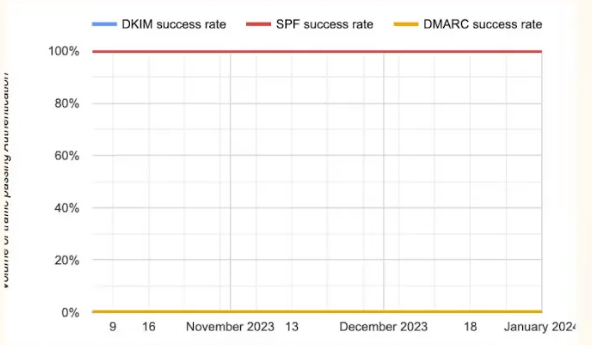
Authentication pass rates confirm your records are configured and signing. A 100% DKIM pass rate on Klaviyo’s shared domain does not mean your brand domain is building Gmail reputation.
Source: klaviyo.com
Healthy benchmarks: SPF passing at 98%+, DKIM passing at 99%+, DMARC passing at 95%+. Any DMARC failure rate above 5% warrants an alignment investigation. See SPF, DKIM, and DMARC Explained for the full breakdown of what each failure mode means and how to resolve it, and the Klaviyo authentication setup guide for the configuration steps inside Klaviyo specifically.
The Four Blind Spots
This is the section that matters most for teams whose Hub looks healthy but whose performance is declining.
The Deliverability Hub shows account-level health signals. It does not show where any specific campaign actually landed. There is no view inside the Hub that answers: “Did my last campaign go to Gmail’s inbox or promotions tab? How did it land at Outlook? Was Yahoo filtering it?”
Those answers do not exist in the Hub because the Hub is not a placement monitoring tool — it is a sending health dashboard. A sending program can show a clean spam rate, High domain reputation, and 100% authentication pass rates while a meaningful percentage of campaigns are landing in the promotions tab or being filtered at Outlook.
The specific gaps:
No per-campaign placement data. Aggregate spam rate trends are visible, but you cannot attribute a spike to a specific campaign, flow, or segment. If your welcome series is generating placement problems while your cart abandonment emails are hitting the inbox cleanly, that distinction is invisible in the Hub.
No Outlook placement visibility. Microsoft does not share placement data with Klaviyo. Outlook filtering problems are completely invisible in the Deliverability Hub. Outlook typically represents 20 to 30% of a consumer email list. If it is filtering your campaigns, a third of your list is not seeing your sends and nothing in the Hub surfaces that.
No promotions tab detection. Gmail routes mail to inbox, spam, or promotions. The Hub’s spam rate captures spam placements via complaint signals. It does not detect promotions tab routing, which suppresses open rates and revenue without triggering any complaint-based signal at all.
No Apple Mail visibility. Apple Mail placement does not appear in the Hub at any level.
The visual below shows exactly where this gap becomes a problem. Klaviyo’s campaign analytics view gives you open rate, click rate, bounces, and revenue — but no inbox placement column, because Klaviyo does not have that data.
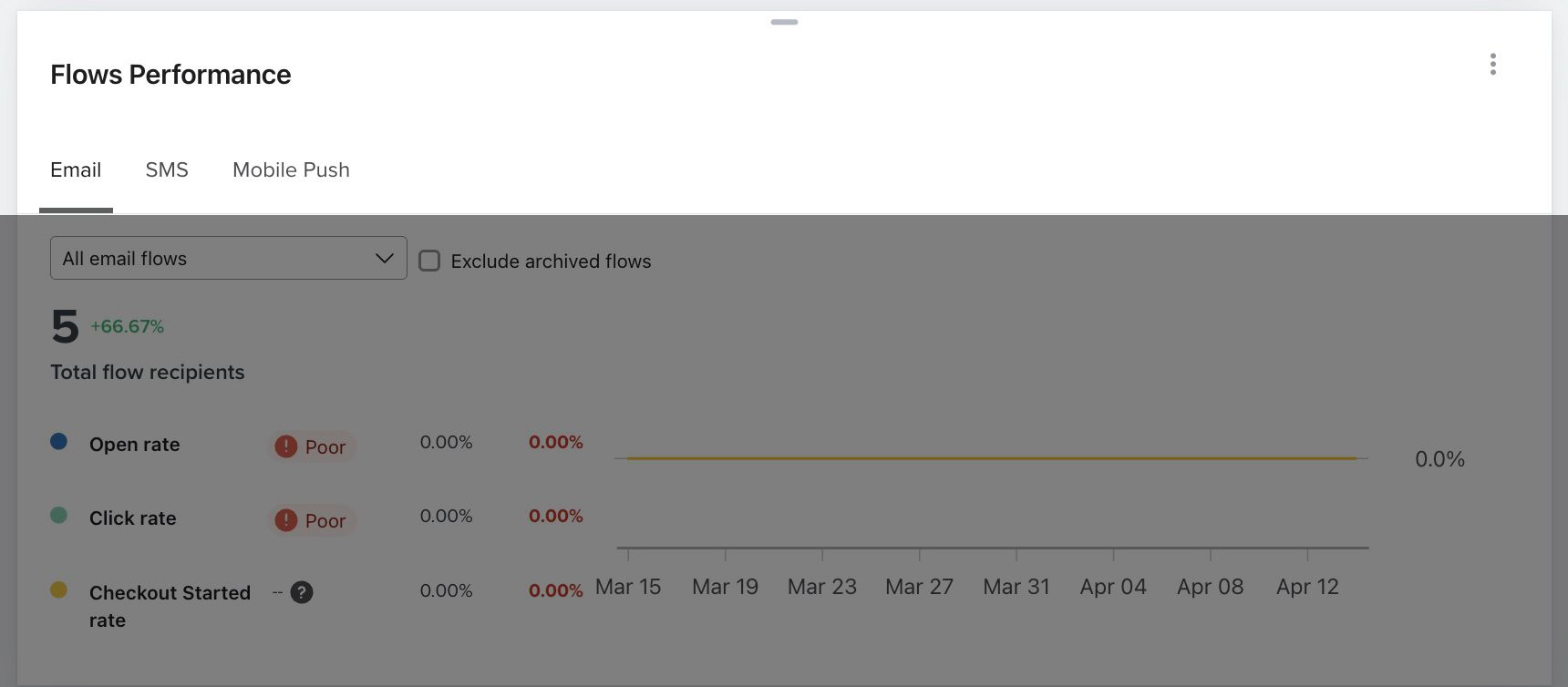
Klaviyo’s campaign analytics view. Open rate, clicks, bounces, revenue — but no inbox placement. A 34% open rate looks healthy. It does not tell you whether the other 66% never opened because the email went to spam or promotions at Gmail, or because Outlook filtered it entirely.
Source: klaviyo.com
This is what per-campaign placement data actually looks like when you have it:
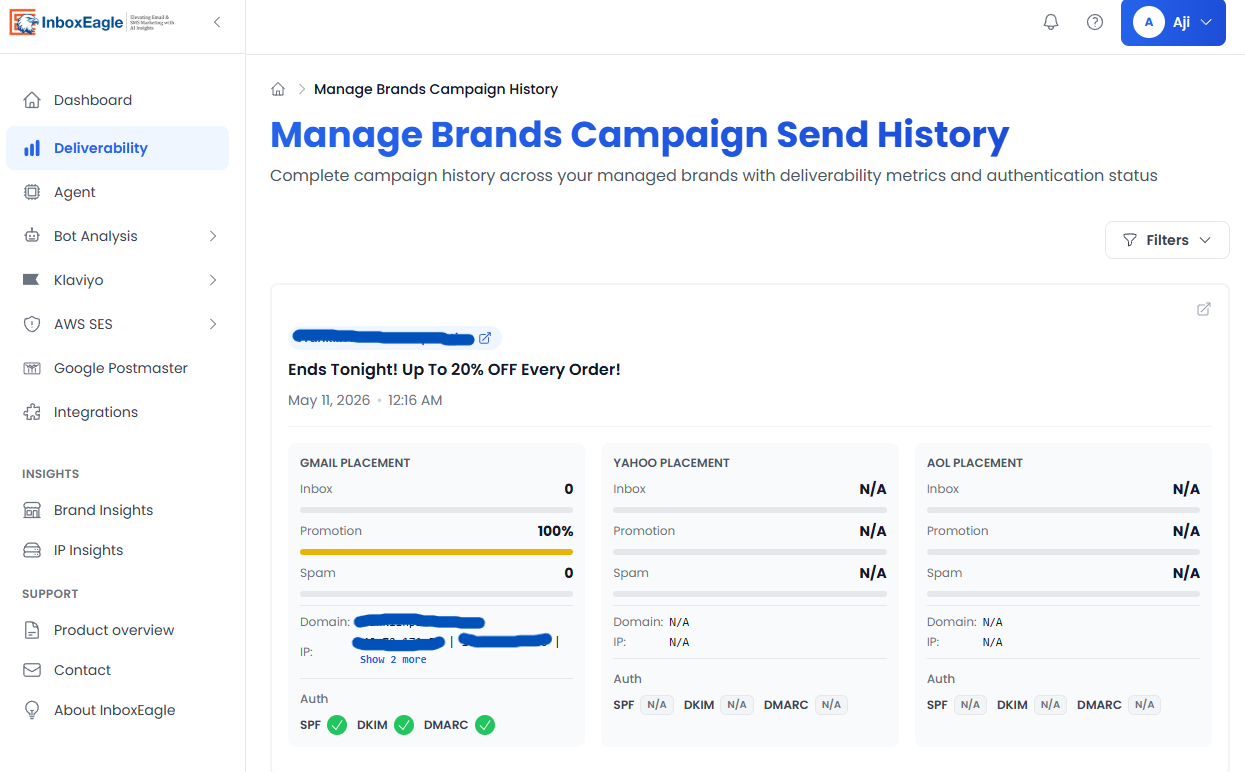
InboxEagle campaign-level placement breakdown: inbox, spam, and promotions tab percentages for each provider, recorded after the live send. The same campaign that shows a healthy open rate in Klaviyo may show 22% spam placement at Outlook — visible here, invisible in the Hub.
How to Use the Hub Effectively Within Its Limits
The Deliverability Hub is most useful as a structured weekly health check, not a campaign-by-campaign diagnostic. Here is the exact workflow:
Weekly: Spam Rate Review
Open the spam rate panel and look at the 30-day trend, not just the current number. A rate that is slowly climbing from 0.04% to 0.07% over four weeks is more concerning than a one-day spike that returns to baseline. If you see a sustained upward trend, pull the sends from the past two weeks and audit which segments received them. The culprit is almost always a campaign sent to a broader engagement window than usual.
Weekly: Domain Reputation Check
Note the current classification and whether it has changed since last week. High is stable. If you are at Medium, treat it as a yellow light and tighten engagement segmentation on your next campaign. High trending toward Medium is your most actionable early warning — something in your recent sending has started accumulating negative signals before placement is visibly affected. Given that Google has said this signal is going away, pair it with Compliance status in Postmaster Tools directly, so the habit survives the retirement.
On Infrastructure Changes Only: Authentication Review
Authentication pass rates are stable once correctly configured. Check this panel when you make any DNS change, add a new sending domain, migrate to a new ESP, or onboard a new subdomain. Confirm all three records return to baseline pass rates within 48 hours of any change. Outside of those events, this panel does not need weekly attention.
Klaviyo now emails you — not just an in-app notification — when it detects a sending domain misconfiguration, which closes some of the gap for teams that do not log in weekly. Treat it as a backstop rather than a monitor: it fires on configuration problems, not on placement decline.
What to Do When the Hub Looks Fine but Performance Is Down
If spam rate is clean, domain reputation is High, authentication is passing, and open rates are still declining: the problem is almost certainly outside what the Hub can see. Check Outlook via SNDS and your bounce log for 550 5.7.515 rejections, check whether you have a promotions tab routing issue at Gmail, and check Apple Mail — where MPP has made open rate unusable and iOS 26 grouping may be suppressing visibility on top of that. None of those answers are in the Hub, and none can be found inside Klaviyo at all.
What the Hub Still Cannot Close
Klaviyo has been actively improving this area. In May 2026 it shipped separate branded sending domains for marketing, transactional and service email, each building its own sender reputation — so a bruising promotional calendar no longer drags order confirmations and password resets down with it, and Helpdesk service mail can carry a branded domain for the first time. Dedicated click-tracking domains became self-serve rather than a support ticket. These are real improvements to sending infrastructure, and subdomain strategy covers how to structure them.
None of it changes what the Hub can see.
You still cannot tell whether any specific campaign landed in the inbox or spam. You cannot see Outlook, which is 20–30% of most consumer lists. You cannot see promotions tab routing at Gmail, which suppresses revenue without triggering a single complaint. You cannot see Apple Mail. And because everything is account-level aggregate, you cannot distinguish a welcome series quietly generating spam placement from a cart abandonment flow landing cleanly — a distinction flows vs. campaigns placement data shows is often large.
In practice: a Klaviyo account with a perfectly healthy Hub view can be losing a significant share of every campaign to spam or promotions at providers Klaviyo has no visibility into. The only symptom is a gradual, unexplained decline in open rates and email-attributed revenue — and by the time that is obvious enough to act on, it has typically been compounding for four to eight weeks.
The gap is structural rather than a limitation Klaviyo could easily close. Klaviyo’s job is to send email and report what happens inside your account. Inbox placement happens after the email leaves Klaviyo’s servers, and observing it requires real addresses inside Gmail, Outlook, Yahoo and Apple Mail reading the outcome of every send as it arrives. If your placement is already declining, Klaviyo inbox placement covers the fixes; this post is about what you can and cannot see.
That is exactly what the InboxEagle Klaviyo integration provides. Once connected via a Klaviyo Private API Key, InboxEagle monitors every campaign and flow send automatically, no manual test submissions, no credits, no gaps between sends. After each live send, you see:
- Inbox, spam, and promotions tab placement broken down by provider: Gmail, Outlook, Yahoo, and Apple Mail
- Campaign-level and flow-level placement separately, so a welcome series generating spam placement is visible as distinct from a cart abandonment sequence landing cleanly
- Bot event filtering so that automated opens from Apple MPP and security scanners are separated from genuine subscriber engagement, keeping your engagement signals accurate
- Deliverability Agent analysis surfaced automatically after every send, flagging what changed and what to investigate
Connecting takes under ten minutes. Go to Integrations inside your InboxEagle account, select Klaviyo, and enter your Klaviyo Private API Key.
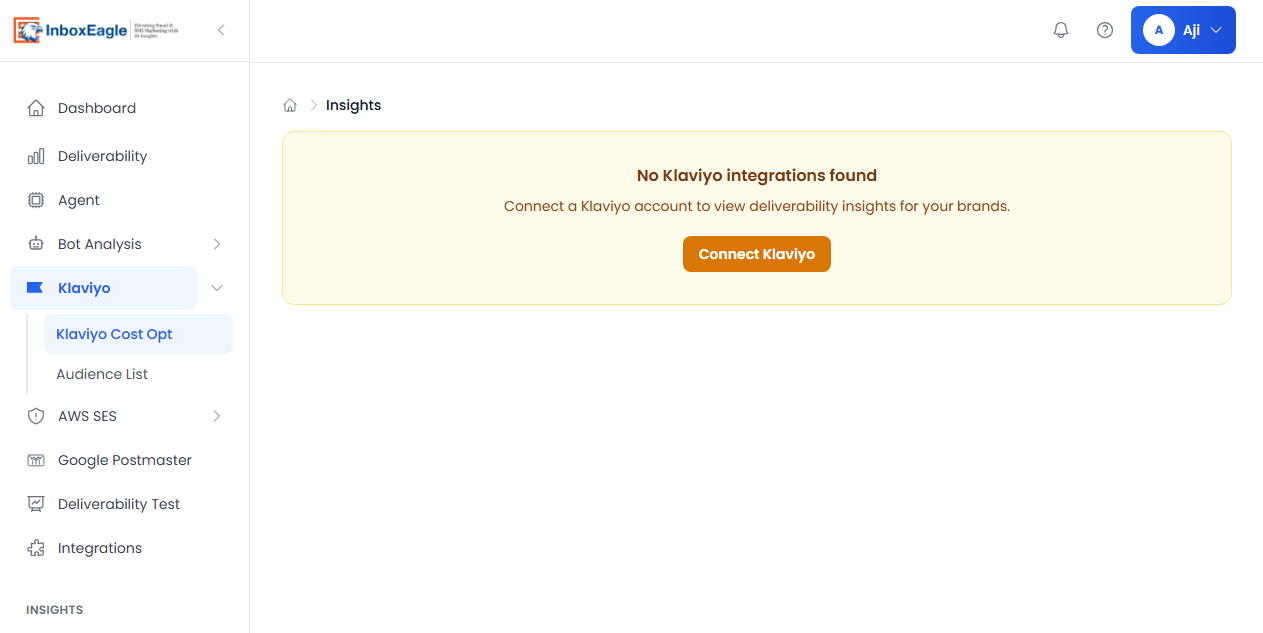
The Klaviyo integration inside InboxEagle. Once connected, every campaign and flow send is monitored automatically — no manual test submissions required.
The Hub tells you what Klaviyo can see. InboxEagle tells you what happened after the email left. Used together, there are no blind spots: the Hub handles account-level health monitoring, InboxEagle handles per-send, per-provider placement visibility. The combination gives you a complete diagnostic picture instead of half of one.
For a full setup walkthrough including Private API Key configuration and webhook setup, see Klaviyo + InboxEagle: How to Monitor Every Flow and Campaign.
Note: Content created with the help of AI and human-edited and fact-checked to avoid AI hallucinations.