
The scenario plays out the same way across eCommerce email programs at every sending volume: open rates drop, revenue from email slips, and the first instinct is to open Klaviyo’s Deliverability Hub. Everything looks fine. Spam rate is clean. Domain reputation shows High. Authentication is passing. And yet performance keeps declining.
The Hub is not wrong. It is showing you exactly what it is designed to show. The problem is that most Klaviyo users treat it as a complete deliverability picture when it is actually a narrow slice of one. Knowing what the Hub measures, and more importantly what it does not measure, is what separates a team that diagnoses placement problems in hours from one that spends weeks adjusting the wrong variables.
This post covers every panel in the Klaviyo Deliverability Hub, what each one actually reflects, how to read it correctly, and the specific gaps that require monitoring outside of Klaviyo.
Klaviyo Deliverability Hub: What the Numbers Represent
What the Klaviyo Deliverability Hub Actually Is
The Deliverability Hub sits inside Klaviyo under Analytics. It pulls from three data sources: Google Postmaster Tools (for spam rate and domain reputation), Klaviyo’s own authentication records (for SPF, DKIM, and DMARC pass rates), and account-level sending history (for volume and bounce trends).
That is a genuinely useful combination. Before the Hub existed, getting a health picture meant cross-referencing Postmaster Tools separately, digging through campaign metrics manually, and piecing together signals from three different tabs. The Hub compresses that into one screen.
What it is not is a placement monitoring tool. It tells you about signals, not outcomes. There is a meaningful difference between knowing your spam complaint rate is 0.08% and knowing that 23% of your last campaign went to Gmail’s spam folder. The Hub gives you the first number. It does not give you the second.
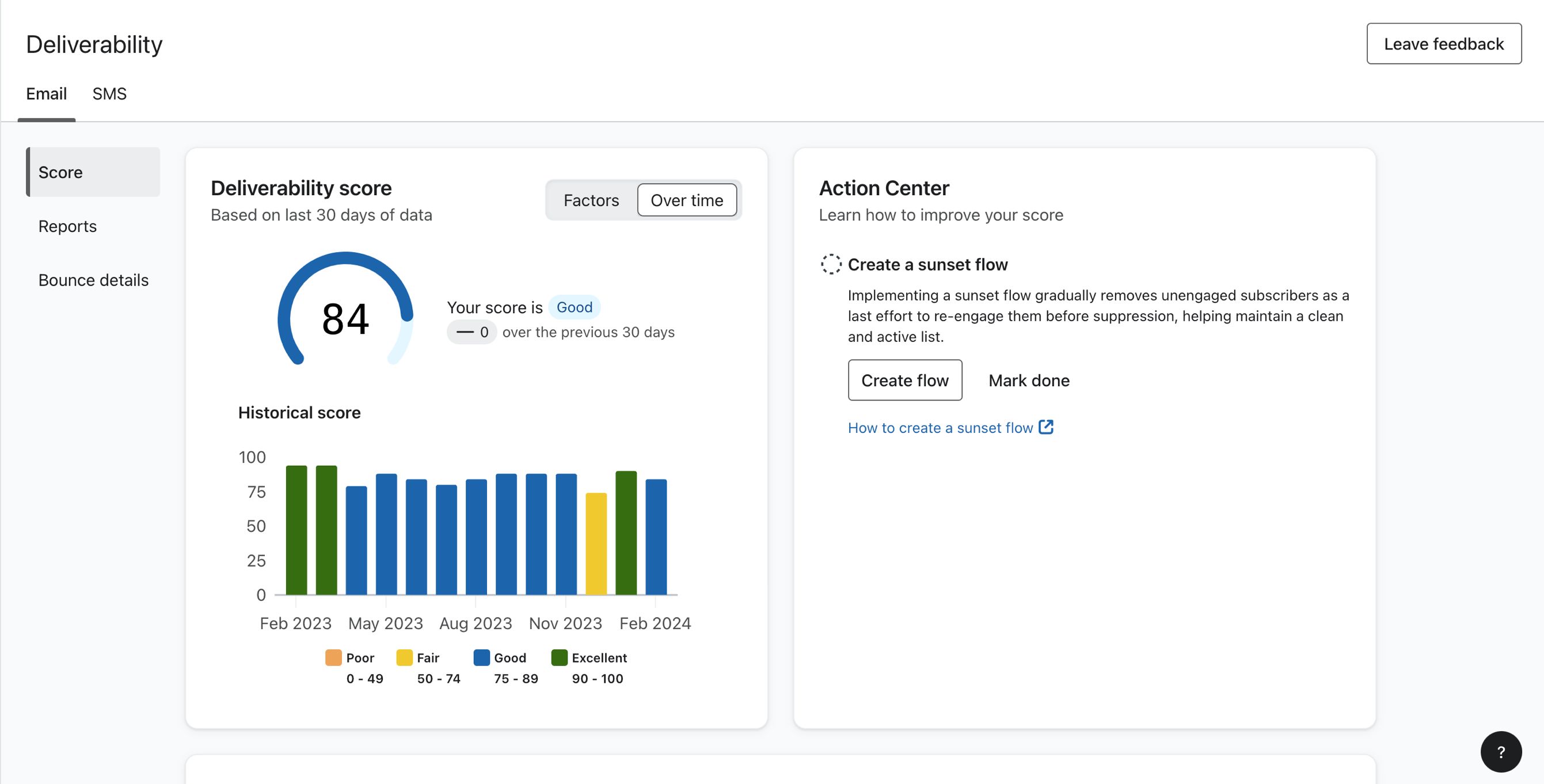
The Klaviyo Deliverability Hub landing view. All panels shown are account-level aggregates. No campaign-specific placement data is available from this screen.
Source: klaviyo.com
The Spam Rate Panel
The spam rate panel is the most-watched metric in the Hub, and the most frequently misread.
The number shown is your Gmail spam complaint rate, pulled directly from Google Postmaster Tools. It reflects the percentage of authenticated emails sent to Gmail recipients that were marked as spam, either via the Gmail spam button or through Gmail’s own filtering signals. Klaviyo surfaces this in the Hub to save you the step of opening Postmaster Tools separately.
Two things about this number are not obvious from the UI.
First, it is Gmail-only. Spam complaints from Outlook users (reported through Microsoft SNDS), Yahoo users (reported through Yahoo’s Complaint Feedback Loop), or any other provider do not appear here. If your Outlook complaint rate is elevated while your Gmail rate looks clean, the Hub shows you a healthy number with no indication that a problem exists elsewhere.
Second, it is a lagging indicator. By the time the spam rate graph shows a meaningful spike, you have already been sending at a damaging complaint rate for several days. The data updates on a delay pulled from Postmaster Tools, not in real time. A campaign that generated a complaint spike on Tuesday may not be fully visible in the Hub until Thursday.
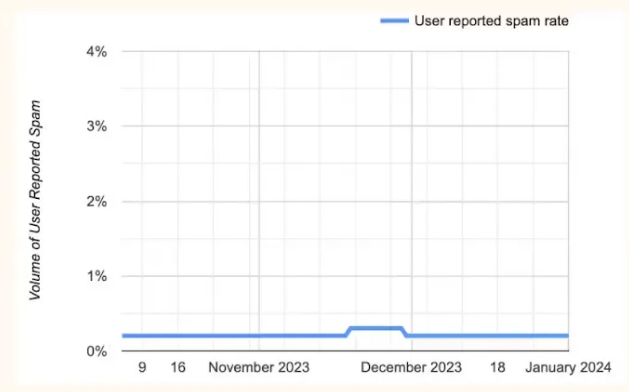
The spam rate graph reflects Gmail complaint rates only. A flat, clean line here does not confirm Outlook or Yahoo complaint rates are equally healthy.
Source: klaviyo.com
How to read it correctly: Treat this panel as your Gmail complaint rate monitor, not your total complaint rate. Below 0.08% is healthy. Between 0.08% and 0.10%, audit your most recent sends for the segment driving the uptick. Above 0.10%, Gmail is actively filtering and reducing complaint rate takes priority over any large campaign sends. For cross-provider complaint monitoring, Yahoo’s Complaint Feedback Loop and Microsoft SNDS need to be checked separately — neither feeds into this panel.
The Domain Reputation Panel
The domain reputation panel shows your sending domain’s reputation classification as Gmail has assessed it: High, Medium, Low, or Bad. This data also comes from Google Postmaster Tools, which labels it on a Good/Medium/Low/Bad scale that Klaviyo surfaces directly.
For Gmail deliverability, this panel is the most actionable number in the Hub. High means Gmail is routing your mail with trust. Medium means you are in a caution zone where engagement quality will determine whether campaigns land in the inbox or promotions tab. Low and Bad mean active filtering is occurring regardless of content quality.
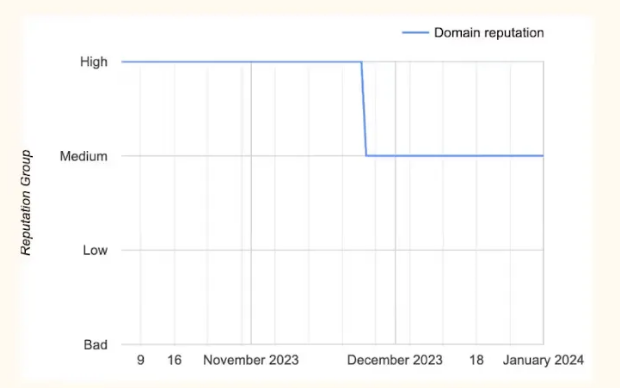
Domain reputation is Gmail’s trust classification for your sending domain. It changes slowly in both directions.
Source: klaviyo.com
The most important thing to understand about this signal is how slowly it moves. It does not respond to a single clean campaign or a single bad one. It is the accumulated weight of your sending history over weeks and months.
The Medium classification is where most teams miss the early warning. A brand sitting at Medium for 60 days while gradually accumulating borderline complaint rates will find that Medium starts suppressing Gmail placement before the classification drops to Low. The filter is already tightening; the label just hasn’t changed yet.
This is why catching a trend at Medium is far more valuable than catching it at Low. At Low, you are doing reputation recovery, which takes 4 to 8 weeks of clean sending. At Medium trending downward, tightening engagement segmentation on your next two or three campaigns can often reverse the signal before any placement damage compounds. The same data exists in Postmaster Tools directly, but having it in the Hub means there is no excuse for missing it.
The Authentication Panel
The authentication panel shows SPF, DKIM, and DMARC pass rates across your sends, calculated from Klaviyo’s own sending records.
For most Klaviyo accounts, DKIM is the one that matters most, and the one most commonly misunderstood. Klaviyo signs all outbound mail with DKIM, but the domain in that signature is what Gmail assigns reputation to. If you have not configured a custom sending domain in Klaviyo, your DKIM signature uses Klaviyo’s shared domain, not your brand’s domain. Every send is accruing reputation to Klaviyo’s infrastructure, not to your own brand’s domain history.
The fix is straightforward: go to Klaviyo under Settings → Sending Domains, add your own domain, and complete the DNS verification. Until that is done, your brand domain is not building Gmail reputation regardless of how cleanly you send.
This creates a specific contradiction that confuses a lot of teams: DKIM pass rates show 100% in the authentication panel while domain reputation in the panel above shows Low or Bad. That is not a bug. Mail can be perfectly DKIM-signed under Klaviyo’s shared domain while your own brand domain accrues no positive reputation at all, because Gmail evaluates the signing domain, not just the From address.
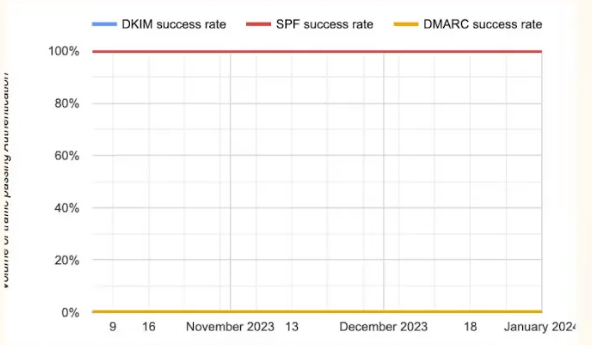
Authentication pass rates confirm your records are configured and signing. A 100% DKIM pass rate on Klaviyo’s shared domain does not mean your brand domain is building Gmail reputation.
Source: klaviyo.com
Healthy benchmarks: SPF passing at 98%+, DKIM passing at 99%+, DMARC passing at 95%+. Any DMARC failure rate above 5% warrants an alignment investigation. See SPF, DKIM, and DMARC Explained for the full breakdown of what each failure mode means and how to resolve it, and the Klaviyo authentication setup guide for the configuration steps inside Klaviyo specifically.
What the Klaviyo Deliverability Hub Does Not Show
This is the section that matters most for teams whose Hub looks healthy but whose performance is declining.
The Deliverability Hub shows account-level health signals. It does not show where any specific campaign actually landed. There is no view inside the Hub that answers: “Did my last campaign go to Gmail’s inbox or promotions tab? How did it land at Outlook? Was Yahoo filtering it?”
Those answers do not exist in the Hub because the Hub is not a placement monitoring tool — it is a sending health dashboard. A sending program can show a clean spam rate, High domain reputation, and 100% authentication pass rates while a meaningful percentage of campaigns are landing in the promotions tab or being filtered at Outlook.
The specific gaps:
No per-campaign placement data. Aggregate spam rate trends are visible, but you cannot attribute a spike to a specific campaign, flow, or segment. If your welcome series is generating placement problems while your cart abandonment emails are hitting the inbox cleanly, that distinction is invisible in the Hub.
No Outlook placement visibility. Microsoft does not share placement data with Klaviyo. Outlook filtering problems are completely invisible in the Deliverability Hub. Outlook typically represents 20 to 30% of a consumer email list. If it is filtering your campaigns, a third of your list is not seeing your sends and nothing in the Hub surfaces that.
No promotions tab detection. Gmail routes mail to inbox, spam, or promotions. The Hub’s spam rate captures spam placements via complaint signals. It does not detect promotions tab routing, which suppresses open rates and revenue without triggering any complaint-based signal at all.
No Apple Mail visibility. Apple Mail placement does not appear in the Hub at any level.
The visual below shows exactly where this gap becomes a problem. Klaviyo’s campaign analytics view gives you open rate, click rate, bounces, and revenue — but no inbox placement column, because Klaviyo does not have that data.
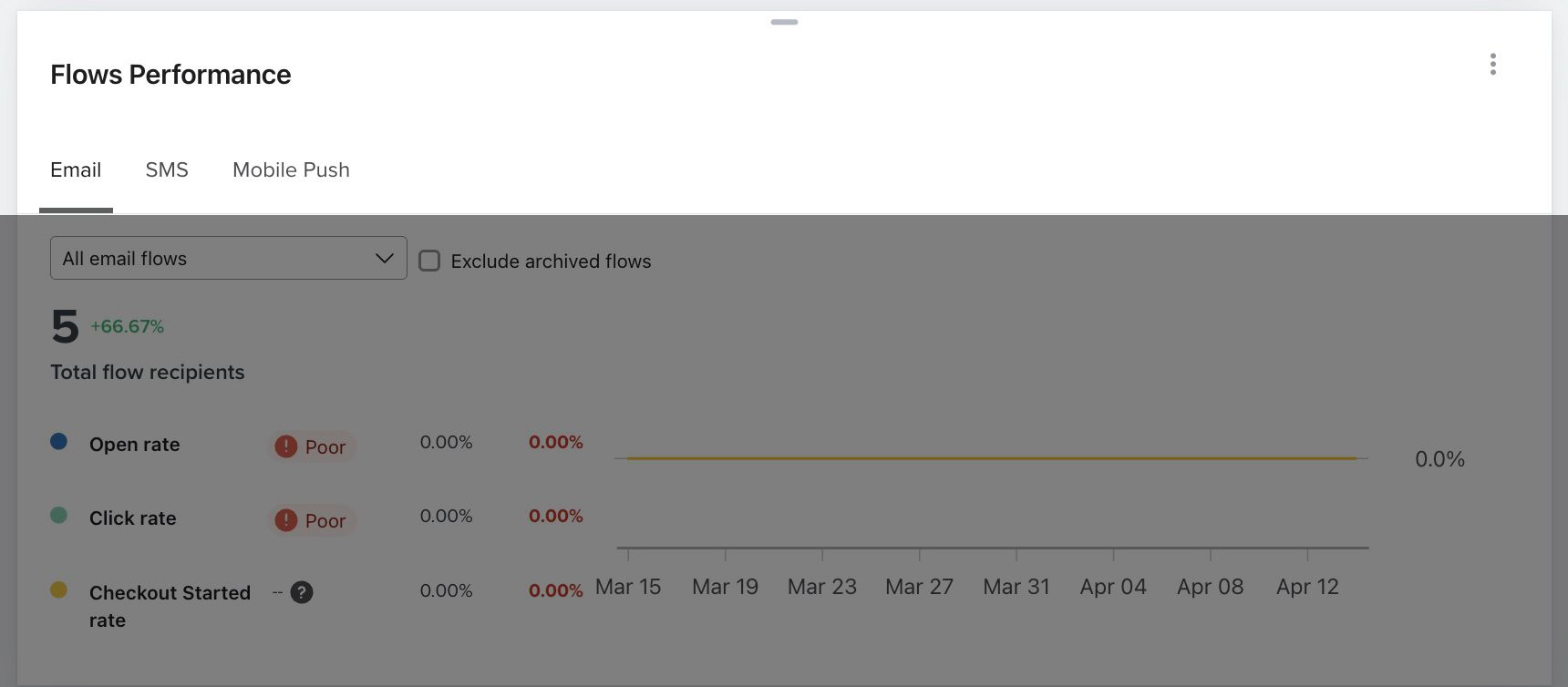
Klaviyo’s campaign analytics view. Open rate, clicks, bounces, revenue — but no inbox placement. A 34% open rate looks healthy. It does not tell you whether the other 66% never opened because the email went to spam or promotions at Gmail, or because Outlook filtered it entirely.
Source: klaviyo.com
This is what per-campaign placement data actually looks like when you have it:
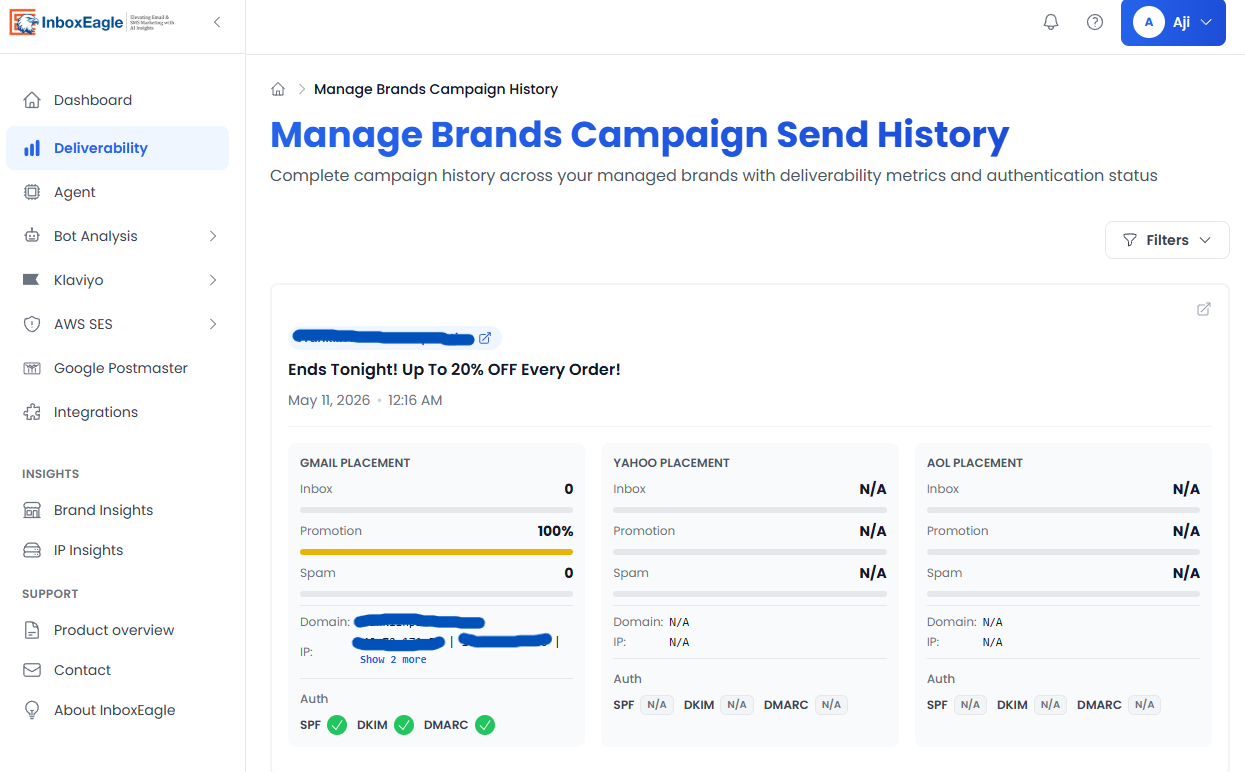
InboxEagle campaign-level placement breakdown: inbox, spam, and promotions tab percentages for each provider, recorded after the live send. The same campaign that shows a healthy open rate in Klaviyo may show 22% spam placement at Outlook — visible here, invisible in the Hub.
How to Use the Hub Effectively Within Its Limits
The Deliverability Hub is most useful as a structured weekly health check, not a campaign-by-campaign diagnostic. Here is the exact workflow:
Weekly: Spam Rate Review
Open the spam rate panel and look at the 30-day trend, not just the current number. A rate that is slowly climbing from 0.04% to 0.07% over four weeks is more concerning than a one-day spike that returns to baseline. If you see a sustained upward trend, pull the sends from the past two weeks and audit which segments received them. The culprit is almost always a campaign sent to a broader engagement window than usual.
Weekly: Domain Reputation Check
Note the current classification and whether it has changed since last week. High is stable. If you are at Medium, treat it as a yellow light and tighten engagement segmentation on your next campaign. High trending toward Medium is your most actionable early warning, it means something in your recent sending has started accumulating negative signals before placement is visibly affected.
On Infrastructure Changes Only: Authentication Review
Authentication pass rates are stable once correctly configured. Check this panel when you make any DNS change, add a new sending domain, migrate to a new ESP, or onboard a new subdomain. Confirm all three records return to baseline pass rates within 48 hours of any change. Outside of those events, this panel does not need weekly attention.
What to Do When the Hub Looks Fine but Performance Is Down
If spam rate is clean, domain reputation is High, authentication is passing, and open rates are still declining: the problem is almost certainly outside what the Hub can see. Check Outlook placement via Microsoft SNDS, check whether you have a promotions tab routing issue at Gmail, and check Apple Mail engagement. None of those answers are in the Hub, and none of them can be found inside Klaviyo at all.
The Gap the Klaviyo Deliverability Hub Cannot Close
Step back and look at what the Hub’s blind spots add up to as a complete picture.
You cannot see whether any specific campaign landed in the inbox or spam. You cannot see what happened at Outlook, which is 20 to 30% of most consumer lists. You cannot see promotions tab routing at Gmail, which suppresses revenue without triggering a single complaint. You cannot see Apple Mail placement. You cannot distinguish between a welcome series that is quietly generating spam placement and a cart abandonment flow that is performing cleanly, because everything is aggregated.
In practice: a Klaviyo account with a perfectly healthy Hub view can be losing a significant portion of every campaign to spam or promotions at providers Klaviyo has no visibility into, and the only signal that something is wrong is a gradual, unexplained decline in open rates and email-attributed revenue.
By the time that signal is obvious enough to act on, it has typically been compounding for four to eight weeks.
The gap is structural, not a limitation Klaviyo can easily close. Klaviyo’s role is to send email and report on what happens inside your account. Inbox placement after the email leaves Klaviyo’s servers requires a monitoring layer with real seed addresses inside Gmail, Outlook, Yahoo, and Apple Mail inboxes, reading the outcome of every real send as it arrives.
That is exactly what the InboxEagle Klaviyo integration provides. Once connected via a Klaviyo Private API Key, InboxEagle monitors every campaign and flow send automatically, no manual test submissions, no credits, no gaps between sends. After each live send, you see:
- Inbox, spam, and promotions tab placement broken down by provider: Gmail, Outlook, Yahoo, and Apple Mail
- Campaign-level and flow-level placement separately, so a welcome series generating spam placement is visible as distinct from a cart abandonment sequence landing cleanly
- Bot event filtering so that automated opens from Apple MPP and security scanners are separated from genuine subscriber engagement, keeping your engagement signals accurate
- Deliverability Agent analysis surfaced automatically after every send, flagging what changed and what to investigate
Connecting takes under ten minutes. Go to Integrations inside your InboxEagle account, select Klaviyo, and enter your Klaviyo Private API Key.
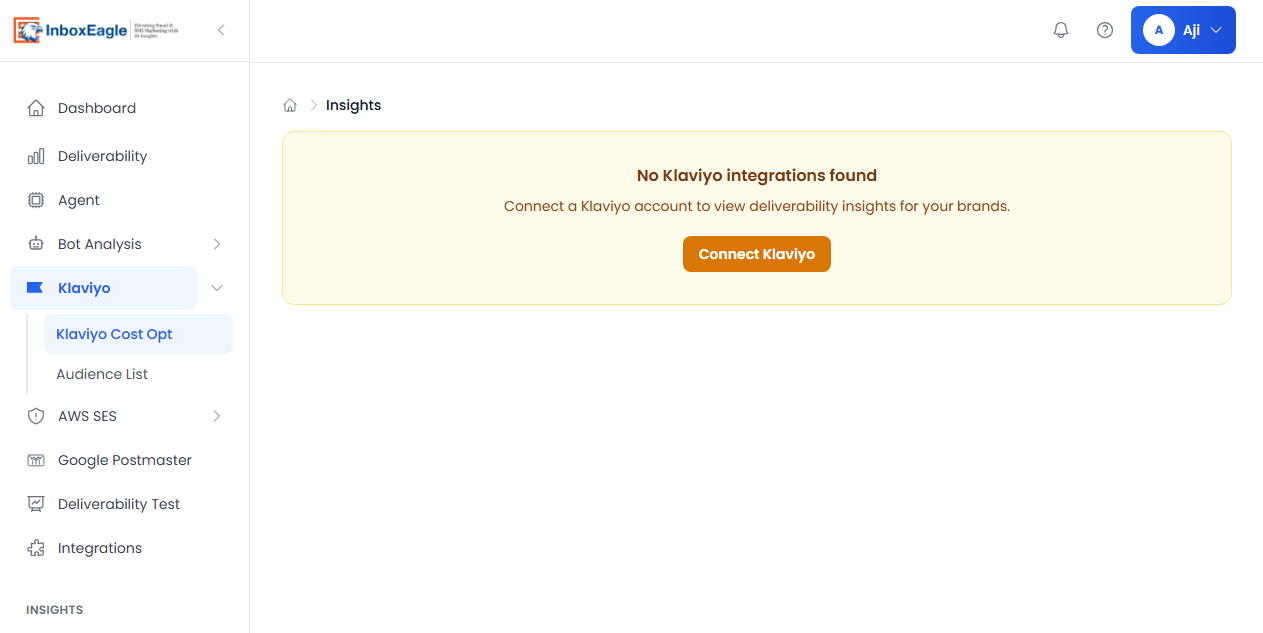
The Klaviyo integration inside InboxEagle. Once connected, every campaign and flow send is monitored automatically — no manual test submissions required.
The Hub tells you what Klaviyo can see. InboxEagle tells you what happened after the email left. Used together, there are no blind spots: the Hub handles account-level health monitoring, InboxEagle handles per-send, per-provider placement visibility. The combination gives you a complete diagnostic picture instead of half of one.
For a full setup walkthrough including Private API Key configuration and webhook setup, see Klaviyo + InboxEagle: How to Monitor Every Flow and Campaign.
Note: Content created with the help of AI and human-edited and fact-checked to avoid AI hallucinations.