


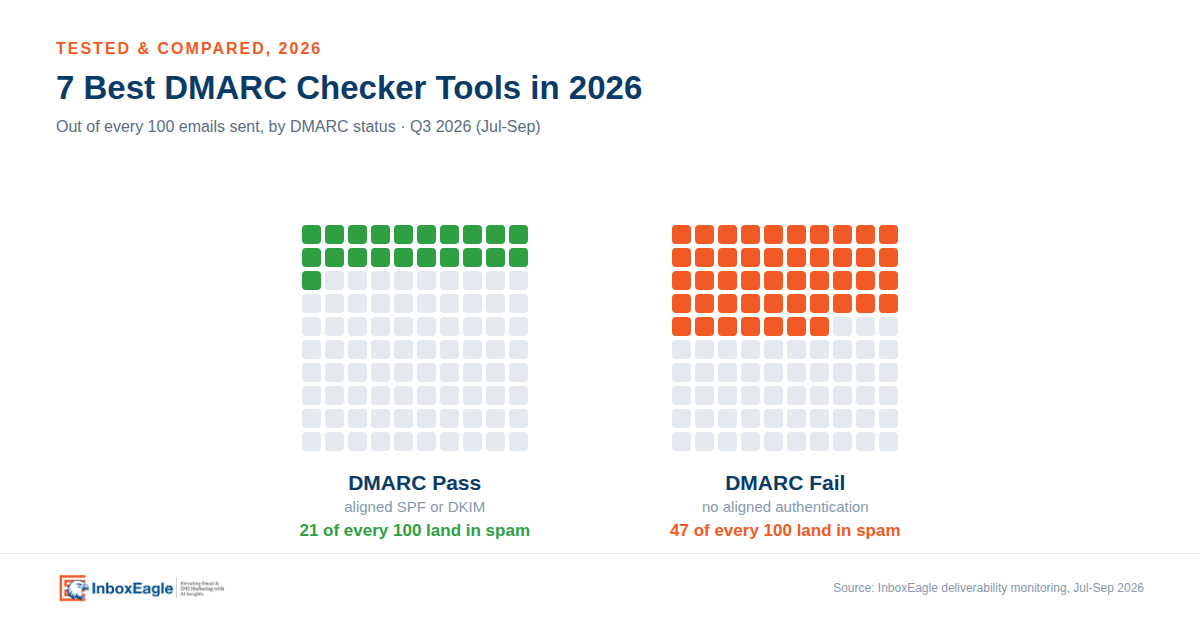
Most of the broken DMARC setups we find in client audits are not missing records. They are records that exist, pass a syntax check, and still let real mail fail.
That gap costs more than it used to. Across 556,290 emails InboxEagle monitored between 1 July and 30 September 2026, mail that failed DMARC landed in spam 46.91% of the time. Mail that passed landed in spam 21.44% of the time, more than double the spam rate on the failing side. (For how that gap has moved since InboxEagle’s April 2026 study on 2.2 million emails, see the note below.)
A DMARC checker is how you find out which side of that line you are on. This guide explains what the tools actually do, where they differ, and which one fits the way you send. We compared seven of them.
556,290 Emails, 1 July – 30 September 2026
What DMARC actually does
DMARC stands for Domain-based Message Authentication, Reporting and Conformance. It is a record you publish in DNS that tells Gmail, Yahoo, Outlook, and every other mailbox provider what to do when a message claims to come from your domain but cannot be verified. What is DMARC? is the plain-English version of this section, and SPF, DKIM and DMARC explained covers the full mechanics if you want the deeper one.
Think of email authentication as instructions you leave with a doorman:
- SPF and DKIM check the credentials.
- DMARC tells the doorman what to do when those credentials don’t hold up, and sends you a daily log of who tried to get in.
Here is how a message gets evaluated:
- SPF checks the sending server. Did the email come from an IP you authorized in your SPF record?
- DKIM checks the signature. Does the cryptographic signature prove the message wasn’t altered in transit, and which domain signed it?
- DMARC checks alignment. DMARC doesn’t just ask whether SPF or DKIM passed. It checks whether the domain that passed matches the domain recipients see in your “From” address.
A message passes DMARC when either SPF or DKIM passes and that passing domain aligns with your From domain. You don’t need both to align, but you need at least one.
This alignment requirement is why so much legitimate ecommerce email fails. If you send through an ESP using its shared sending domain, SPF and DKIM may both pass under the ESP’s domain. But if your From address uses your own store domain (for example, hello@yourstore.com), nothing aligns. DMARC fails, even though a basic checker reports that SPF and DKIM passed.
What happens next depends on the policy you published:
| Policy | What you are telling receivers | What actually happens |
|---|---|---|
| p=none | Monitor only, deliver as normal | Mail is delivered and reported on. Nothing is blocked. |
| p=quarantine | Treat failures as suspicious | Failing mail usually goes to the spam folder |
| p=reject | Ask receivers to reject failures | A request, not a command: receivers may reject, junk or still deliver failing mail |
Two caveats worth knowing. A DMARC pass is not a delivery guarantee: it means the message is authenticated, and the mailbox provider still applies its own reputation and spam filtering on top. And policy is a request, not a command. Receivers can apply local policy and override you, which is common with forwarded mail and mailing lists. If you’ve never had a record at all, our guide on what “no DMARC record found” means walks through the setup from zero.
Why you need a DMARC checker
A DMARC checker looks up the _dmarc TXT record on your domain and tells you whether it exists, whether the syntax is valid, what policy it sets, and where reports are being sent.
That used to be housekeeping. Now that Gmail rejects a growing share of non-compliant bulk mail outright (more on that below), a record with a typo in it is a delivery problem, not a compliance footnote. And because DNS changes quietly, a record that was correct when your developer set it up two years ago may not survive a migration, a new subdomain, or a well-meaning agency adding a second record.
Check your own domain’s DMARC record
Free, no signup. Confirms your record exists and parses every tag.
What changed in 2026: the rules, and the spec itself
Two separate things shifted, and they are easy to confuse.
The mailbox providers raised the bar. Google and Yahoo set bulk sender requirements in February 2024: if you send 5,000 or more messages a day to personal Gmail accounts, you need SPF and DKIM, a DMARC record at p=none or stronger, alignment on the From domain, and one-click unsubscribe on marketing mail. Microsoft applied equivalent rules to Outlook.com, Hotmail, and Live.com starting May 5, 2025, sending non-compliant bulk mail to Junk first, with rejection (550 5.7.515) following later. Gmail has its own escalation: starting in November 2025, Google began ramping up enforcement on non-compliant traffic, moving a growing share of it from temporary deferrals to permanent rejections rather than just quarantining it to spam.
Complaint rates sit alongside authentication. Google’s guidance is to stay below 0.1% user-reported spam and never reach 0.3%. Cross 0.3% and you lose eligibility for delivery mitigation until you hold below it for seven consecutive days. Yahoo works to 0.3%. In practice, treat 0.1% as your working ceiling, not your target.
The DMARC specification itself was rewritten. In May 2026, the IETF published DMARCbis as RFC 9989, obsoleting RFC 7489. Your existing records stay valid and keep using v=DMARC1, so this is not an emergency. But three changes affect what a good checker should now tell you:
- pct is gone, along with rf and ri. Receivers applied percentage values inconsistently, and too many teams parked at p=quarantine; pct=10 forever instead of treating it as a ramp.
- New tags: np, t, psd. np sets policy for non-existent subdomains, which closes a real spoofing gap. t=y replaces pct as a binary testing mode. psd flags public suffix domains.
- The Public Suffix List is out, replaced by a DNS tree walk for finding the organizational domain.
If your record still carries pct, it is not broken. It just references a tag the current standard no longer defines, and better analyzers now flag it as removed. Add np=reject while you are in there.
See whether your record carries a removed tag
Flags pct, rf, and ri, and whether your record is DMARCbis-ready.
DMARC checker vs. DMARC record checker vs. DMARC report analyzer
These three terms get used interchangeably in product marketing. They do different jobs.
| Tool type | What it does | When you need it |
|---|---|---|
| DMARC checker | Quick pass/fail on whether a domain has DMARC and what policy it publishes | Spot-checking any domain, including a competitor’s or a vendor’s |
| DMARC record checker | Validates the individual tags (v, p, sp, np, rua, ruf, adkim, aspf, t) and the syntax around them | Setting up a record, or changing one |
| DMARC report analyzer | Parses daily aggregate XML into readable sending sources, volumes, pass rates and alignment failures | Getting from p=none to enforcement without blocking your own mail |
In search terms, a DMARC checking tool is the first row. A DMARC testing tool is what you use once you send a test message and read the headers for dmarc=pass (the steps are below). A DMARC analyzer tool is the third row. A DMARC service usually means report processing, the third tool type, sold as a subscription. Among DMARC services, price and volume limits differ the most, so match the tier to your actual sending before you commit.
Most people start by needing the first, think they need the second, and only solve their actual problem with the third. The record is the easy part. Finding every legitimate system sending as your domain is the real work. If you’d rather check SPF, DKIM, and DMARC together in a single lookup instead of comparing standalone tools, see our combined SPF, DKIM, DMARC checker guide.
The 7 best DMARC checker tools in 2026
Short version, if you are scanning:
- InboxEagle: best overall for ecommerce and ESP senders, because it connects DMARC to inbox placement
- MxToolbox: best free one-off lookup
- EasyDMARC: best for a guided first deployment
- dmarcian: best for expert-led rollout and education
- PowerDMARC: best for MSPs and multi-domain estates
- DMARC Advisor: best budget option, but only if you are in Europe, Africa, or Russia
- Dmarcly: best for teams stuck on the SPF 10-lookup limit
The table below is a best DMARC software comparison across all seven tools.
| Tool | Best for | Record checker | Report analyzer | Inbox placement | Free option | From |
|---|---|---|---|---|---|---|
| InboxEagle | Ecommerce and ESP senders | Yes | Yes (DMARC Processing, separate) | Yes | Free tools | from $19/mo |
| MxToolbox | Quick free lookups | Yes | Yes (XML upload) | No | Yes | $129/mo |
| EasyDMARC | Guided setup | Yes | Yes | No | Free (personal use only) | $44.99/mo |
| dmarcian | Expertise and education | Yes | Yes (Inspector) | No | Free (personal, limited) | $24/mo |
| PowerDMARC | MSPs and enterprises | Yes | Yes | No | Free tools | $15/mo |
| DMARC Advisor | Small businesses, EU/Africa/Russia only | Yes | Yes | No | Free tier | €19/mo |
| Dmarcly | Hosted SPF, simple UI | Yes | Yes | No | Trial only | $17.99/mo |
Prices checked October 2026 against each vendor’s own pricing page. Entry prices are not directly comparable: some vendors price per domain, others by email volume, and DMARC Advisor/DMARC Manager bills in euros while the rest bill in dollars, so check the tier that matches your actual sending before committing.
How we compared these tools
We ran each tool’s own free lookup against a real domain and compared what came back: how clearly it explained the record, what it flagged beyond a plain pass or fail, and how far the free tier goes before you hit a paywall. Report analysis, monitoring, and alerting features were evaluated from each vendor’s own product pages and documentation, since those require an authenticated account and real inbound DMARC report volume to put through their paces hands-on.
What we compared: depth of the record checker’s output, whether the report analyzer names sending sources by service (Klaviyo, Google Workspace, SendGrid) or leaves you reading raw IPs, alerting, multi-domain support, DMARCbis readiness, and pricing transparency.
Reviewed: September–October 2026.
Where the 556,290-email figure comes from
The spam-rate comparison above draws on InboxEagle’s inbox placement monitoring, unscoped by vertical or ESP, across the brands InboxEagle monitors, which skew majority-ecommerce. The window is 1 July to 30 September 2026. Because the underlying senders are already running deliverability monitoring, this population likely skews more authentication-aware than an average random sender, so treat 46.91%/21.44% as a floor on the gap, not a ceiling. For a larger, earlier snapshot of the same underlying relationship, see the 2.2 million email study from April 2026, which found a 1.84x gap (30.75% vs. 16.7%). The wider gap in this update reflects Gmail’s tightened enforcement since, not a change in methodology.
Check your DMARC record free with InboxEagle
The same checker used throughout this review.
1. InboxEagle: best overall for ecommerce and high-volume senders
Why it is here: every other tool on this list stops at whether your DMARC passed. InboxEagle carries on to where the mail actually landed.
That distinction matters because passing DMARC and reaching the inbox are different outcomes. You can fix alignment, watch your pass rate hit 100%, and still sit in the Gmail spam folder because of reputation or content. Seed-list placement testing tells you which problem you have.
- Record checking: free DMARC record checker, plus SPF and DKIM checkers, email header analyzer, domain scanner and deliverability checker.
- Report analysis (DMARC Processing, a separate paid product): ingests and processes your DMARC aggregate reports at volume, with monitoring included on every tier. The base Email Deliverability subscription checks your DMARC policy record every 24 hours and alerts on change.
- Beyond DMARC: seed placement testing across real Gmail, Yahoo, AOL and Outlook mailboxes. IP and domain reputation, blocklist monitoring, bot detection and competitive benchmarking.
- Integrations: Klaviyo, Google Postmaster Tools, Amazon SES.
- Alerts: by email and Slack. Postmaster-sourced alerts fire within a minute of Google publishing the data, which Google does 24-48 hours late.
Here is what the report analysis layer (DMARC Processing) actually looks like once a domain is connected. Instead of a one-time pass or fail, you get a health score built from pass rate, policy disposition, and how much of your DMARC-evaluated mail is actually enforced rather than just monitored:
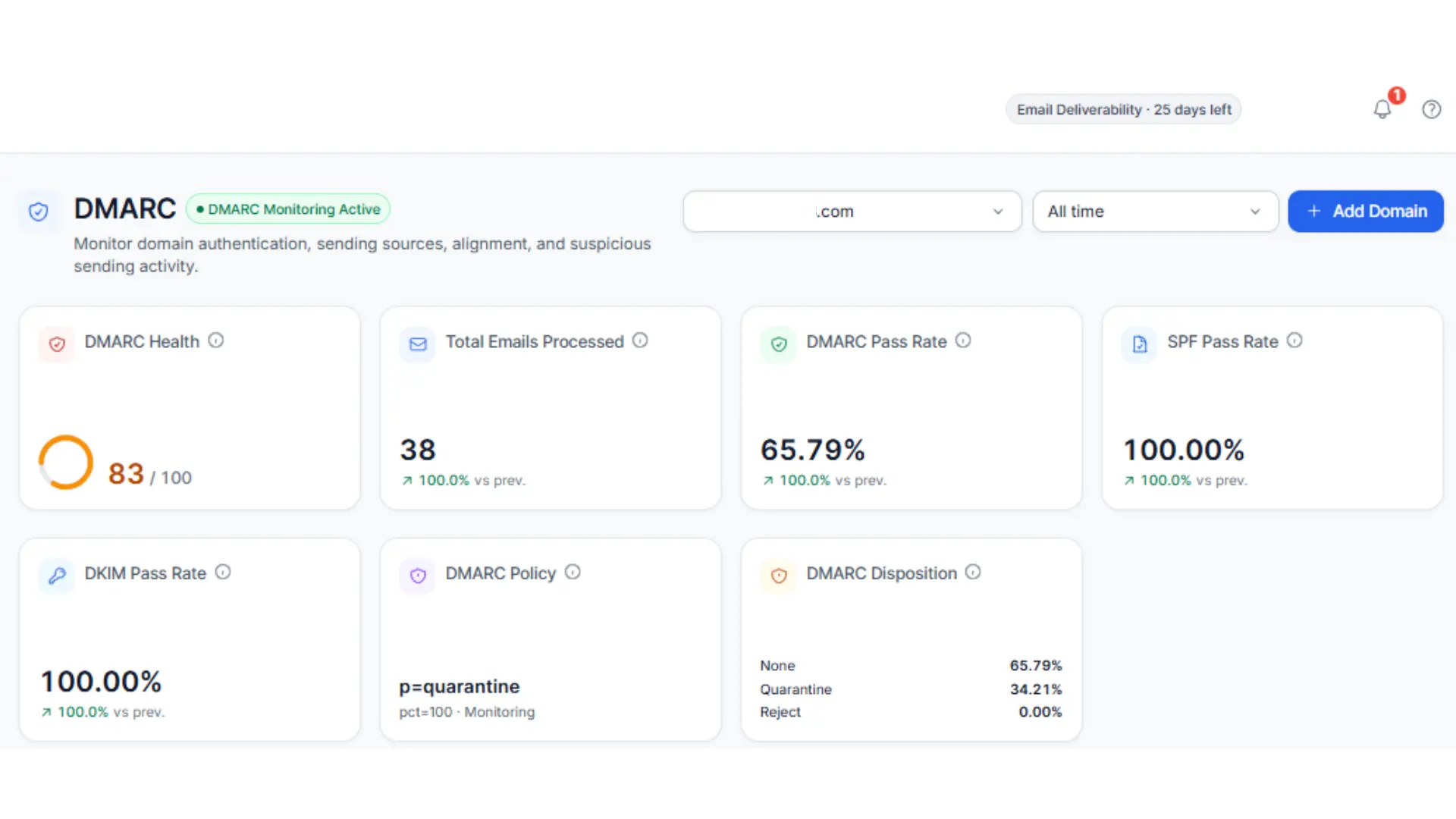
A health score alongside pass rate and policy disposition, not a one-time record check.
That score is backed by a pass-rate trend over time rather than a single snapshot, next to an authentication summary that splits failures by exactly what broke: an SPF mismatch, a DKIM mismatch, or both at once:
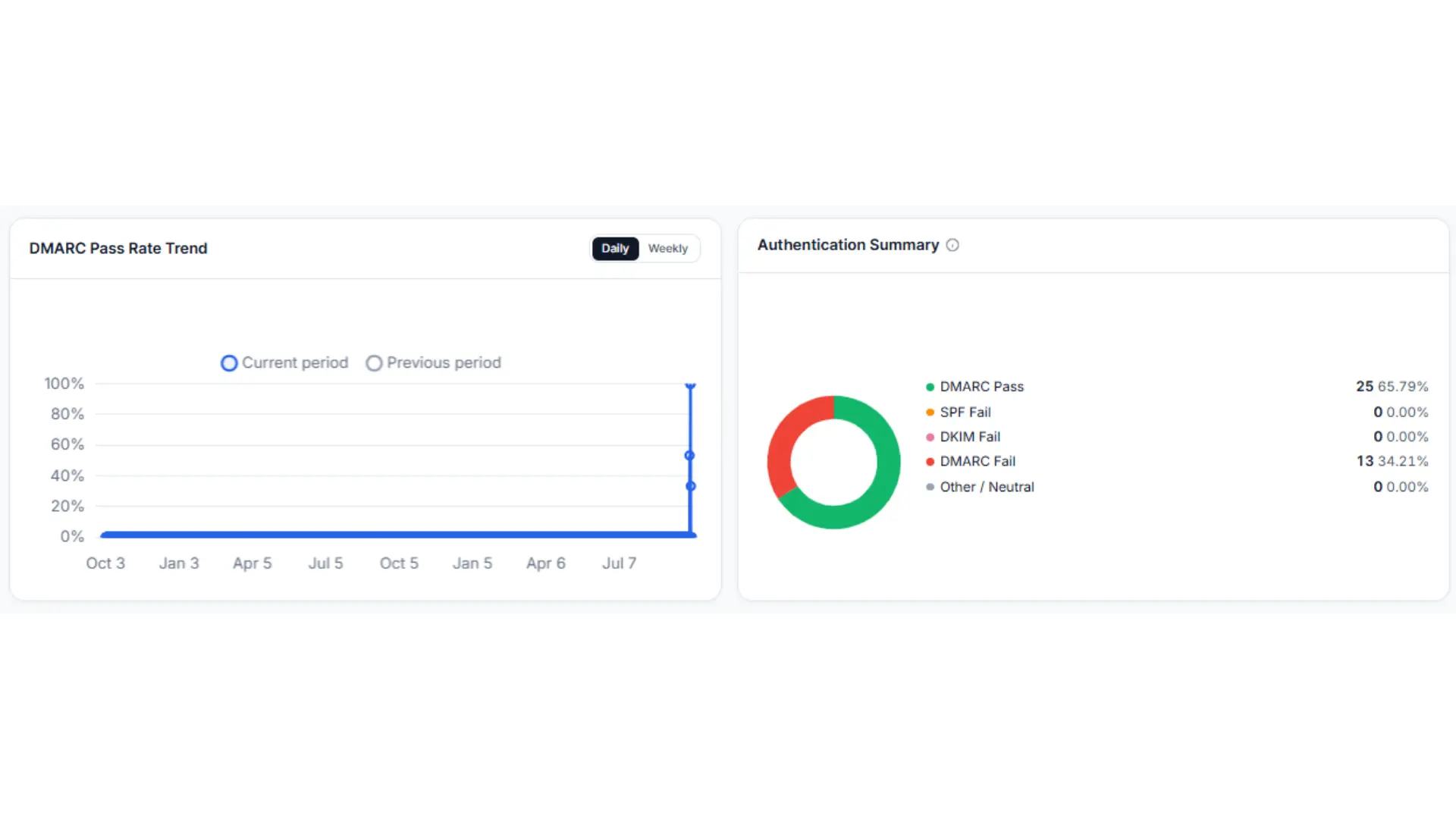
Trend over time, not a single-day pass rate, plus a breakdown of what kind of failure is driving the number.
The piece a one-time record checker structurally cannot do is name the sender behind a failure. DMARC Processing’s sending-sources view lists every IP sending as your domain alongside its DMARC pass rate, and for the ones failing, the specific reason: SPF alignment, DKIM alignment, or both:
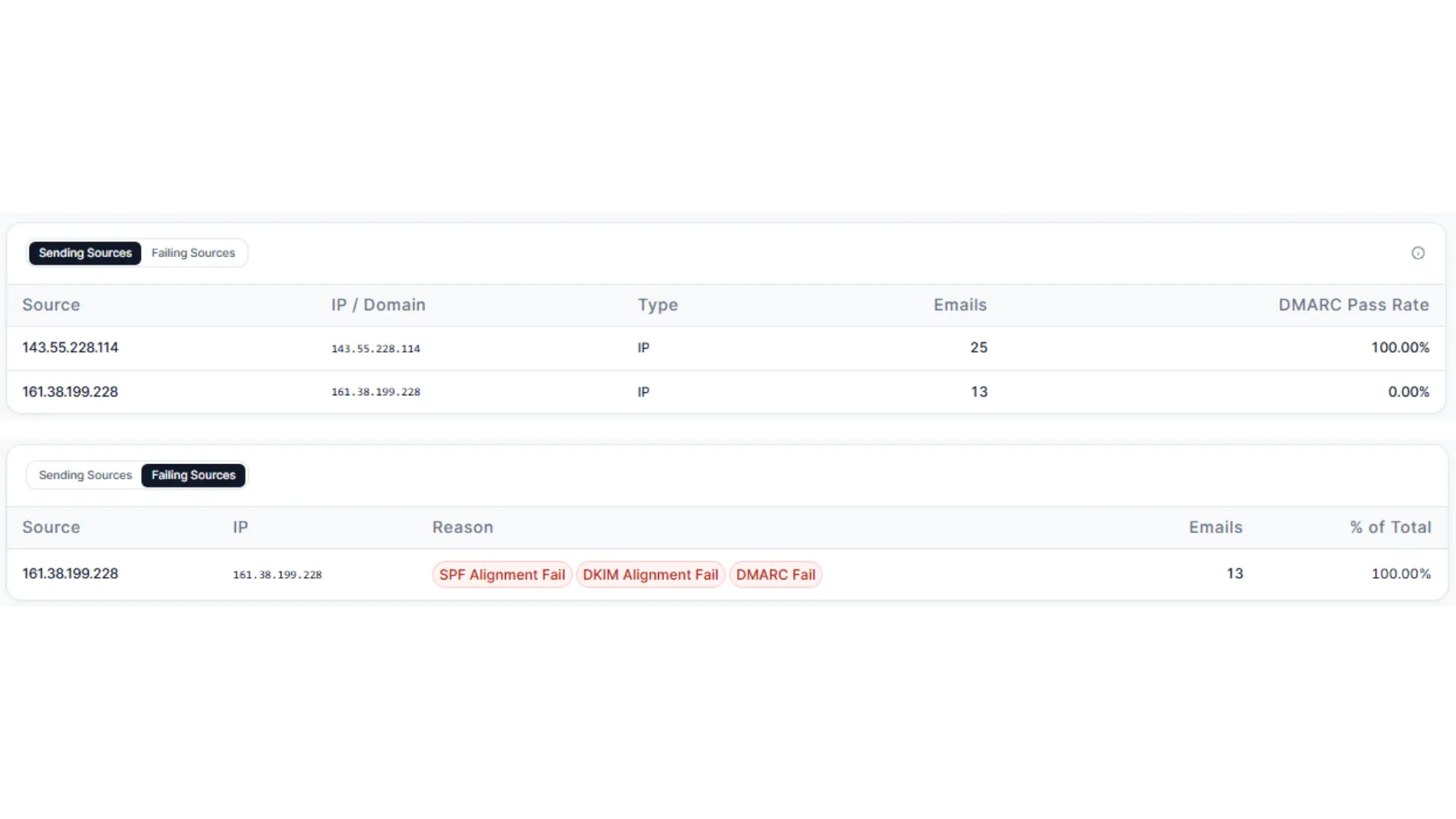
This is the step that turns “DMARC is failing” into “this specific IP is failing, and here is why.”
Where it is not the right fit: it is built for marketers and ESP senders who own deliverability numbers. A security team that wants DMARC as one line item inside a broader email-auth program, with hosted MTA-STS and TLS-RPT management, will find those pieces thinner here than in PowerDMARC.
Best for: Shopify and Klaviyo brands, agencies running client sending, and anyone whose bonus depends on revenue per email.
InboxEagle DMARC Processing pricing (ingests and processes your DMARC aggregate reports at volume, monitoring included on every tier):
Checking your record with InboxEagle in three steps
- Run the free checker. Enter your domain. It pulls _dmarc.yourdomain.com and parses every tag.
- Read the warnings, not just the verdict. The output flags policy level, a missing or unreachable rua, removed tags, and whether your alignment mode is relaxed or strict.
- Connect Postmaster Tools and run a seed test. This is the step the other tools cannot do. You find out whether your authenticated mail actually reaches inboxes at Gmail, Yahoo, AOL and Outlook.
Try step 1 right now, on your own domain:
Check Your Own Domain
Know your DKIM selector? Enter it for an exact check.
Active — this domain is already tracked by InboxEagle. Sign up free to unlock its full report.
Inactive — DMARC is set up, but we are not tracking this domain yet.
No Record — no DMARC record was found, so there is nothing to report yet.
Free, no signup. SPF, DKIM, and DMARC results come from a live DNS lookup; the InboxEagle Monitoring status below checks InboxEagle's own records for this domain.
See the full free DMARC record checker →
2. MxToolbox: best free lookup for a quick check
The tool every sysadmin already has bookmarked. Free DMARC lookup, an XML upload parser for aggregate reports, and a diagnostic suite covering MX, blocklists and SMTP that goes well beyond DMARC.
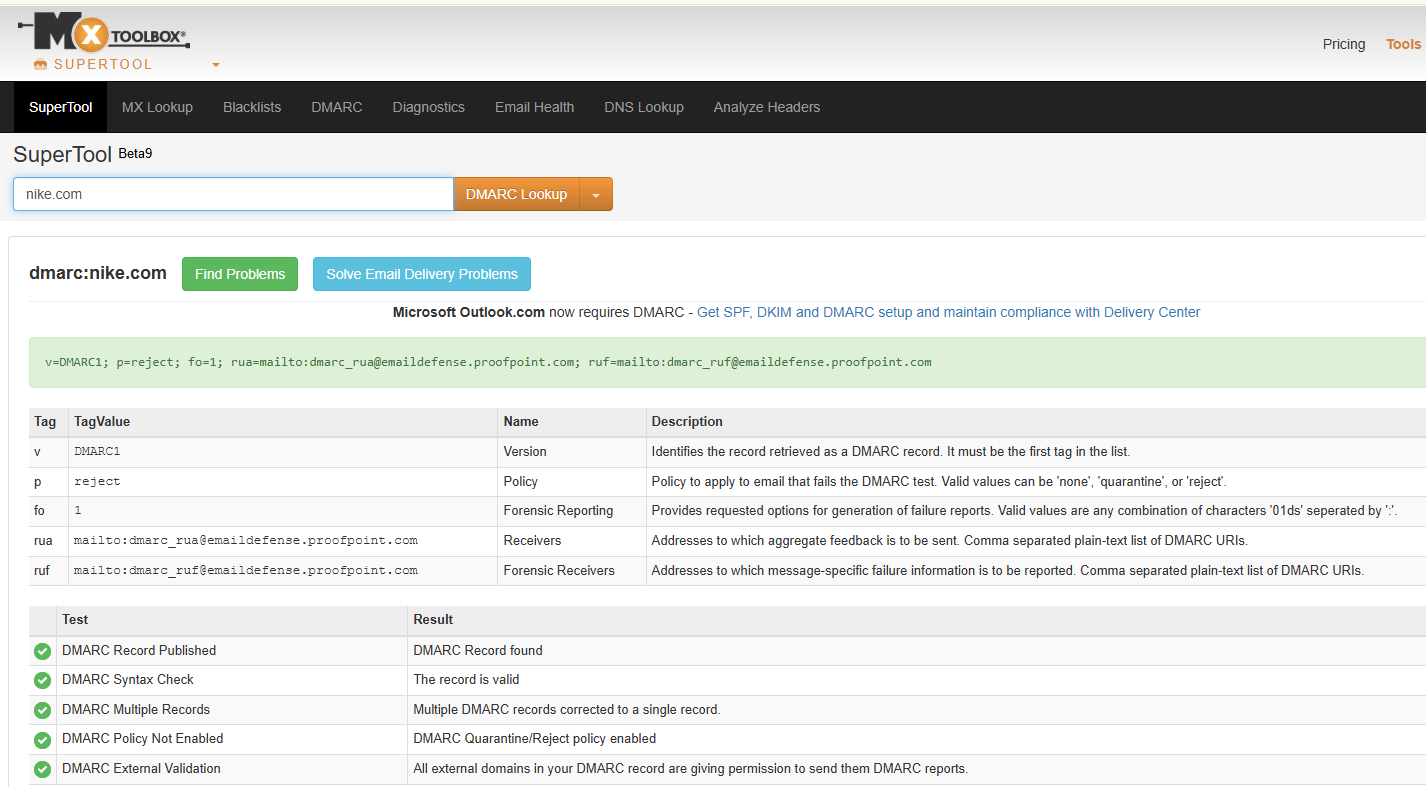
- Strengths: fast, broad, free, and the closest thing the industry has to a default.
- Drawbacks: the interface shows its age, continuous monitoring and alerting sit behind Delivery Center, and there is no inbox placement data.
- Pricing: from $129/month for Delivery Center.
- Best for: one-off diagnostics and sysadmins troubleshooting a specific failure.
3. EasyDMARC: best for a guided first deployment
Lookup, record generator, report analyzer, hosted SPF and BIMI support, wrapped in the most beginner-friendly path to enforcement on this list.
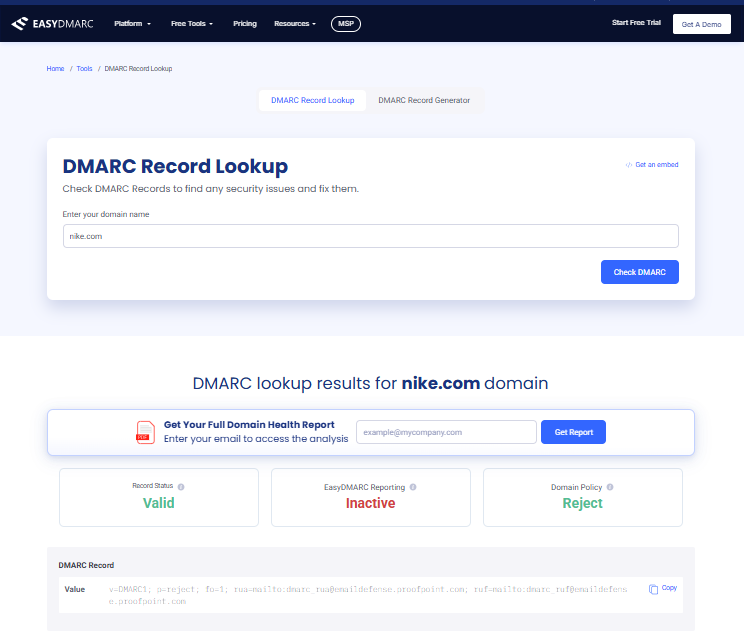
- Strengths: genuinely good at walking a first-timer from p=none to p=reject without breaking anything.
- Drawbacks: useful features move up-tier quickly, and limits are volume-based. The free plan is for personal, non-commercial use only.
- Pricing: from $44.99/month (DMARC Plus). Custom-priced Deliverability and Enterprise tiers sit above it.
- Best for: SMBs deploying DMARC for the first time with no in-house deliverability expertise.
4. dmarcian: best for expertise and education
DMARC Inspector for record checking, SPF Surveyor for lookup chains, and aggregate report processing, from a company founded by a contributor to the original DMARC spec.
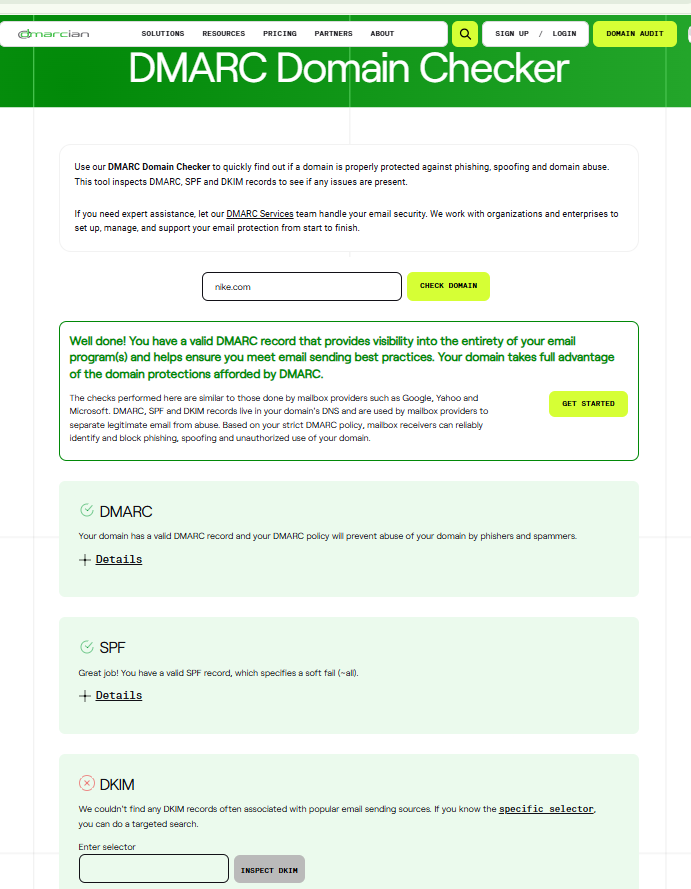
- Strengths: the best knowledge base and deployment support here, and it shows in how errors are explained.
- Drawbacks: the interface is dated, and the tier jump is steep: 10x from Basic to Plus ($24 to $240/month).
- Pricing: Personal tier is free for non-business domains. Paid tiers run $24/month (Basic) to $240/month (Plus) to $600/month (Enterprise).
- Best for: organizations that want expert-led deployment rather than a self-serve tool.
Context: dmarcian and DMARC Advisor (below) were partners until their split led to the litigation described in the DMARC Advisor entry.
5. PowerDMARC: best for MSPs and multi-domain estates
A full email-authentication suite: DMARC analysis, hosted DMARC, SPF, MTA-STS, TLS-RPT and BIMI, threat intelligence, plus multi-tenant and white-label options.
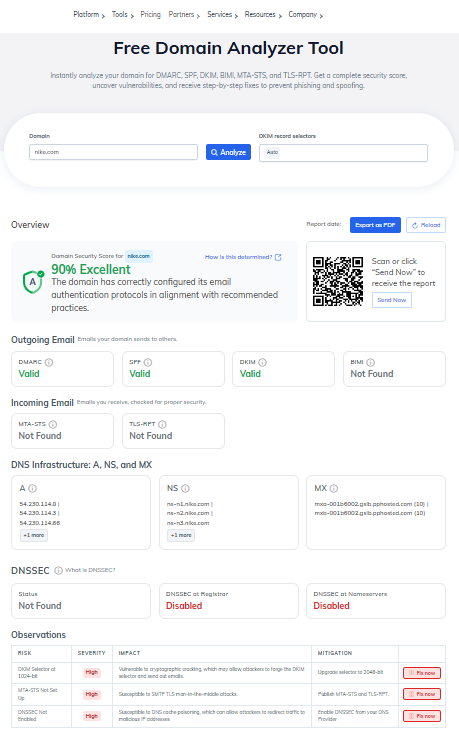
- Strengths: the widest protocol coverage on this list, an MSSP program, and broader SSO support (SAML, OIDC) than competitors at this price.
- Drawbacks: substantial overhead if you have one domain and one ESP.
- Pricing: from $15/month (Basic, 100,000 DMARC-compliant emails). Enterprise and Partner Program tiers are custom-quoted.
- Best for: MSPs and enterprises managing dozens or hundreds of domains.
6. DMARC Advisor: capable, but check whether you can buy it
Solid DMARC checking, report analysis, clean dashboards and EU-based data handling, with a free tier covering 2 domains and 10,000 emails. The product itself now trades under the name DMARC Manager, the rebrand of the legacy DMARC Advisor platform.
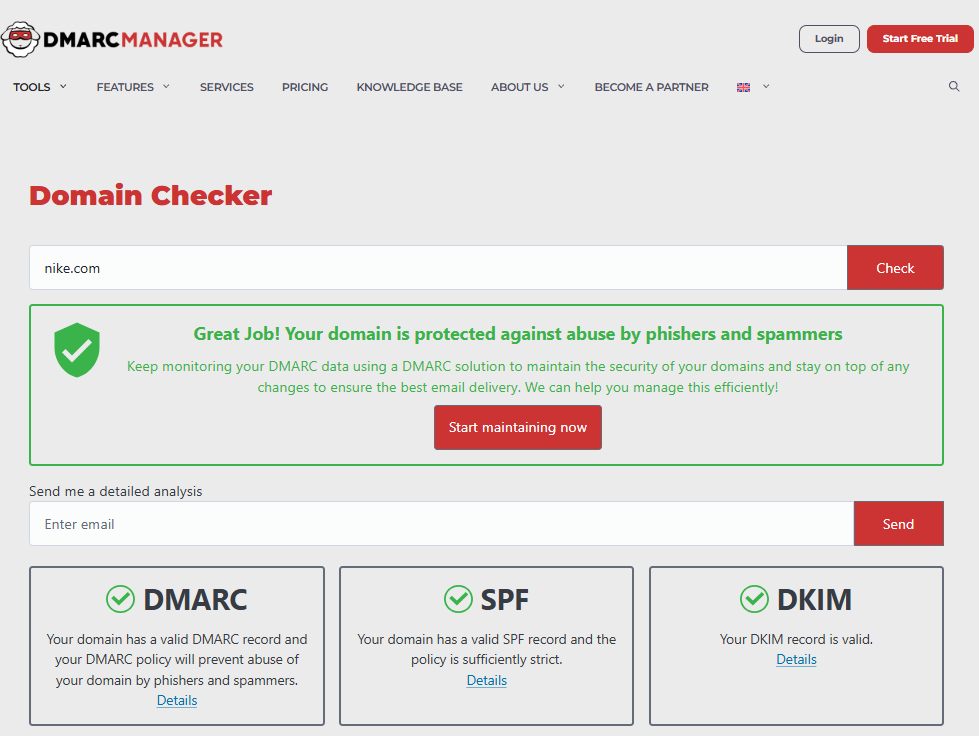
The catch is not technical. DMARC Advisor BV, formerly known as dmarcian Europe BV, split from dmarcian, Inc. in a dispute that turned into federal litigation over trademark, trade secret, and unfair-competition claims. In Dmarcian, Inc. v. DMARC Advisor BV, No. 23-1790 (4th Cir. July 10, 2026), the Fourth Circuit affirmed the district court’s injunction, which bars DMARC Advisor BV from providing its service to, or letting its website be reached by, customers located outside Europe, Africa, or Russia. DMARC Advisor BV asked the Supreme Court for an emergency stay; the Chief Justice denied that application on September 9, 2026 (Docket No. 26A298). If you are in the US, APAC or LATAM, you cannot buy this product today.
- Pricing: from €19/month (Basic), up to €499/month (Enterprise). Billed in euros, not dollars, consistent with the EU-based entity.
- Best for: small businesses and single-domain owners based in Europe, Africa, or Russia.
7. Dmarcly: best for teams hitting the SPF lookup limit
SPF, DKIM and DMARC checkers, a report analyzer, alerting, and hosted SPF that flattens your includes so you stop hitting the 10-lookup cap.
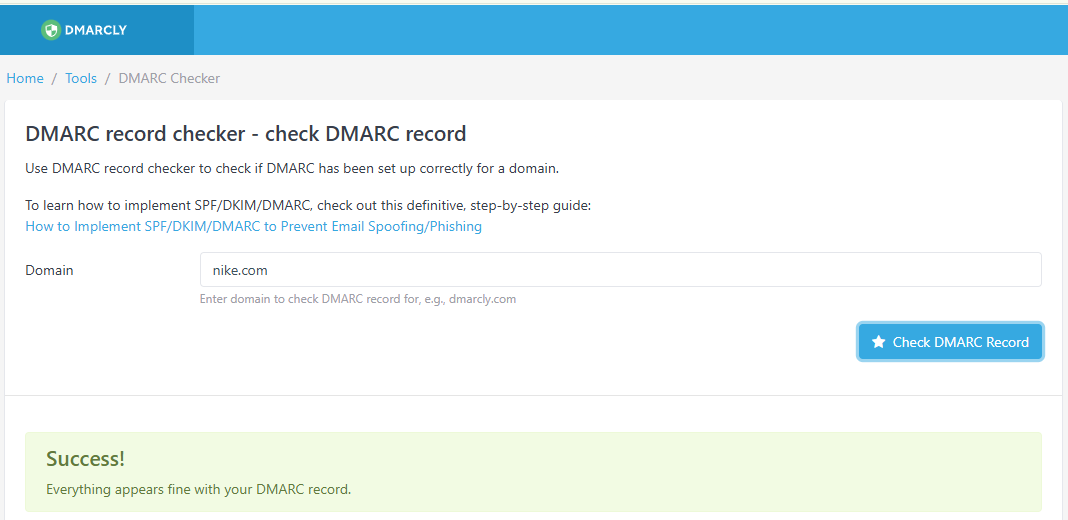
- Strengths: clean interface, fast setup, and hosted SPF solves a specific problem that bites ecommerce brands with long tool stacks.
- Drawbacks: smaller integration ecosystem, and no free plan, just a trial.
- Pricing: from $17.99/month.
- Best for: teams whose SPF record has quietly passed 10 lookups and started returning permerror.
How to check your DMARC record
- Look it up. Enter your domain into a DMARC record checker, like InboxEagle’s free tool. Confirm a record exists at _dmarc.yourdomain.com and that there is exactly one.
- Read the tags. Policy, subdomain policy, reporting address and alignment mode are the four that decide your outcomes. See the annotated example below.
- Send a test message and check the headers. In Gmail, open the message, choose Show original, and look for dmarc=pass with header.from matching your domain. This catches alignment problems a record checker cannot see.
- Confirm reports can actually reach you. If rua= points to a different domain from the one publishing the record, that domain must publish an external report authorization record. Without it, receivers will not send you anything.
- Fix what turns up, then follow the rollout path further down.
An annotated record
v=DMARC1; p=quarantine; sp=quarantine; np=reject; rua=mailto:dmarc@yourstore.com; adkim=r; aspf=r| Tag | What it does |
|---|---|
| v=DMARC1 | Version. Unchanged under DMARCbis, and still the only valid value. |
| p=quarantine | Policy for your main domain. Failing mail goes to spam. |
| sp=quarantine | Policy for subdomains. Omit it and subdomains inherit p. |
| np=reject | Policy for subdomains that do not exist. New in RFC 9989, and the cheapest spoofing win available. |
| rua=mailto: | Where aggregate reports go. Without this you are flying blind. |
| adkim=r / aspf=r | Relaxed alignment: send.yourstore.com counts as aligned with yourstore.com. Strict (s) requires an exact match and breaks most ESP setups. |
No pct tag: RFC 9989 removed it. If you need a softer test than full enforcement, use t=y.
Which DMARC checker should you pick?
Choosing a DMARC tool comes down to who owns the problem.
- You send through Klaviyo or a similar ESP and care where mail lands: InboxEagle. DMARC checks, report processing and seed placement from one vendor.
- You need one free lookup right now: MxToolbox, or InboxEagle’s free record checker.
- You are deploying DMARC for the first time with no specialist help: EasyDMARC.
- You want someone to guide you through enforcement: dmarcian.
- You manage 50 or more client domains: PowerDMARC.
- You run one domain on a tight budget and you are in Europe, Africa, or Russia: DMARC Advisor.
- Your SPF record keeps breaking the 10-lookup limit: Dmarcly.
- You are an agency running deliverability across client ESP accounts: InboxEagle or PowerDMARC, depending on whether you are judged on placement or on multi-tenant administration. If you’re comparing deliverability tooling more broadly, not just DMARC, see our full deliverability tools roundup.
Tools not covered here but worth knowing: Valimail, Red Sift OnDMARC, and Google Postmaster Tools, which gives you free Gmail-specific authentication data whatever else you use.
Common DMARC errors, and how to fix them
No record at all. Nothing published at _dmarc.yourdomain.com means no protection and no visibility into who is sending as you. In our own data, this shows up more often on Klaviyo and Shopify stores than you’d expect. See why a DMARC record goes missing on ecommerce stores for the full setup.
Fix: publish v=DMARC1; p=none; rua=mailto:dmarc@yourdomain.com today. It changes nothing about your delivery and starts the data flowing.
Two records on the same domain. DNS will happily hold both TXT records, but receivers treat a domain with multiple DMARC records as having no valid policy at all. They do not pick the first one. Fix: delete the duplicate. Check for this before troubleshooting anything else, because every other symptom points elsewhere.
Parked at p=none forever. Monitoring mode stops nothing. Plenty of domains published p=none in 2024 and never moved. Fix: work the reports until legitimate sources are aligned, then advance. p=none is a starting line.
Missing or unreachable rua. No reporting address means no aggregate reports, which means no way to know whether enforcement would break your own mail. Fix: add one. If it is on a different domain, publish the external report authorization record on that domain too.
Alignment failures. SPF and DKIM both pass, but DMARC still fails because the authenticated domain does not match the From domain. This is the single most common cause of failure on ecommerce mail. If you’re on Klaviyo specifically, our Klaviyo authentication guide covers the exact setup that produces an aligned result. Fix: configure the branded or custom sending domain in your ESP, so DKIM signs with d=yourdomain.com and the Return-Path uses your subdomain. Keep alignment relaxed (adkim=r, aspf=r) unless you have a specific reason not to.
A sending source nobody authenticated. Klaviyo, Shopify, the helpdesk, the review app and the invoicing tool each need their own SPF and DKIM setup. Miss one and that stream fails DMARC regardless of how clean the rest is. Fix: build the list from your aggregate reports, not from memory. There is almost always a tool on it that you forgot about.
SPF past 10 DNS lookups. Every include: costs lookups, and the cap is hard. Past it, SPF returns permerror and stops passing, leaving DKIM alone to carry DMARC. Fix: flatten the record or use hosted SPF.
The record in the wrong place. It belongs at _dmarc.yourdomain.com. The common failure is a DNS host that auto-appends the domain, giving you _dmarc.yourdomain.com.yourdomain.com. Fix: check what the record actually resolves to, not what you typed into the panel. Subdomains inherit the parent policy through sp, so most senders need one record, not many.
A From address on a consumer domain. Sending as yourbrand@gmail.com or @yahoo.com through an ESP fails DMARC, because those providers publish p=reject on their own domains. Fix: send from your own domain. There is no workaround.
Nobody reads the reports. Publishing the record is half the job. Fix: set a monthly review, or use a tool that alerts you when the pass rate drops.
Run your domain through these checks
Free, no signup. Catches duplicate records, bad rua addresses, and alignment gaps.
How to read DMARC reports with a DMARC report analyzer
Two types of reports
- Aggregate reports (rua): a daily summary from each participating mailbox provider showing which IPs sent mail as your domain, how much, and whether it passed. These are the ones that matter. They contain no message content.
- Forensic reports (ruf): details on individual failed messages. Many providers, including Gmail, don’t send them for privacy reasons, so treat them as a bonus rather than something to plan around.
What a raw report looks like
Aggregate reports arrive as XML, structured for machines. A trimmed record looks roughly like this:
<record>
  <row>
    <source_ip>198.51.100.24</source_ip>
    <count>1482</count>
    <policy_evaluated><disposition>none</disposition>
      <dkim>pass</dkim><spf>fail</spf></policy_evaluated>
  </row>
  <identifiers><header_from>yourstore.com</header_from></identifiers>
</record>
What an analyzer turns it into
| Source | Emails | SPF aligned | DKIM aligned | Verdict |
|---|---|---|---|---|
| Klaviyo | 1,482 | No | Yes | Legitimate, passing on DKIM |
| Google Workspace | 640 | Yes | Yes | Legitimate |
| Unknown IP (203.0.113.25) | 210 | No | Yes | Likely forwarding |
| Unknown IP (192.0.2.77) | 320 | No | No | Investigate |
Same data, minus the parsing.
Telling a legitimate sender from a spoofer
Three patterns cover most of what you will see.
- Known service, everything passing. Your ESP, your Google Workspace, your transactional provider. Nothing to do.
- DKIM passes, SPF fails, from an IP you do not recognize. Usually forwarding. A recipient auto-forwards your mail to another address, which breaks SPF because the forwarding server is not in your record, while the DKIM signature survives intact. This is exactly why DKIM alignment is the one to prioritize.
- Both fail, unfamiliar IPs, meaningful volume. Either spoofing, or a tool somebody in the business signed up for without telling you. Check internally before assuming an attack. In client audits, it is a new marketing app about as often as it is a bad actor.
Getting to enforcement without breaking your own mail
- p=none: stay here for at least 2 to 4 weeks, and long enough to cover a full sending cycle, until reports show every legitimate source aligned and passing on comfortably more than 98% of your legitimate volume.
- p=quarantine: move here and watch for a week or two.
- p=reject: go to full enforcement once nothing legitimate is failing.
Why a full sending cycle: anything that sends monthly or quarterly, like invoicing, seasonal campaigns or a review request flow, will not show up in two weeks of reports. For a typical ecommerce brand with a normal tool stack, four to eight weeks from first report to p=reject is realistic.
Under DMARCbis, if you want a softer step than full enforcement, use t=y rather than the old percentage ramp.
Reading raw XML by hand works until you have more than one or two sending sources.
Get your DMARC reports parsed automatically
DMARC Processing is a separate paid product that ingests and processes your aggregate reports at volume.
What to watch through the rest of 2026
- DMARCbis is the story of the year. RFC 9989 landed in May and obsoleted the 2015 spec. Nothing breaks, but pct was removed (Appendix A.6, with t replacing it), np is available, and the organizational domain is now found by DNS tree walk instead of the Public Suffix List. Expect checkers to diverge here: some already flag removed tags, others have not caught up.
- Enforcement has teeth now. The shift from spam-foldering toward outright rejections at Gmail changed the risk profile of a misconfigured record. A bad DMARC setup used to cost you open rate. Now it can cost you the send.
- BIMI keeps pulling brands toward enforcement. Putting your logo in the inbox requires p=quarantine or p=reject applied to all mail, plus a VMC or CMC certificate for Gmail. Our BIMI/CMC setup guide covers what changed since Gmail began accepting Common Mark Certificates, which lets brands without a registered trademark qualify too, making BIMI a realistic finish line for smaller ecommerce senders rather than an enterprise project. Adoption is still thin, a February 2026 scan of 5.5 million domains found only 0.4% had published a BIMI record, but certificate issuance is growing about 24% year over year, so the first-mover window is still open but closing.
- Anomaly detection is moving into reporting. More platforms now flag unfamiliar senders and sudden authentication drops automatically, instead of expecting someone to read XML on a Monday morning.
- Authentication and revenue are converging. DMARC was treated as a security checkbox for a decade. The tools worth paying for now connect authentication to placement, and placement to revenue, rather than stopping at pass or fail.
Find out which side of the line you are on
Mail that fails DMARC lands in spam more than twice as often. Check yours free.